




The holiday season brings a surge of invitations, promotional offers, and shared documents — all familiar ways for cybercriminals to disguise malicious activity.
During the 2026 Thanksgiving and Black Friday season, ANY.RUN analysts investigated five cases involving fake corporate invitations, e-cards, healthcare surveys, promotional newsletters, and discount coupons. The campaigns aimed to steal credentials, collect personal data, deploy scripts, or gain remote access.
Some relied on multi-stage redirects and browser fingerprinting; others abused legitimate services and software rather than traditional malware.
These cases show why email inspection alone isn’t enough. SOC and MSSP analysts need to understand what happens after a user clicks a link or opens a file.
Let’s look at how each attack worked, the indicators it left behind, and the lessons for defenders.
Thanksgiving: When Holiday Invitations Become Corporate Security Threats
Thanksgiving-themed campaigns in the 2026 dataset primarily used invitations and familiar workplace communications rather than shopping offers.
Two cases involved threats against corporate employees, while the third used a seasonal survey to collect personal information and solicit payments.
1. Thanksgiving Potluck Invitation Leads to a Fake Google Workspace Login
Threat type: Credential phishing, browser fingerprinting
Observed: November 4-5, 2026
Target: Employees of a US real estate agency network
A Thanksgiving potluck invitation sent from an organization’s own office mailbox can easily look like an ordinary workplace announcement.
View the campaign analysis in ANY.RUN Interactive Sandbox
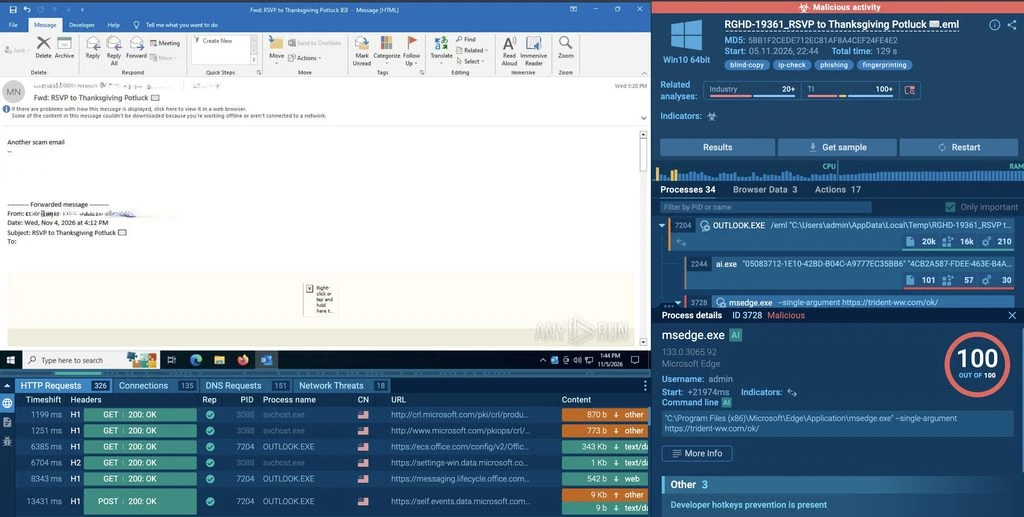
In this case, ANY.RUN researchers investigated an email sent from the front desk mailbox of a franchise office belonging to a large US real estate agency network. An employee from another office forwarded the message, flagging it as suspicious.
The subject was “RSVP to Thanksgiving Potluck.” The email contained a festive invitation reading “Thanksgiving Potluck — you’re invited!” and asked recipients to RSVP before November 16.
The message imitated a familiar event invitation format, making it particularly convincing in a corporate environment.
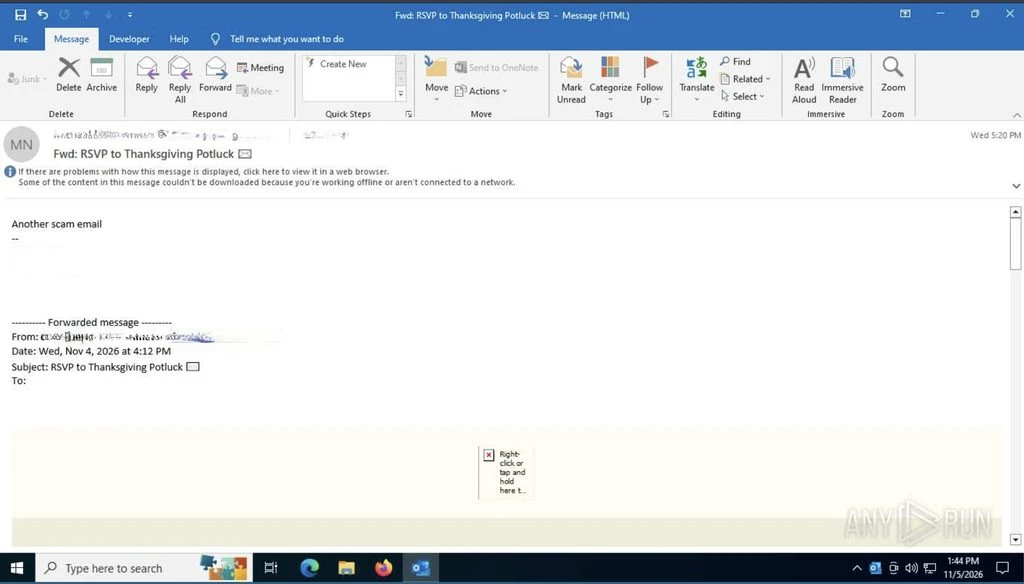
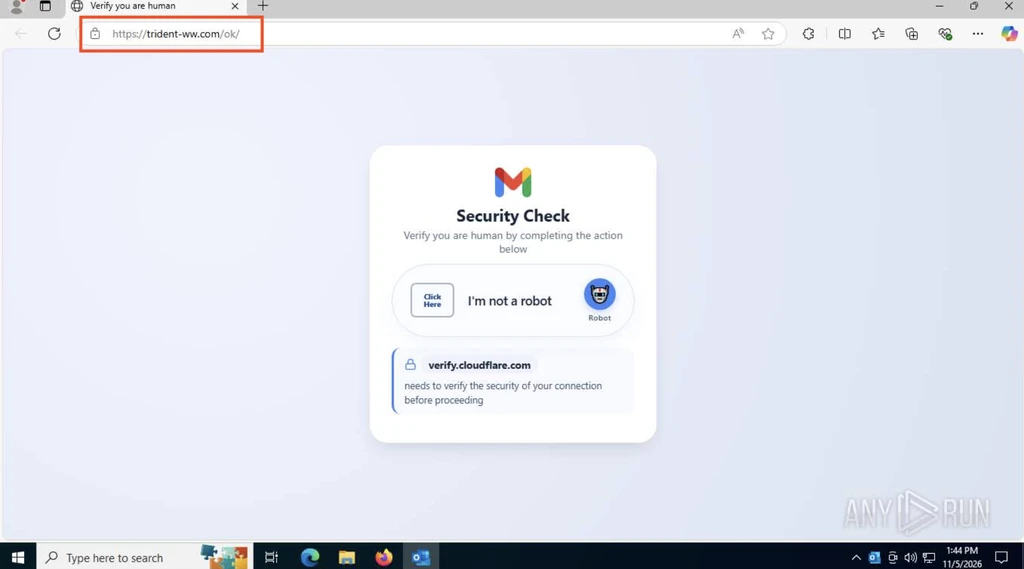
Clicking the “View & RSVP” button redirected the recipient to trident-ww[.]com/ok/, where the phishing chain began.
The page displayed a fake security verification step featuring a Gmail logo and the message “Security Check — I’m not a robot.”
After displaying “Verification successful,” it presented a Google Workspace sign-in page.
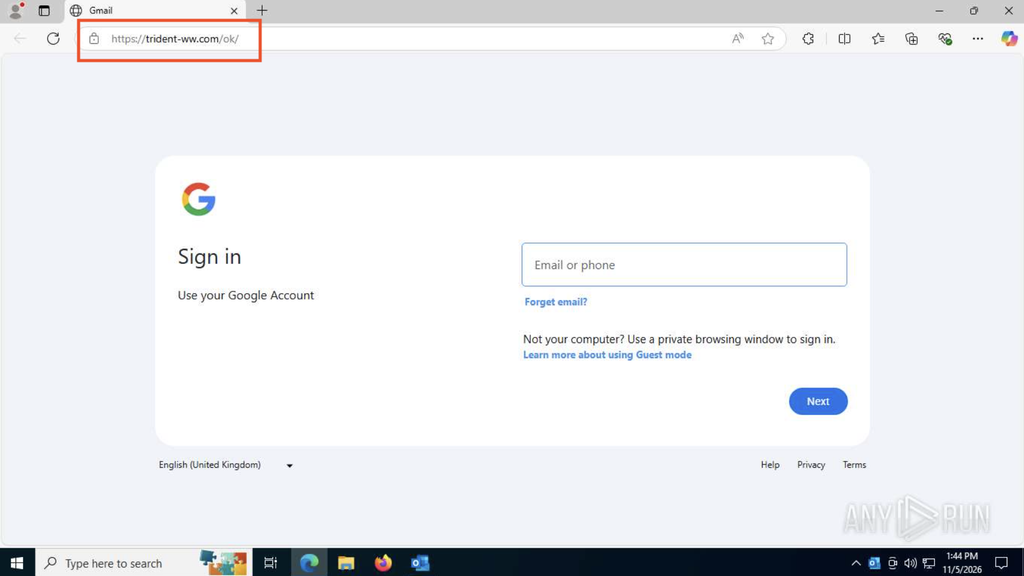
The login form was loaded inside an iframe from a separate domain, om[.]anthonnyfry[.]com. Interestingly, opening the form directly caused a redirect to an unrelated website, indicating an attempt to prevent straightforward inspection.
When a victim entered their credentials, the information was transmitted through POST requests to /st and /e endpoints on the same host.
The observed attack chain:
- Thanksgiving invitation arrives from an apparently internal mailbox.
- The recipient clicks “View & RSVP.”
- A fake Cloudflare-style verification page appears with Gmail branding.
- The browser loads a Google Workspace login form inside an iframe.
- Submitted credentials are transmitted to the attacker’s infrastructure.
The objective was to steal corporate Google Workspace credentials. No malware deployment was observed.
An important detail is that this was not an isolated phishing email. The underlying operation had been active since August 2026, with approximately 350 ANY.RUN Interactive Sandbox sessions and more than 170 associated domains. Its operators rotated between different lures, including party invitations, document-sharing notifications, and payment messages.
The Thanksgiving invitation was simply another seasonal disguise for an established phishing operation.
Investigating Beyond the Email: Identifying the Broader Phishing Campaign
The findings also point to the need to investigate beyond the initial email. After observing the redirect and credential-submission behavior in the Sandbox, enterprise users can utilize its powerful new capability — Related Threat Context (Related analyses) — to explore associated activity.
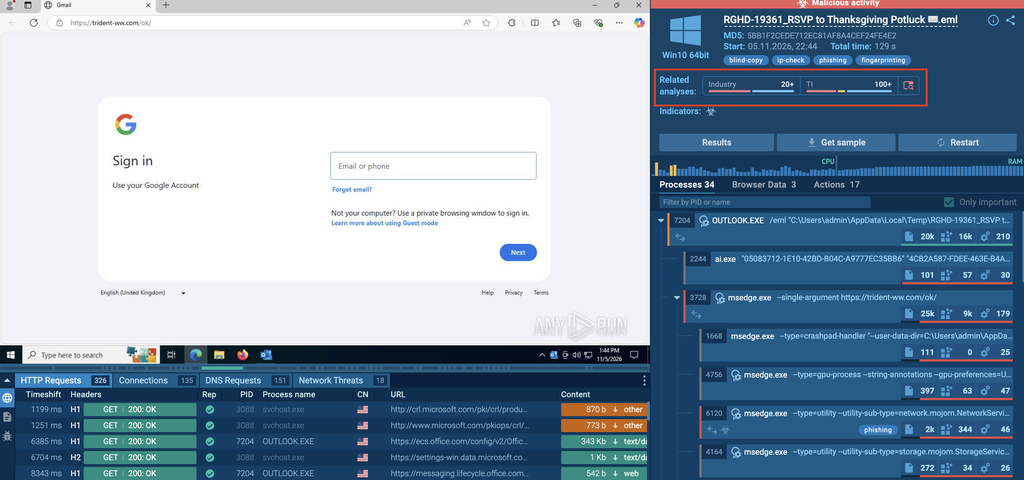
SOC and MSSP teams can enrich investigations with previous analysis sessions, additional IOCs, and behavioral insights drawn from public analyses and anonymized threat data shared by a community of over 700,000 security professionals and 16,000 organizations.
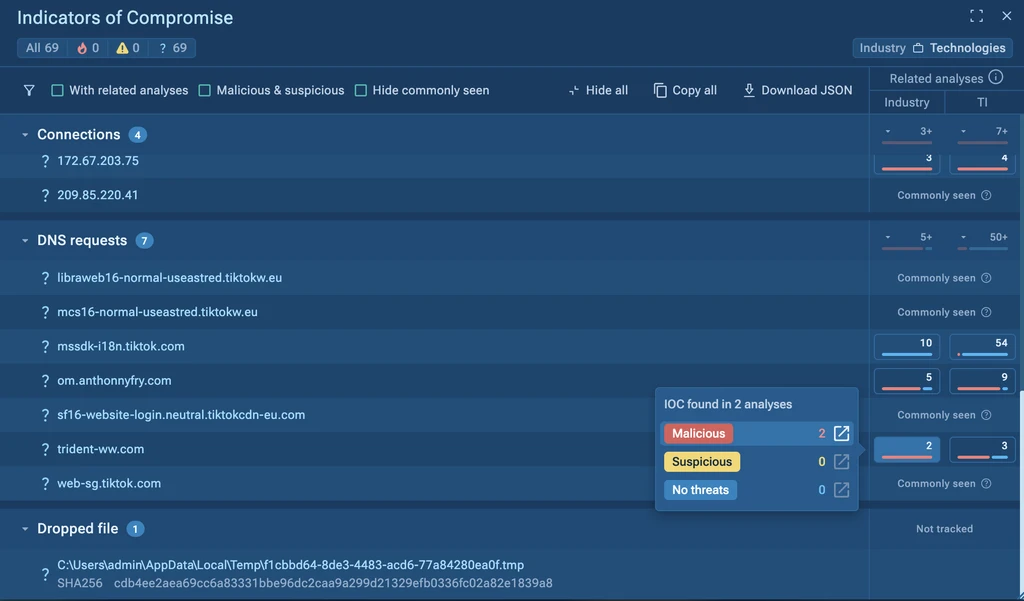
After that, analysts can pivot to Threat Intelligence Lookup in a single click to examine suspicious domains and other indicators.
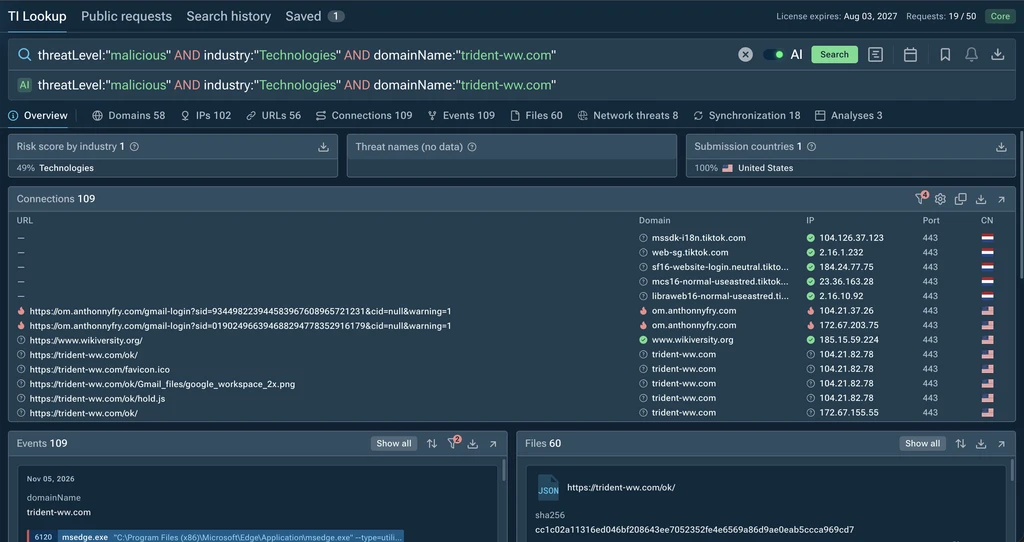
These steps can help determine whether an apparently isolated message is part of a broader operation.
The combination of a corporate-looking sender, fake verification page, and embedded login form is particularly relevant for phishing detection. Analysts should also look for repeated redirect patterns and credential-submission requests when investigating related emails.
Indicators of Compromise (IOCs)
| Indicator | Type/Role |
|---|---|
| 08fee2a1e29a649f0f7c69aa701304c32e015b49ba39709b57ac21b5459e4f73 | SHA-256, phishing email |
| Initial phishing redirect | Initial phishing redirect |
| om[.]anthonnyfry[.]com | Fake Google Workspace login host |
| /gmail-login?sid= | Phishing form path |
| /st, /e | Observed credential-submission endpoints |
2. Thanksgiving E-Card Delivers ScreenConnect for Unauthorized Remote Access
Threat type: Remote access delivery, social engineering
Observed: October 30, 2026
Target: Likely corporate employees (inferred from the invitation scenario)
The second case demonstrates that an attacker does not always need to deliver a custom malware executable to gain access to a victim’s device.
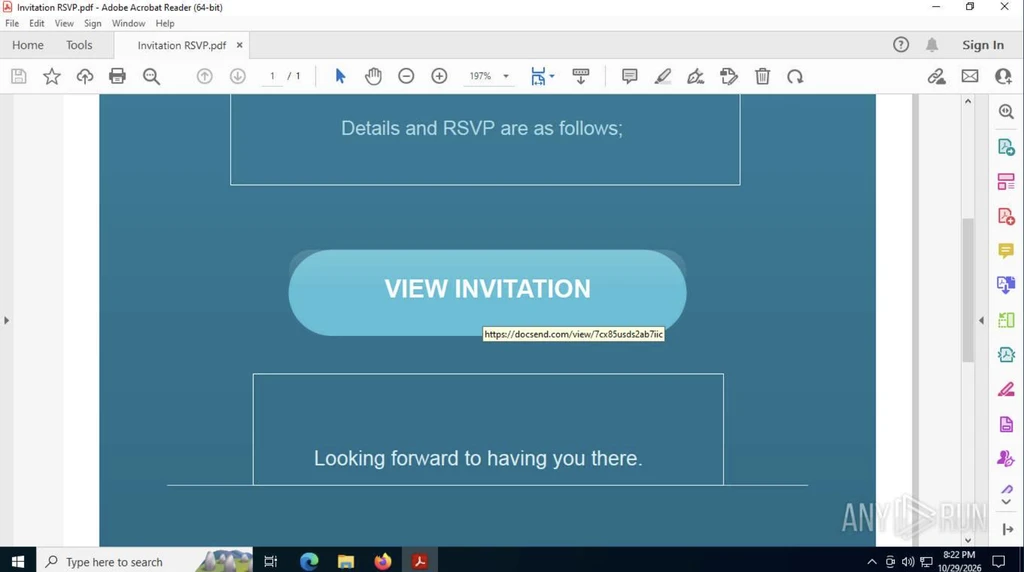
ANY.RUN analysts investigated a PDF attachment named Invitation RSVP.pdf. It featured Blue Mountain greeting-card branding and invited the recipient to view an electronic invitation.
View the analysis in ANY.RUN’s Interactive Sandbox
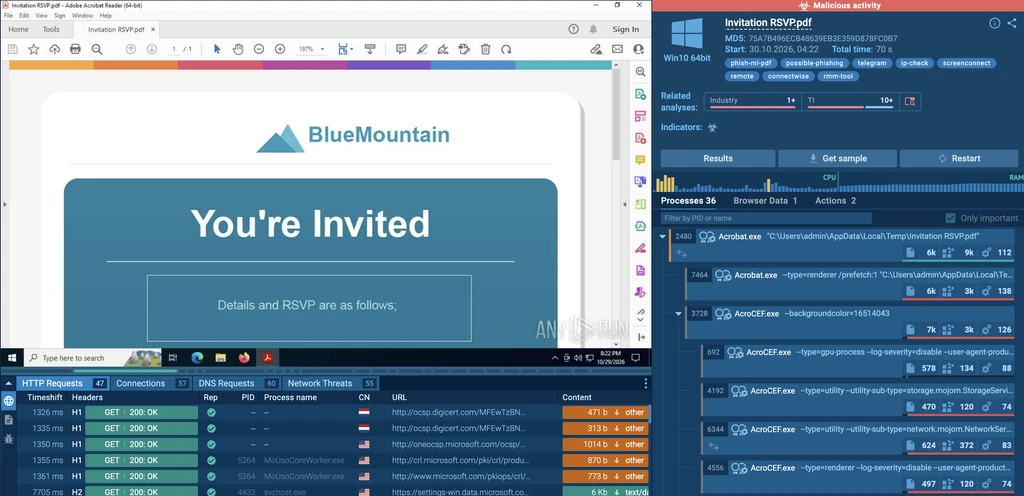
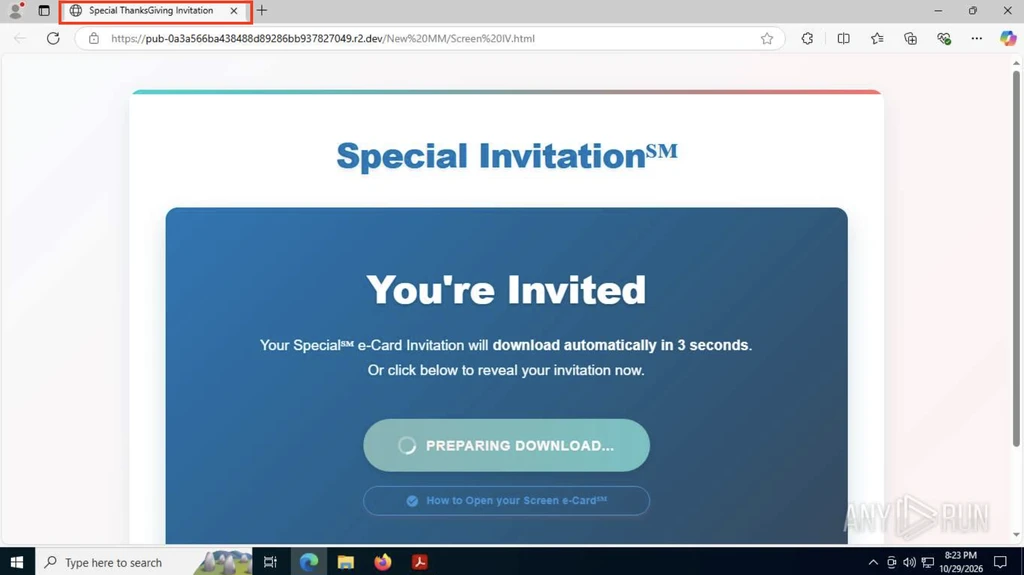
The PDF contained a “VIEW INVITATION” button that redirected to DocSend. From there, the visitor reached an HTML page hosted in a public Cloudflare R2 storage bucket.
The page displayed a generic invitation, but its browser tab carried the title “Special ThanksGiving Invitation.” It also announced that an electronic card would download automatically within three seconds.
Instead of an electronic card, the page automatically downloaded ScreenConnect.ClientSetup.msi from a cloud-hosted ScreenConnect instance.
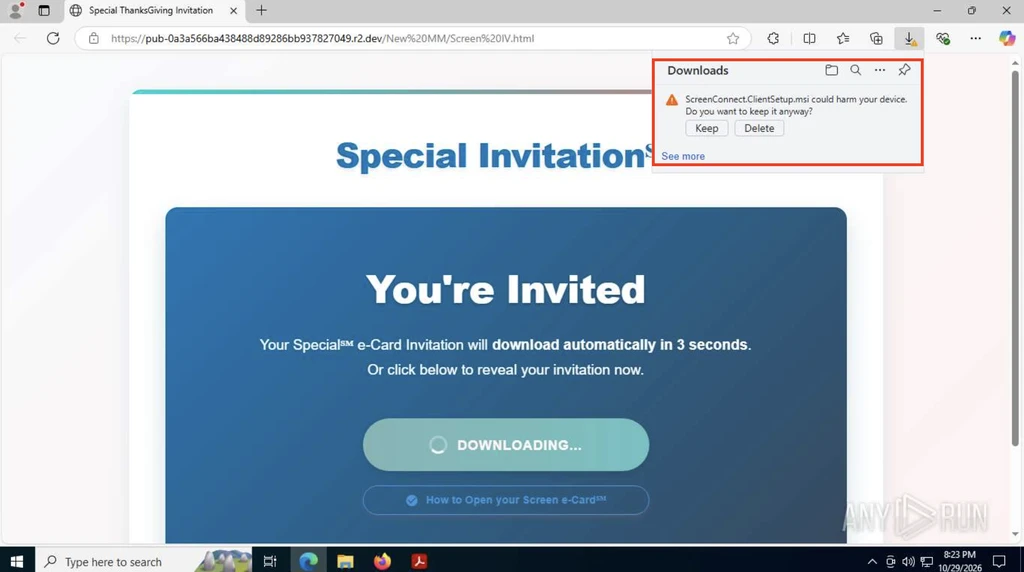
ScreenConnect is legitimate remote monitoring and management software developed by ConnectWise. However, unauthorized installation can give an attacker remote access to a victim’s machine.
The page also collected the visitor’s public IP address using external lookup services, including ipwho[.]is and ipify, and transmitted it to a Telegram bot through a sendMessage request.
The observed chain was:
- The recipient opens the PDF and clicks “VIEW INVITATION.”
- The browser follows a DocSend link to an HTML page hosted on Cloudflare R2.
- The page automatically downloads the ScreenConnect installer.
- The visitor’s IP address is collected and sent to a Telegram bot.
The investigation confirmed the installer download and IP transmission. The assumption that the intended victims were corporate employees, as well as the attacker’s subsequent actions, remains unconfirmed.
Nevertheless, unauthorized RMM installation creates a significant security risk. Once an attacker obtains remote access, they may be able to interact with the endpoint, access information, or introduce additional malicious tools.
This case also illustrates why identifying known malware is not enough. The PDF is not malicious by itself, and the software being downloaded is legitimate. The threat becomes apparent when the analyst reconstructs the sequence of actions that led to the installation.
For detection engineering, the combination of an unexpected PDF-to-browser transition, automatic MSI download, and unauthorized RMM installation deserves attention. Monitoring new remote management clients and their installation sources can help identify suspicious activity that traditional malware signatures may not detect.
Indicators of Compromise (IOCs)
| Indicator | Type/Role |
|---|---|
| 294e052c6d89634e8f73fca4ac997c499a07693d5f18182eac4ce73133 | SHA-256, PDF attachment |
| pub-0a3a566ba438488d89286bb937827049[.]r2[.]dev/New%20MM/Screen%20IV.html | HTML invitation page |
| nepaldentalhome1[.]screenconnect[.]com | ScreenConnect download infrastructure |
| 135.148.5[.]91 | IP address associated with the ScreenConnect instance |
| ScreenConnect.ClientSetup.msi | Downloaded remote access installer |
| ipwho[.]is, ipify | Services used to identify the visitor's IP address |
| Telegram sendMessage | Observed IP-reporting mechanism |
3. Fake MyChart Thanksgiving Survey Collects Personal Data and Payments
Threat type: Data harvesting, promotional fraud
Observed: November 3-17, 2026
Target: US consumers, including corporate email recipients
The third case used a different approach. Instead of targeting corporate accounts directly, attackers impersonated MyChart, a patient portal used by US healthcare providers.
View sessions in ANY.RUN’s Interactive Sandbox: Thanksgiving picture attachment and the lure email.
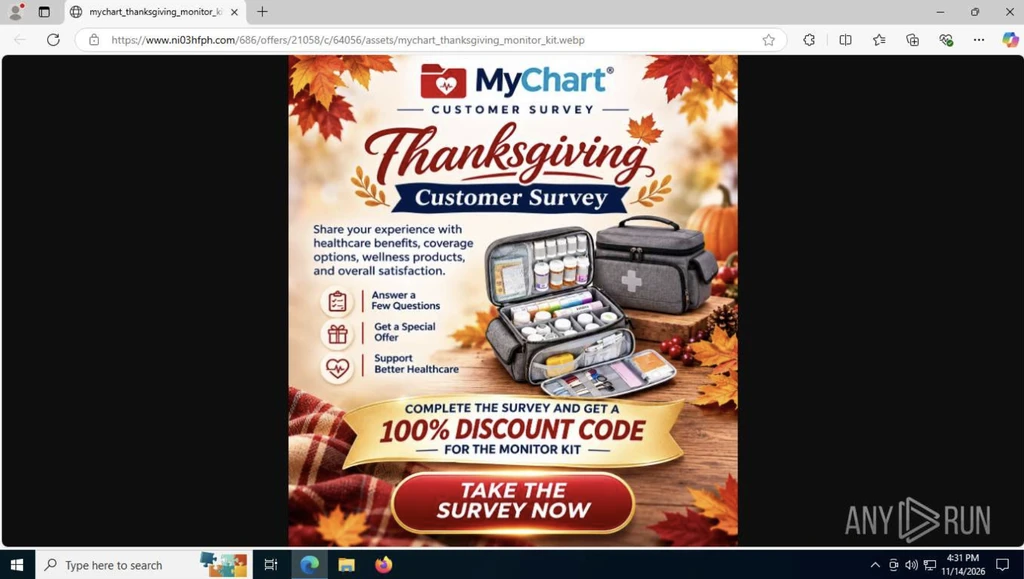
The email, sent under the subject “Tell us about your MyChart experience,” appeared to come from someone named Sarah at MyChart. Its main content was a Thanksgiving-themed promotional image advertising a customer survey and a 100% discount code for a medical monitoring kit.
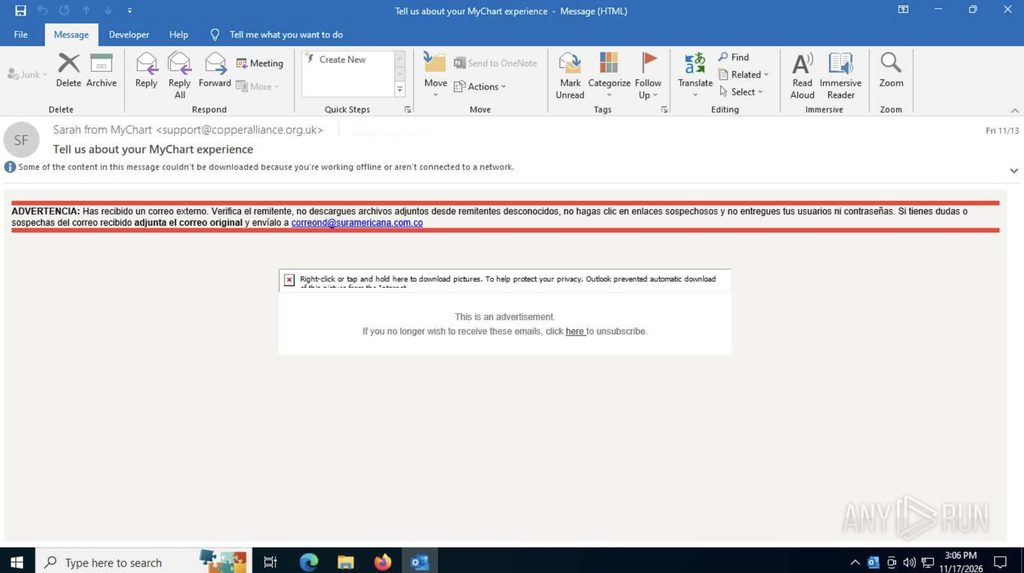
The campaign used an image-only email with almost no readable text describing the offer. This can make detection harder for email security tools that rely on text extraction and content analysis.
Clicking the image triggered a multi-stage redirect chain managed by a traffic distribution system (TDS). Depending on the visitor, it could lead to a verification page, the survey, or an unsubscribe page. The verification screen mimicked Cloudflare’s Slide to verify interface before redirecting visitors to a fraudulent MY CHART — Customer Survey page.
The survey asked eight questions about MyChart and healthcare benefits. After completion, the site simulated response verification, product availability checks, and discount application. A counter claiming only 61 codes remained added urgency.
The final step exposed the objective: visitors were asked to provide delivery details and pay a $10.55 processing fee. The order form collected names, email addresses, phone numbers, and physical addresses. The investigation confirmed personal data collection and the fee request, but did not observe the subsequent payment stage. Card harvesting and hidden subscriptions therefore remain unconfirmed.
Analysts also linked the Thanksgiving email to a broader promotional operation through the shared offer ID 21058, found in both the email image path and TDS parameters. The campaign was already active before the holiday-themed message appeared.
For SOC and MSSP teams, this case highlights the value of inspecting image-based emails, tracing TDS redirect chains, and pivoting on shared identifiers to connect messages with related pages and infrastructure.
Indicators of Compromise (IOCs)
| Indicator | Type/Role |
|---|---|
| e390b1892ac7f26c0348644d088ebb16a0332c02132caec9a53c832892e15ac3 | SHA-256, email |
| ni03hfph[.]com | Hosting for promotional email images |
| trustedaftermark[.]com | TDS domain |
| solidfairhubhost[.]com | TDS domain |
| awakeserver[.]com | TDS domain |
| exploredomainpole[.]com | TDS domain |
| specialhostdense[.]com, xcxfi08q[.]com | Additional campaign-related domains |
| storage.googleapis[.]com/medicarekitusa/ | Hosting for verification-page resources |
| naverio[.]boats | Survey landing page |
| commercialbuygroup[.]com/medicarekit/ | Final order form |
| 21058 | Shared offer identifier |
Black Friday: When Discounts and Business Communications Conceal Threats
The Black Friday cases used two different techniques. One campaign concealed a phishing link inside genuine promotional newsletters, while another used a Word document disguised as a discount coupon to execute a VBS script.
Unlike conventional shopping scams, both demonstrate how attackers can use familiar commercial content to deliver threats that are not immediately visible.
4. Black Friday Newsletter Hides a Corporate NDA Phishing Link
Threat type: Credential phishing, browser fingerprinting, conditional redirects
Observed: November 6-10, 2026
Target: US businesses, including contractors and service companies
In this campaign, Black Friday advertising was not the primary lure. Instead, attackers used genuine promotional newsletters to make a fraudulent business request appear more trustworthy.
View the campaign in ANY.RUN’s Interactive Sandbox
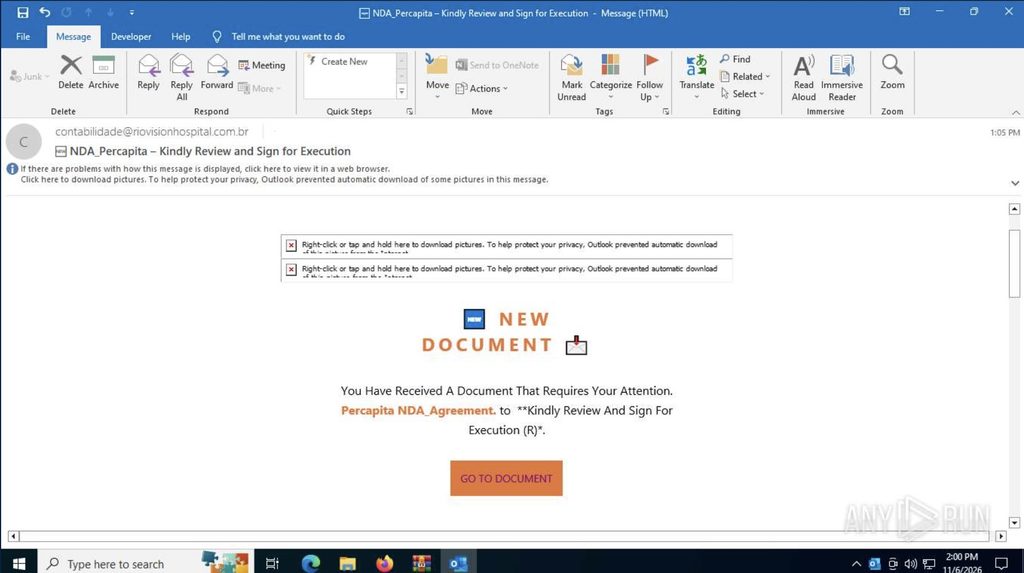
ANY.RUN researchers identified 29 related tasks from November 6 to 10, targeting corporate mailboxes at small US businesses, including construction contractors and service providers.
Each email blended two unrelated elements: an NDA document notification requesting a signature and a genuine Black Friday promotional newsletter. In the observed sample, the newsletter came from Celebrity Cruises and appeared below the OPEN DOCUMENT button.
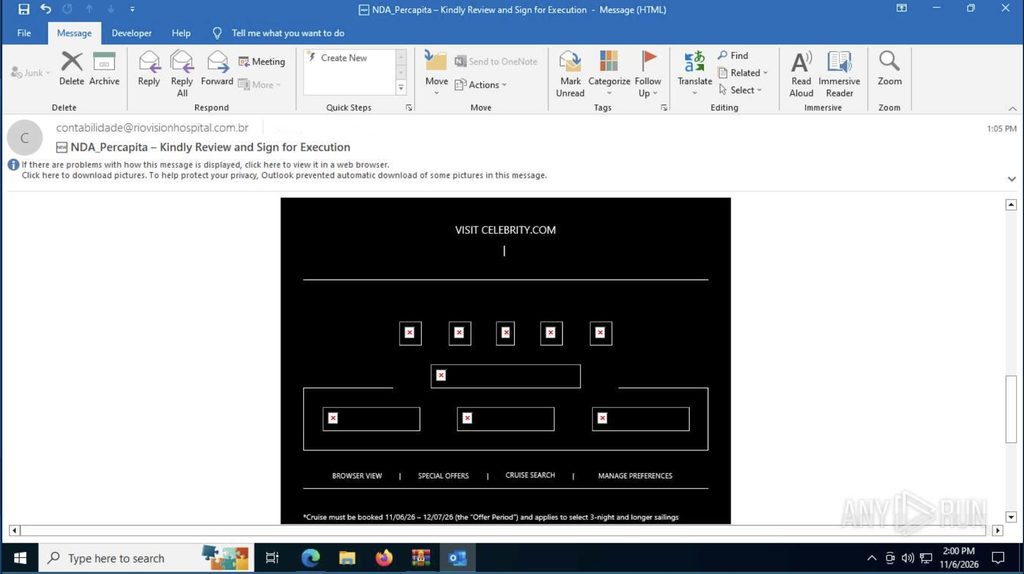
The newsletter contained 30–46 links, most pointing to legitimate retail pages, but one or two led to phishing infrastructure.
The emails were sent through Amazon SES using domains associated with medical clinics. SPF, DKIM, and DMARC checks passed for the observed senders.
Clicking OPEN DOCUMENT redirected recipients to a compromised website with a PHP intermediary. Using FingerprintJS, it collected browser information and selectively routed visitors. In the observed sandbox sessions, this led to harmless decoys, including a USA Today article and the SpaceX homepage.
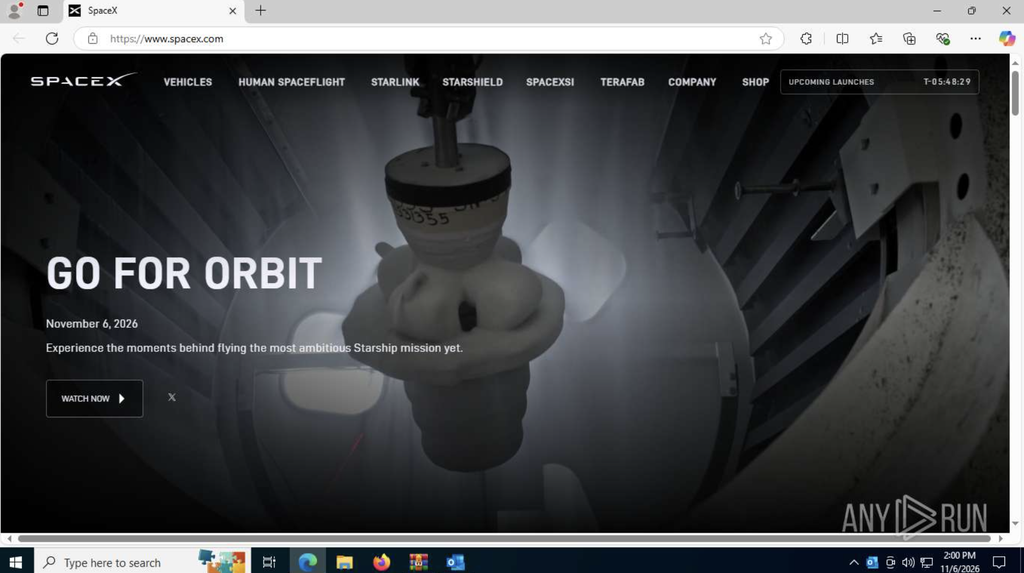
The final phishing page did not appear in the investigated tasks, so credential theft remains a likely objective rather than a confirmed outcome.
The selective redirection is a key finding: browser fingerprinting and conditional routing allowed the infrastructure to show different content to different visitors, potentially hiding the phishing page from automated analysis. A scanner might see a harmless page while an employee is redirected to a credential form.
The presence of legitimate marketing content also does not make every link in an email safe. Analysts can use the two observed domains as starting points to search for related URLs, infrastructure, and historical activity that may reveal a broader campaign.
Indicators of Compromise (IOCs)
| Indicator | Type/Role |
|---|---|
| 7fe07cdc67e233fb4fb4847993fadbd99e4fa64a38d323b33d12233b023b5cbd | SHA-256, email |
| 5c8c5c5a71c1f18d49b6a781ea300c6ca01a0938a60fbd23d7dd2f72ade68051 | SHA-256, ZIP attachment |
| addictionmiddletown[.]com/dashboard/ | Compromised redirect infrastructure |
| pakagrico[.]com/FRIS/ | Compromised redirect infrastructure |
| @medicalspacelp[.]com | Observed sender domain |
| @riovisionhospital[.]com[.]br | Observed sender domain |
| FingerprintJS | Browser fingerprinting component |
| Amazon SES | Email delivery service used in the campaign |
5. Black Friday Word Coupon Uses an Embedded VBS Script to Attempt Malware Delivery
Threat type: Script execution, attempted malware delivery, persistence
Observed: September 14-October 5, 2026
Target: English-speaking online shoppers
The final case relied on a familiar shopping incentive: an exclusive Black Friday coupon promising an extra 30% off. ANY.RUN analysts identified nine related tasks involving a malicious ZIP archive or Word document advertising discounts at Amazon, eBay, AliExpress, and other retailers.
View analysis in ANY.RUN’s Sandbox
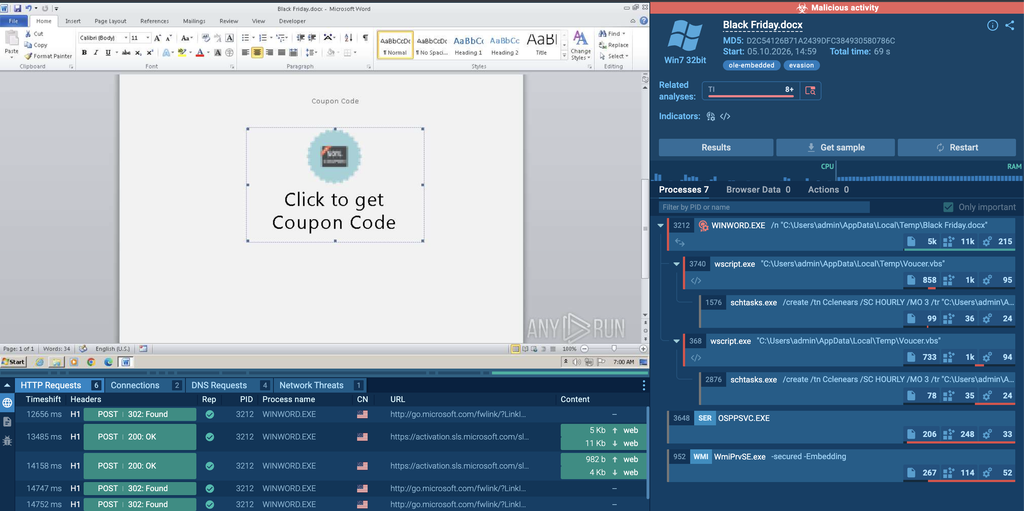
The document displayed a prominent BLACK FRIDAY — EXTRA 30% OFF SALE — Today only banner and a Click to get Coupon Code button. But instead of revealing a coupon, it concealed an OLE package containing a Visual Basic Script named Voucer.vbs.
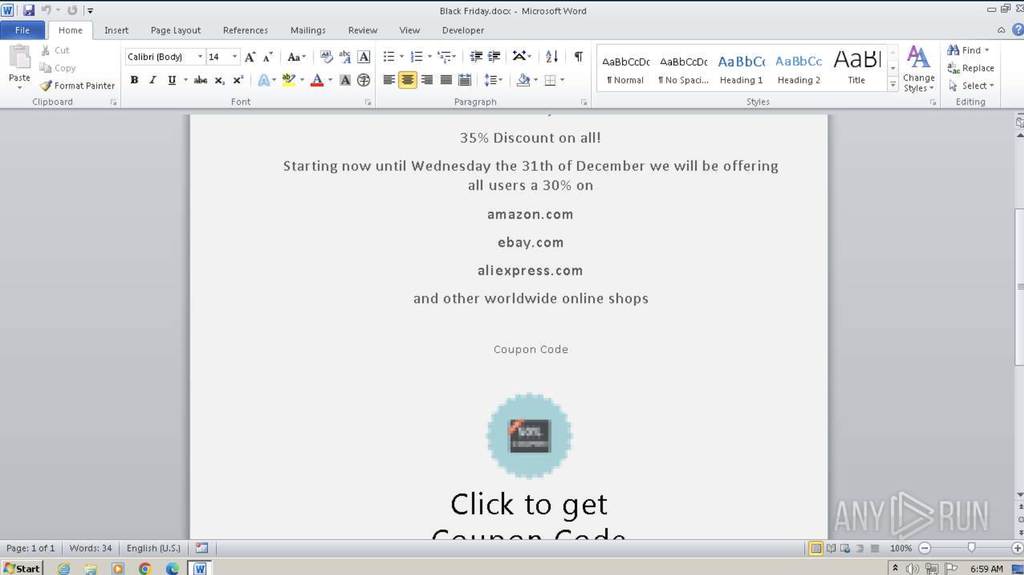
Unlike macro-based attacks, this chain required the user to open the embedded package and proceed through an Office security warning.
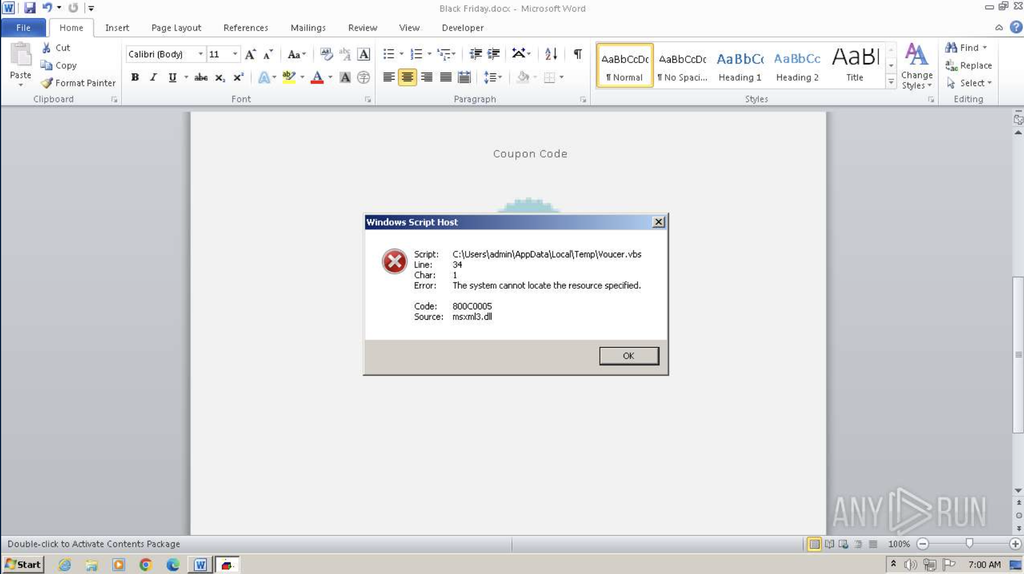
Once opened, the script ran through Windows Script Host (wscript.exe). It attempted to download a second-stage executable from hxxps://forum.cryptopia[.]gdn/sys.exe and save it as %APPDATA%\sys.exe.
The script also attempted to create a scheduled task named Cclenears, configured to run every three hours. The name resembles CCleaner, a legitimate system-cleaning utility.
The observed process chain was: WINWORD.EXE → wscript.exe → schtasks.exe
The activity included:
- Executing Voucer.vbs through Windows Script Host.
- Attempting to download sys.exe from the external URL.
- Attempting to save the file in %APPDATA%.
- Creating the recurring Cclenears scheduled task.
There is an important limitation: the second-stage executable failed to download in all nine observed tasks. Windows Script Host reported that the requested resource could not be located. As a result, the malware family and its eventual capabilities remain unknown. The analysis confirmed script execution and attempts to download and establish persistence, but not successful malware installation.
The nine executions within a short period, all involving Windows 7 and Word 2010, may also point to campaign testing rather than widespread distribution.
For defenders, the key takeaway is that seemingly harmless coupon documents can conceal executable scripts in embedded OLE packages. Since this technique does not rely on traditional Office macros, macro-focused detection alone may miss the initial execution chain.
Indicators of Compromise (IOCs)
| Indicator | Type/Role |
|---|---|
| 5fd4b1ef7a3069c8ae76b83f220e0beff5b2b7f939357656f4b198ed02cd850c | SHA-256, ZIP archive |
| a7447db99ba60c2f7bfd9e9bcfadfb05a4fc0ea214450b76ea85d386db1f727b | SHA-256, DOCX document |
| f67a2de79ed8b4da056619dc29e16824478ee028efb86f53aaa94536f77ef742 | SHA-256, VBS script |
| c29eb8b3b8bccd4f2e154a1230b6a435f4c8b9d27c1dab683a5d1b86f9cf2de5 | SHA-256, LNK file |
| forum[.]cryptopia[.]gdn/sys.exe | Attempted second-stage download |
| Voucer.vbs | Embedded script |
| Cclenears | Scheduled-task persistence name |
| WINWORD.EXE → wscript.exe | Suspicious Office-to-script process relationship |
From Investigation to Continuous Threat Detection
Across all five cases, the lures differed, but the defensive approach was consistent: inspect suspicious artifacts, observe their behavior, and use the findings to guide further investigation.
ANY.RUN Interactive Sandbox lets analysts examine files, URLs, redirects, process activity, and network requests in a controlled environment. Related Threat Context helps uncover connections to other analyses, while Threat Intelligence Lookup supports investigation of domains, IP addresses, hashes, and other indicators.
In addition, Threat Intelligence Feeds bring fresh intelligence into existing security workflows, helping teams connect individual investigations with ongoing detection. ANY.RUN‘s internal data analysis found that up to 30% of unique malicious IOCs observed in Sandbox sessions had already been identified by ANY.RUN and included in TI Feeds. This means that when these indicators appear in an organization’s telemetry, security tools can potentially flag them through an existing intelligence match — even before an analyst manually investigates the activity in the Sandbox.
Analysts should distinguish confirmed findings from assumptions. A suspicious redirect warrants investigation, but does not make every associated host malicious. Likewise, an attempted payload download does not confirm successful installation. Accurate conclusions help teams prioritize threats without overstating the evidence.
Why Cyber Monday Deserves Equal Attention
Black Friday is only part of the holiday shopping rush — Cyber Monday brings another wave of opportunities for attackers. Promotional emails, limited-time offers, and order notifications give attackers new opportunities to disguise malicious links and attachments.
SOC and MSSP teams should watch for unexpected document-sharing requests, image-only promotions, fake verification pages, and exclusive-discount lures. Unusual redirects, browser fingerprinting, unauthorized remote-access downloads, and Office-to-script execution also deserve attention.
These cases show that holiday-themed attacks can steal corporate credentials, collect personal data, abuse legitimate remote-access tools, or execute malicious scripts. Looking beyond the lure to examine actual behavior and enrich findings with threat intelligence can help defenders identify related activity before it leads to a compromise.

s1nc3rt
I’m a Cyber Threat Analyst whose work is focused on turning current threats and malware into reliable detections. I specialize in network traffic analysis and write signatures that help security teams spot malicious activity early and with minimal noise.





0 comments