
Recent posts


Choosing an enterprise threat intelligence solution is about more than just data volume or integrations. The right provider should deliver relevant intelligence, fit existing workflows, and help security teams investigate threats faster.
While SOCs may prioritize rapid investigation and enrichment at scale, MSSPs may focus more on multi-tenancy and customer separation.
This enterprise threat intelligence buying guide covers the key criteria to consider, including intelligence quality, integrations, data privacy, scalability, and proof-of-concept testing.
Key Takeaways
- Start by defining your threat intelligence requirements and the security workflows you need to support.
- Focus on intelligence quality, freshness, context, and threat intelligence enrichment rather than data volume alone.
- Check integrations, API capacity, and STIX/TAXII support before making a decision.
- Consider privacy, scalability, and IOC management as part of the evaluation.
- Use real alerts and investigations to test shortlisted offerings during a proof of concept.
- Choose a provider based on how effectively its intelligence supports your team’s day-to-day security operations.
Start With Your Security Team’s Requirements
The first step in threat intelligence vendor selection is understanding what your security team needs intelligence to accomplish, rather than comparing feature lists.
Some organizations may prioritize faster alert investigation and enrichment, while others need intelligence for threat hunting, malware analysis, or proactive monitoring. MSSPs may also require strong customer separation and efficient multi-tenant workflows.
Start by identifying the teams, workflows, and data involved, then define your threat intelligence requirements around factors such as intelligence freshness, investigation context, API capacity, integrations, privacy, automation, and access management.
Clear requirements make it easier to focus on capabilities that directly support your security operation.
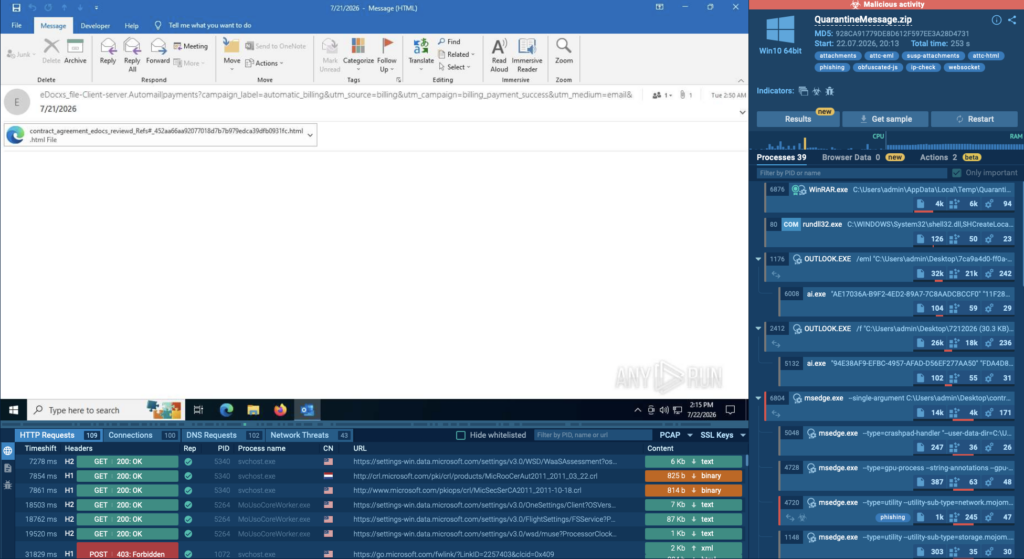
For teams that need both intelligence and hands-on analysis, it can also be useful to consider how threat intelligence connects with malware and phishing investigation. ANY.RUN’s Interactive Sandbox provides an environment for analyzing threats in real time, with capabilities including interactive analysis, SOC-ready reporting, and integrations through API, SDK, and security standards. Its virtual machines start in under 10 seconds, with reports available in about 40 seconds.
Look at Threat Intelligence Quality and Context
The size of an intelligence database doesn’t necessarily determine its value. During evaluation, consider the quality and sources of the data, how quickly it becomes available, how indicators are validated, and how much context accompanies each result.
This is especially important for threat intelligence aggregation. Combining multiple sources can improve coverage, but may also introduce outdated, duplicate, or conflicting data. Without effective filtering and context, more data can simply create more noise.
Analysts often need more than a malicious or benign verdict. Details such as related domains, URLs, files, malware families, infrastructure, and historical activity can help determine an indicator’s relevance.
Threat intelligence enrichment provides analysts with the context needed to assess threats and determine what to investigate next.
For example, ANY.RUN’s Threat Intelligence Lookup (TI Lookup) lets analysts search indicators and event fields and investigate relationships between domains, IPs, URLs, hashes, files, TTPs, and other data. It delivers each result in about 2 seconds and connects threat intelligence with data from sandbox research sessions, giving analysts additional context for investigations.
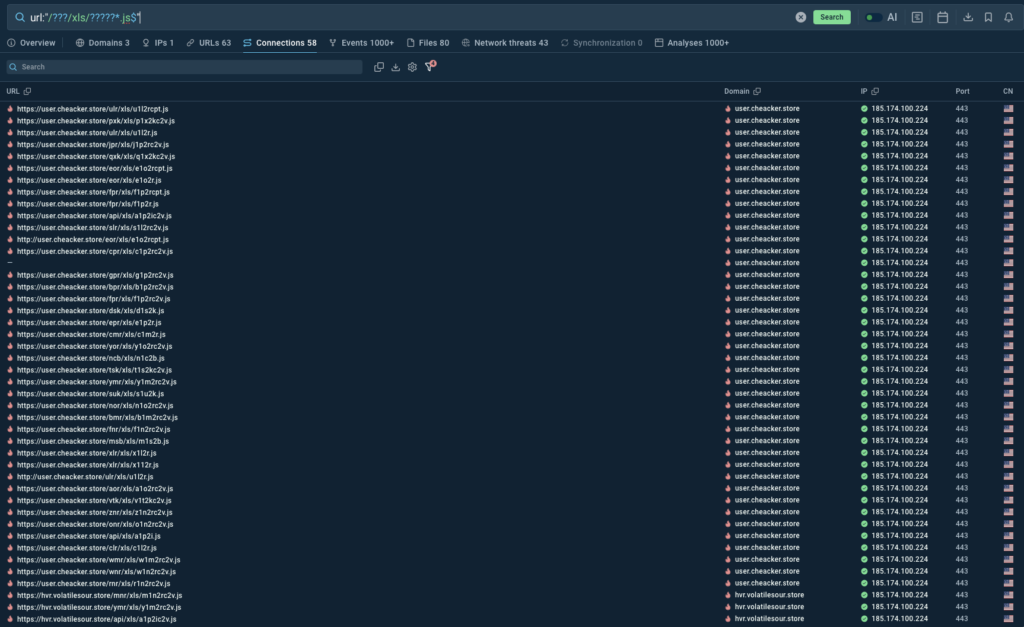
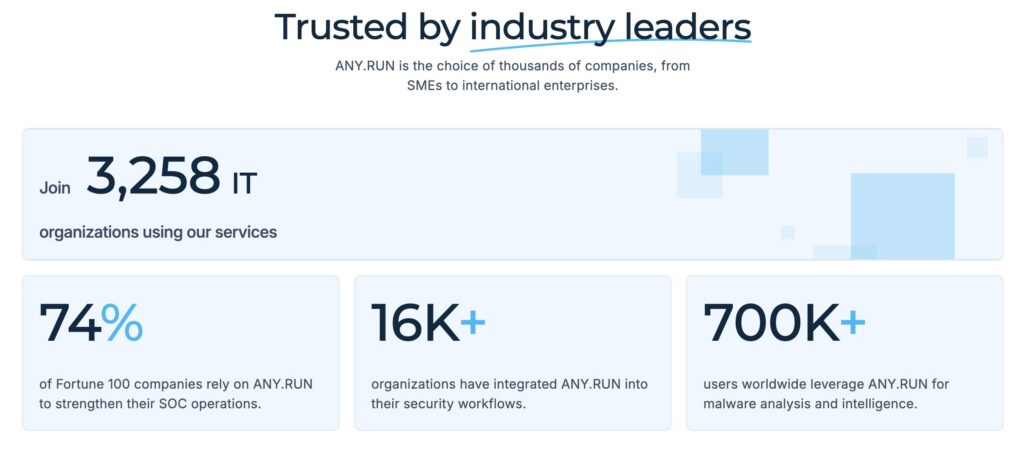
TI Lookup draws on threat intelligence contributed through investigations from 16,000 organizations and more than 700,000 analysts, providing additional context for investigations. It delivers fresh, up-to-date intelligence on the latest malware and phishing attacks, helping security teams stay informed about emerging threats and attack trends.
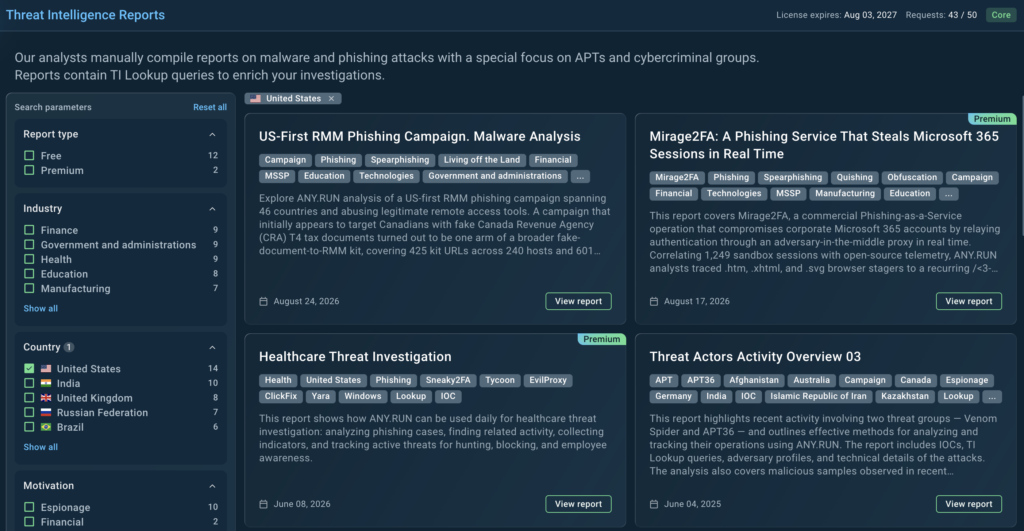
In addition, Threat Intelligence Reports (TI Reports) can provide another layer of context by summarizing emerging threats, attack techniques, malware activity, and relevant indicators. When evaluating a provider, consider whether reports are timely, well-sourced, actionable, and easy for analysts to connect with ongoing investigations.
Prioritize Fresh Intelligence
Threat intelligence can lose relevance over time, especially when used to identify active infrastructure or support automated detection.
When evaluating a provider, consider how quickly new intelligence becomes available and how outdated indicators are identified, updated, or retired. Fresh data helps teams respond to current activity, while historical visibility allows analysts to investigate whether an indicator or related infrastructure has appeared before.
The right balance depends on your use case. Real-time alert enrichment may require frequent updates, while threat hunting may place greater value on extensive historical context.
Look for clear information on how intelligence is timestamped, validated, updated, and maintained, as these factors directly affect its value in investigations and detection workflows.
ANY.RUN’s Threat Intelligence Feeds can support these requirements by providing live malicious IPs, domains, and URLs enriched with sandbox analysis. TI Feeds continuously update their data, with 99% of unique, high-confidence IOCs undergoing validation before being added.
Evaluate Correlation, Not Just Individual Indicators
An indicator is often just the starting point of an investigation. Its real value increases when analysts can connect it to related infrastructure, files, malware, and other activity.
Threat intelligence correlation helps uncover these relationships. For example, a suspicious domain may be linked to an IP address, URL, malicious file, or malware family, giving analysts a broader view of the threat rather than a single isolated data point.
This goes beyond IOC management, which focuses on tracking, validating, and distributing indicators. For more complex investigations, analysts also need to understand how indicators are connected and what those relationships reveal about the activity behind them.
When evaluating a solution, test common investigation scenarios and see how easily analysts can pivot between related intelligence. The goal is to determine whether the available context can reduce investigation time and manual research.
Assess Integration Options
Threat intelligence should fit into the security workflows your organization already uses.
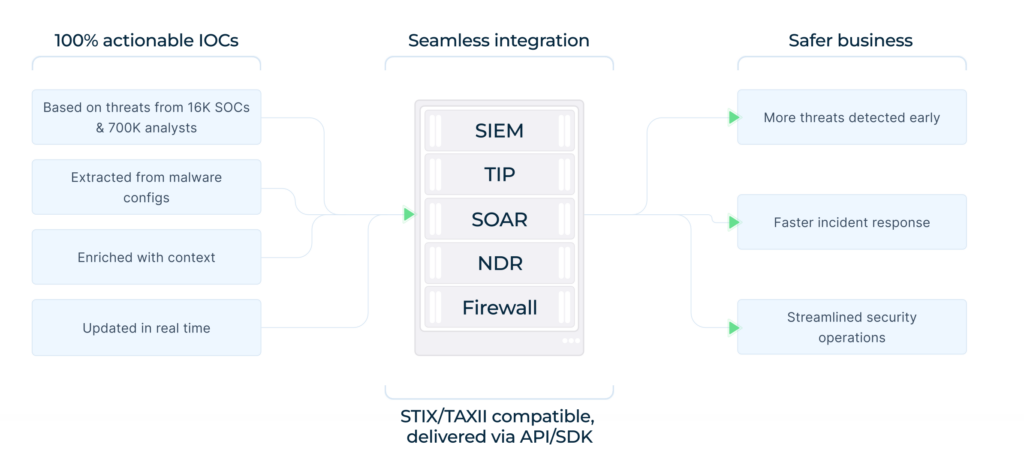
Enterprise teams may need intelligence to move between SIEM, SOAR, EDR/XDR, firewalls, case-management systems, and other security tools. Integration should therefore be part of the procurement process, not an afterthought.
ANY.RUN integrates with existing security environments through APIs, SDKs, and ready-made integrations, helping teams bring threat analysis and shared context into their established workflows.
Beyond API availability, consider request limits, quotas, bulk operations, response times, authentication, SDK support, and automation capabilities, especially when handling thousands of enrichment requests daily.
Explore all ANY.RUN integrations
Consider STIX/TAXII Support
STIX/TAXII support can simplify the exchange of structured threat intelligence between security systems and reduce custom integration work.
TI Feeds support STIX/TAXII alongside API and SDK integrations, making it easier to incorporate intelligence into existing workflows.
During a proof of concept, test whether the data arrives in the expected format, includes the required context, updates at the right frequency, and works reliably with your existing systems.
Plan for Scale From the Beginning
A service that works for a small security team may face different demands as usage expands. More analysts and automated enrichment can increase investigation volume and API requests, while MSSPs may need to support multiple customer environments at once.
Consider user management, permissions, workspace separation, auditability, API capacity, and data volumes when assessing scalability. MSSPs should also look closely at multi-tenancy to ensure customer data remains properly separated.
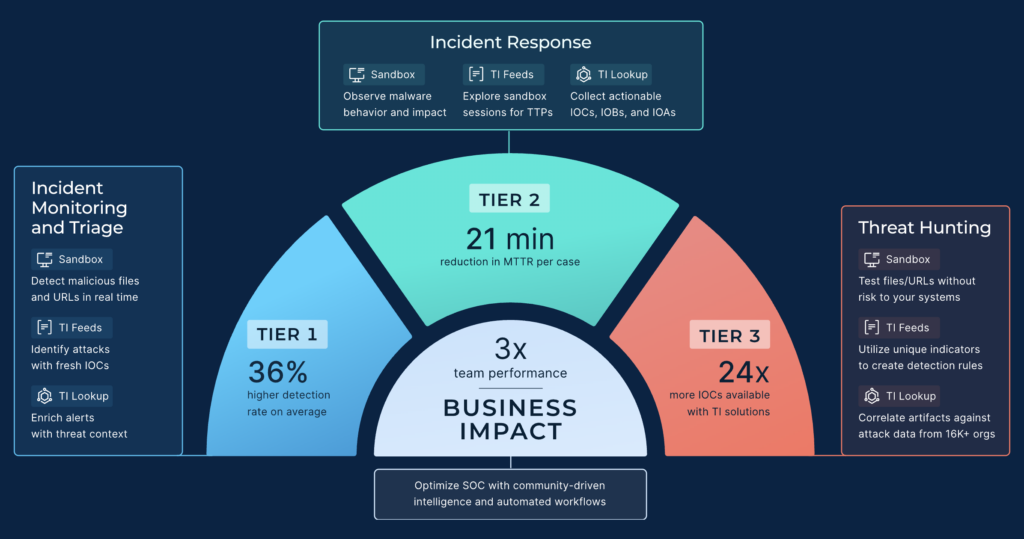
ANY.RUN’s MSSP offering supports high-volume workflows with automation, standardized reporting, API/SDK access, and capabilities designed for multiple customer environments. Interactive Sandbox, TI Lookup, and TI Feeds deliver 3x better SOC performance.
Scalability also means keeping the service manageable as more teams, analysts, and customers rely on it.
Test the Analyst Experience
Threat intelligence should help analysts investigate threats efficiently. Even extensive intelligence can be difficult to use if analysts have to navigate multiple disconnected workflows.
During evaluation, pay attention to search, filtering, historical visibility, pivoting, and how easily analysts can move between related indicators.
A practical test is to give analysts a familiar investigation scenario involving a suspicious domain, IP, URL, or file hash. See how quickly they can determine its relevance, identify related activity, and gather enough context to decide what to investigate next.
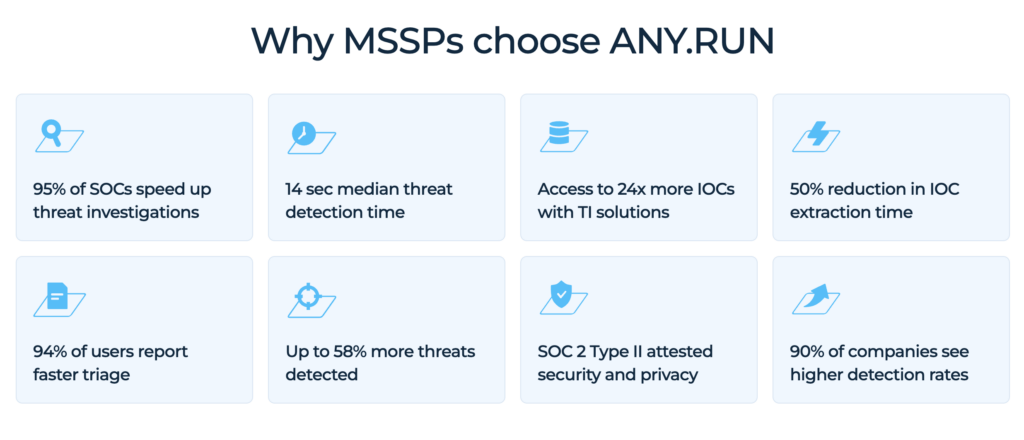
Interactive Sandbox can also support hands-on malware and phishing analysis, allowing analysts to interact with threats in live virtual environments and access findings such as IOCs and TTPs. For enterprise SOCs, 95% of SOC teams speed up threat investigations, while 94% of users achieve faster triage.
Determine the Need for Dark Web Monitoring
Dark web monitoring can help organizations identify leaked credentials, exposed corporate information, or brand-related threats.
Rather than treating it as a must-have feature, assess whether it addresses a specific security requirement. Consider source coverage, validation, detection speed, and how easily analysts can act on the findings.
Use Real Data in the Proof of Concept
A proof of concept should reflect real security workflows, not just provider demonstrations.
Use representative historical alerts, including malicious, benign, and ambiguous cases. Measure outcomes such as investigation time, enrichment quality, false-positive reduction, manual effort, search performance, and API reliability.
If automated enrichment is planned, test realistic request volumes to identify potential limitations before deployment.
Review the Total Cost of Ownership
The cost of a threat intelligence service extends beyond the subscription. Integration, maintenance, training, analyst time, infrastructure, and API usage can all add to the total.
Review API limits and additional usage costs, and consider whether the service adds meaningful coverage or context to your existing intelligence sources.
For example, TI Feeds help identify up to 58% more threats overall and offer a 21-minute reduction in MTTR per case. When assessing ROI, teams can compare metrics such as these with their own baseline investigation time, detection coverage, and analyst workload.
Turn Requirements Into a Practical Decision
Once requirements and testing are complete, assess how well each offering fits your security workflows.
Consider intelligence quality, freshness, enrichment, correlation, integration, automation, privacy, scalability, usability, and cost. The priorities will vary by organization and use case.
An MSSP may focus more on multi-tenancy and API capacity, while an enterprise SOC may prioritize investigation speed and contextual enrichment.
A threat intelligence procurement guide should help teams base their decision on requirements, testing, and measurable operational outcomes.
Conclusion
Choosing an enterprise threat intelligence offering starts with understanding your security requirements and use cases.
Assess intelligence quality, freshness, context, enrichment, integrations, privacy, scalability, and automation, then validate those criteria with real-world testing.
The goal is to turn threat intelligence into useful context that helps security teams investigate threats faster and reduce unnecessary work.
About ANY.RUN
ANY.RUN provides interactive malware analysis and threat intelligence to more than 16,000 organizations and 700,000 security professionals worldwide.
Using Interactive Sandbox, it’s possible for SOC teams and MSSPs to analyze files, URLs, phishing, and malware in real time while monitoring processes, network activity, and other threat behavior.
ANY.RUN’s Threat Intelligence helps teams investigate indicators, uncover related infrastructure, enrich alerts, and bring fresh threat data into existing workflows.
Dedicated Enterprise and MSSP offerings provide capabilities for privacy, access control, collaboration, automation, and high-volume investigations. ANY.RUN is also SOC 2 Type II attested.
FAQ
Enterprise threat intelligence is information about cyber threats that helps organizations detect, investigate, and respond to security incidents. It can include data on malicious IPs, domains, URLs, files, malware, and threat activity. ANY.RUN Enterprise provides enterprise-focused threat analysis and intelligence capabilities and is used by 16,000 organizations across a range of industries.
Common threat intelligence use cases include alert enrichment, threat hunting, incident response, malware analysis, phishing detection, proactive monitoring, and IOC management. Interactive Sandbox can help analysts investigate suspicious files and URLs, extract IOCs and TTPs, and integrate findings with existing security tools.
Threat intelligence requirements define what a security team needs from an intelligence solution, including data quality, freshness, context, integrations, API capacity, automation, privacy, and scalability. For MSSPs, requirements may also include multi-tenant workflows and customer separation. ANY.RUN for MSSPs highlights API/SDK integration and reports that 1,700+ MSSPs use the platform.
The threat intelligence lifecycle typically includes planning, collection, processing, analysis, dissemination, and feedback. It helps organizations turn raw threat data into actionable intelligence.
A threat intelligence maturity model helps organizations assess and improve their intelligence capabilities, including data collection, analysis, automation, integration, and intelligence sharing.
Threat intelligence frameworks provide structured approaches for collecting, analyzing, and sharing threat information. Common examples include MITRE ATT&CK, STIX, and TAXII. ANY.RUN’s Interactive Sandbox supports integrations with security platforms, while TI Feeds can deliver structured threat intelligence for security workflows.
Threat intelligence data sources can include internal security telemetry, malware analysis, open-source intelligence, security researchers, commercial providers, and information-sharing communities. ANY.RUN’s TI Lookup draws on research from 16K organizations and 700K analysts, providing data from sandbox investigations.
Threat intelligence feeds provide continuously updated threat data, such as malicious IPs, domains, URLs, and file hashes. When evaluating feeds, consider freshness, validation, context, and integration options. ANY.RUN TI Feeds provides feeds enriched with sandbox analysis; 99% of unique, high-confidence IOCs are added after validation.
Tactical threat intelligence focuses on technical indicators and adversary techniques. Operational intelligence provides context about campaigns and activity, while strategic intelligence addresses broader threats, trends, and risks.
Evaluate intelligence quality, freshness, context, integrations, API capacity, privacy, scalability, automation, usability, and cost. Test shortlisted solutions with real security workflows during a proof of concept.
Use real or representative alerts and investigation scenarios. Measure enrichment quality, investigation time, manual effort, search performance, API reliability, and scalability.
Context helps analysts understand whether an indicator is relevant by connecting it to related domains, IPs, files, malware, TTPs, and historical activity.



0 comments