

A SOC is where every second counts. Amidst a flood of alerts, false positives, and ever-short time, analysts face the daily challenge of identifying what truly matters — before attackers gain ground.
That’s where alert triage comes in: the essential first step in detecting, prioritizing, and responding to threats efficiently. Done right, it defines the overall effectiveness of a SOC or MSSP and determines how well an organization can defend itself.
Spoiler Alert About Alerts
Here’s your spoiler for today: good triage is not just about checking whether an IOC is malicious. It is about understanding what happened, how serious the threat is, and what action should come next.
That becomes much easier when analysts have the right environment to safely analyze suspicious files, URLs, and emails, plus the threat intelligence needed to connect each finding to a wider campaign or infrastructure.
ANY.RUN supports this process from the first alert to the final decision. Analysts can observe real behavior in the interactive sandbox, enrich findings with live threat context, inspect browser-level activity during phishing investigations, and turn the results into clear Tier 1 Reports for faster escalation or closure.
The result is a stronger triage workflow where teams do not rely on scattered indicators or guesswork. They can validate threats, understand the bigger picture, and make faster, more confident decisions.
Why Triage Is the Heartbeat of the SOC
Behind every successful SOC, there’s a smooth triage flow that keeps chaos under control. It’s not just about filtering alerts. It’s about shaping the SOC’s rhythm and resilience.
When analysts perform triage effectively:
- They build the first and strongest defense layer against real attacks.
- They ensure human attention is spent where it matters most.
- They create a foundation for accurate detection and response metrics like MTTD and MTTR.
- They make security predictable and measurable, not reactive and random.
Why Triage Quality Matters to SOC Leaders
For analysts, poor triage means more manual checks, more uncertainty, and more alerts waiting in the queue. For SOC managers, Heads of SOC, CISOs, and MSSP leaders, the impact is bigger.
Slow or inconsistent triage creates higher escalation pressure, longer response times, missed SLA targets, and less visibility into which threats require urgent action. It also makes it harder to measure SOC performance because every investigation depends too much on individual experience and manual interpretation.
That is why mature SOCs need more than raw alerts or isolated indicators. They need a repeatable process that helps Tier 1 teams validate threats faster, gives Tier 2 and IR teams cleaner context, and gives leadership a clearer view of incident severity, business risk, and response priorities.
The Daily Puzzle: Making Sense of a Thousand Pings
The challenge is not a lack of data — it’s too much of it. The toughest barriers to effective triage include:
- Alert overload: When every ping demands attention, focus becomes the first casualty.
- False positives: Automation can cry wolf more often than it should.
- Threat complexity: Today’s attackers employ sophisticated techniques designed to evade detection.
- Context gaps: An IP is just an IP until you know its story.
- Time compression: Analysts often have seconds, not minutes, to make judgment calls.
- Data silos: TI feeds, SIEMs, and sandboxes don’t always talk to each other.
The result? Valuable threats risk getting buried under a pile of meaningless noise.
Speed, Precision, and the Numbers That Matter
In triage, speed without accuracy is chaos, and accuracy without speed is luxury. That’s why SOCs track their efficiency through key metrics. KPIs aren’t just for bosses—they’re your triage compass. Track these to benchmark progress and spot bottlenecks:
| KPI | Description | Target Benchmark | Why It Matters for Triage |
|---|---|---|---|
| Mean Time to Detect (MTTD) | Average time from threat emergence to alert generation. | <1 hour | Measures triage speed in spotting signals amid noise. |
| Mean Time to Respond (MTTR) | Time from alert to containment/remediation. | <4 hours | Highlights routing efficiency—faster triage feeds faster responses. |
| False Positive Rate | Percentage of alerts dismissed as non-threats. | <20% | Low rates mean better prioritization; high ones signal fatigue. |
| Alert Closure Rate | Alerts triaged per analyst per shift. | 50-100 | Gauges productivity without burnout. |
| Escalation Rate | % of alerts bumped to higher tiers. | <30% | Reflects triage accuracy—fewer escalations mean empowered Tier 1. |
| Wrong Verdict Rate | Misclassified alerts (internal audit). | <10% | Tracks skill gaps; aim for continuous improvement via training. |
High-performing SOCs balance speed and certainty by using intelligence enrichment to cut decision time without cutting quality. Those KPIs are not just numbers; they’re the story of how well your triage works.
From Metrics to Meaning: Why Triage Drives Business Outcomes
Triage KPIs are not just operational numbers. They show how well the SOC turns alerts into decisions, decisions into action, and action into measurable risk reduction.
When MTTD goes down, teams identify suspicious activity earlier. When MTTR improves, incidents move toward containment faster. When false positives and unnecessary escalations decrease, analysts have more time for threats that actually matter.
For SOCs and MSSPs, stronger triage creates value in several ways:
- Fewer false positives protect analyst focus and reduce wasted investigation time.
- Faster validation helps teams meet response expectations and maintain client trust.
- Better prioritization keeps high-risk incidents from being delayed by low-value alerts.
- Lower escalation volume gives senior specialists more time for complex investigations.
- Cleaner triage data makes SOC performance easier to track and improve over time.
In short, triage is where daily alert handling becomes visible business value. A faster, more structured process helps teams reduce operational waste, improve response quality, and prove that security work is moving risk in the right direction.
From Alert to Decision: How ANY.RUN Strengthens the Triage Process
Effective triage is not a single action. It is a sequence of decisions: Is this alert worth attention? What happened? How serious is it? Should the case be closed, escalated, or moved toward response?
ANY.RUN helps SOC teams move through this process faster by giving analysts one connected workflow for threat validation, context gathering, and evidence collection.
Step 1: Understand What Triggered the Alert
Triage usually starts with an indicator: a suspicious IP, domain, file hash, URL, process, or network connection. On its own, that indicator rarely tells the full story.
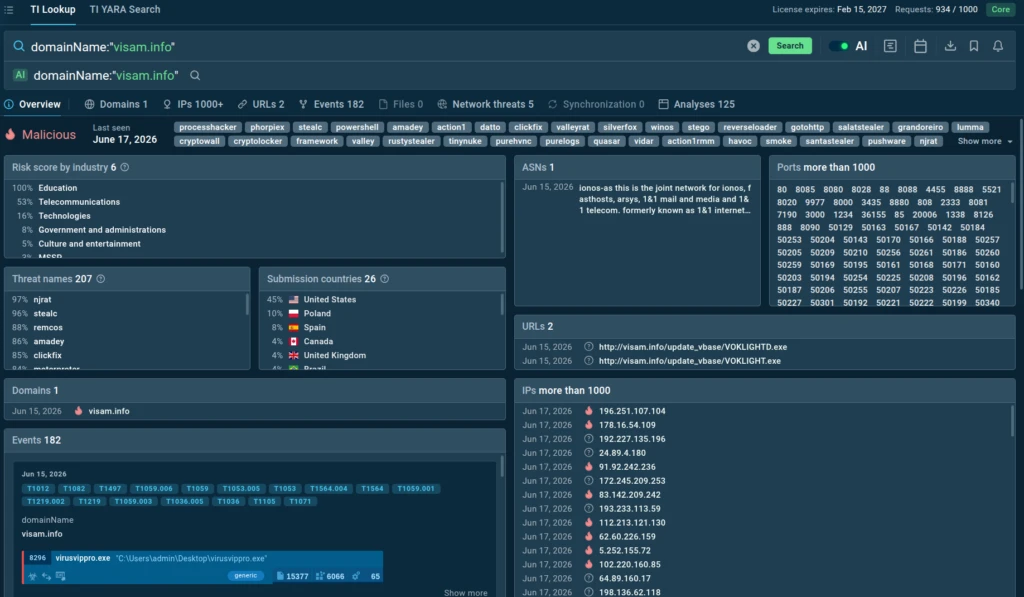
With ANY.RUN’s Threat Intelligence, analysts can quickly check whether the IOC has appeared in previous analyses, what malware families or campaigns it may be connected to, and what behavior was observed around it. This gives teams an immediate starting point instead of forcing them to investigate from zero.
At this stage, the goal is not to make a final verdict yet. The goal is to understand whether the alert has enough risk signals to deserve deeper analysis.
Step 2: Validate the Threat in a Safe Environment
If the alert looks suspicious, the next step is behavior validation. At this stage, analysts need to understand what the threat actually does, not just what one IOC or static scan suggests.
ANY.RUN’s Interactive Sandbox gives teams a safe environment to open suspicious files, URLs, and emails, observe execution in real time, and collect behavioral evidence without risking internal systems. Instead of relying on partial indicators, analysts can see network connections, dropped files, process activity, persistence attempts, phishing flows, redirects, and other signals that confirm whether the alert is real.
Get Behavior Visibility in Seconds
In triage, speed matters. ANY.RUN helps analysts reach meaningful evidence quickly, with most malicious behavior becoming visible within the first 60 seconds of analysis.
View real-world threat analyzed in 60 seconds
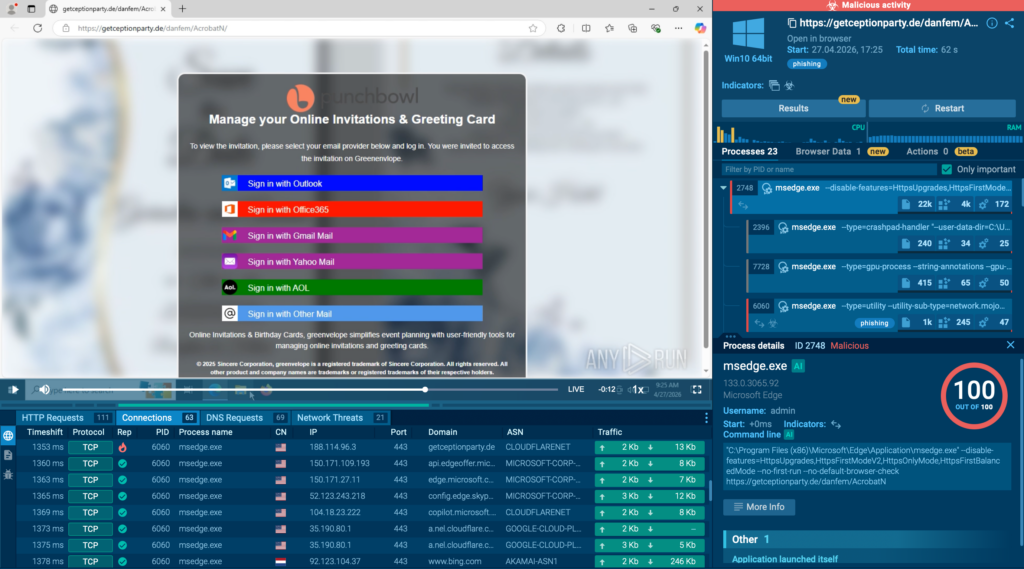
This allows Tier 1 teams to validate suspicious activity earlier and avoid spending several minutes manually checking every file, link, or redirect path.
For SOCs and MSSPs, this means faster verdicts, shorter queues, and less time lost on alerts that do not need deep investigation.
See What Happens Inside the Browser
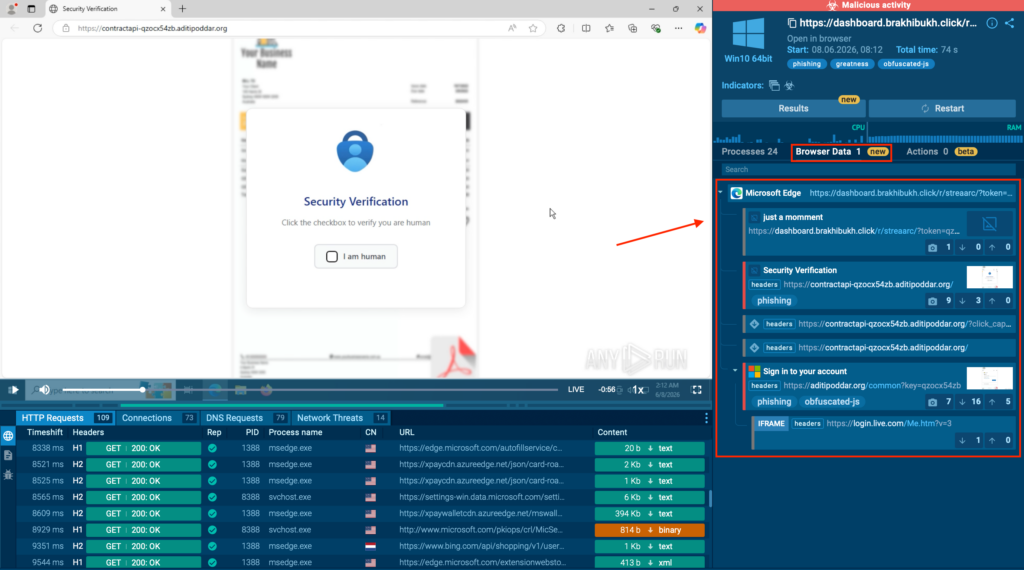
For phishing and web-based threats, the most important evidence often appears inside the browser. Static analysis may show a URL or HTML code, but it can miss what happens after the page loads.
With in-browser data inspection, analysts get deeper visibility into browser-level activity during URL analysis. They can review redirects, scripts, DOM changes, forms, screenshots, requests, and other page behavior in one place. This helps teams understand how the phishing flow works, what data the page tries to collect, and which artifacts can support detection or response.
Let Automation Handle Routine Actions
Many modern threats are built to wait for user behavior. They may require clicks, archive opening, button presses, CAPTCHA solving, QR code extraction, or other actions before the malicious part appears.
ANY.RUN’s Automated Interactivity helps reveal these threats by mimicking real user actions inside the sandbox. It can click, type, open files, follow links, extract URLs, and solve CAPTCHA challenges, helping the analysis reach the final payload or phishing page faster.
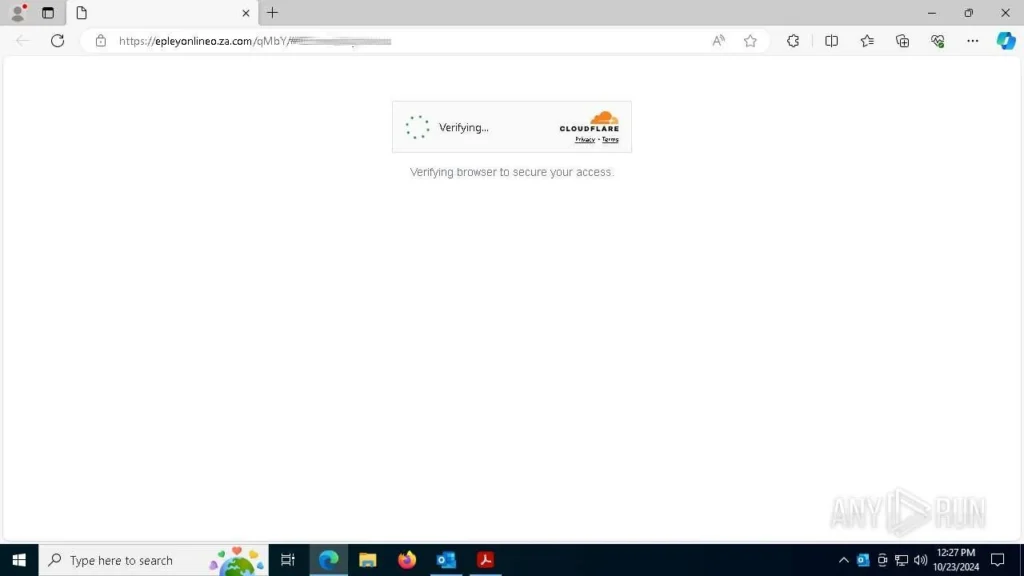
This saves time for analysts because they do not need to manually repeat every routine step. It also reduces the chance that an evasive threat stays hidden simply because no one interacted with it.
Keep Analysts in Control When Needed
Automation speeds up the routine work, but triage still needs human judgment. ANY.RUN remains fully interactive, so analysts can step in at any moment, click through the sample, change the path of execution, test suspicious behavior, or inspect details more closely.
That combination of automation and manual control is what makes the sandbox valuable for real SOC workflows. Teams can move quickly when the case is simple, but still dig deeper when the alert looks complex, evasive, or business-critical.
This makes triage more accurate and less dependent on guesswork. Analysts can observe the threat, confirm behavior, collect evidence, and understand what the alert actually means before closing, escalating, or moving it toward response.
Keep Triage Work Visible Across the Team
In larger SOCs and MSSPs, triage is rarely handled by one person from start to finish. ANY.RUN’s Teamwork capabilities help managers keep sandbox activity organized by reviewing shared task history, monitoring analyst activity, supervising active analyses, and controlling task privacy settings.
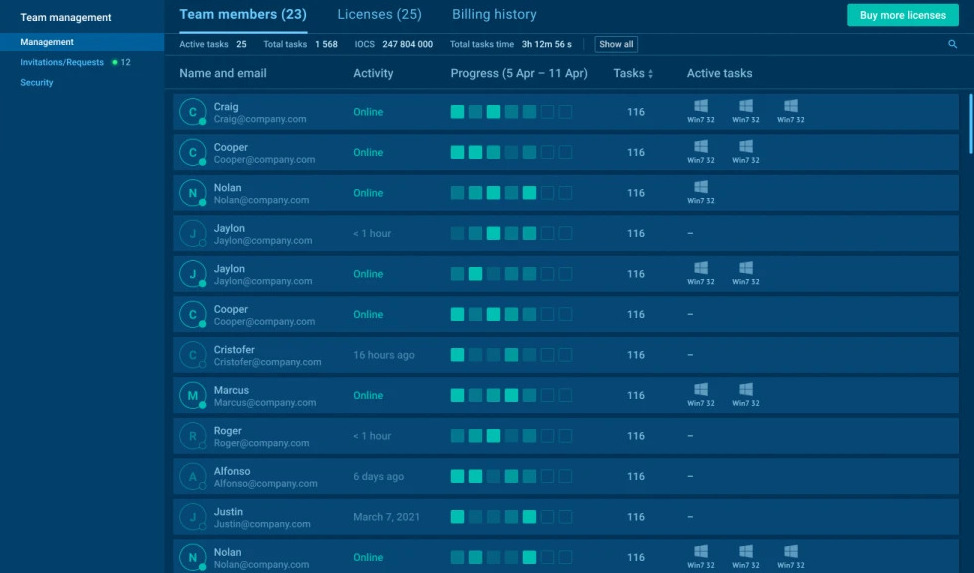
This gives teams better visibility into ongoing investigations, reduces duplicated work, and helps keep triage consistent across analysts, shifts, and client cases.
Step 3: Connect Behavior to Threat Context
Once analysts validate suspicious behavior in the sandbox, the next question is context. Is this an isolated event, or part of a larger malware campaign, phishing operation, or active infrastructure?
This is where threat intelligence becomes part of the triage decision. Instead of treating an IP, domain, hash, or URL as a separate data point, analysts need to understand how it behaves in real attacks, what infrastructure it connects to, which techniques are involved, and whether similar activity has already been observed in the wild.
ANY.RUN helps teams connect sandbox findings with live threat intelligence built from millions of real-world malware and phishing investigations. Analysts can move from “what is this indicator?” to “how does this threat operate?” within seconds.
Link IOCs to Real Behavior
A single IOC rarely tells the full story. A suspicious domain may be connected to a payload, a C2 server, a phishing kit, or a known malware family.
domainName:”23.ip.gl.ply.gg”
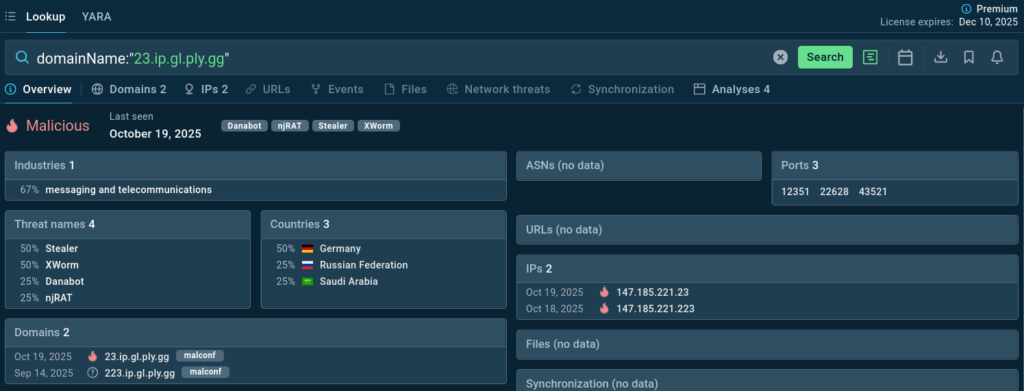
With ANY.RUN, analysts can enrich indicators with execution context, infrastructure relationships, related analyses, and associated TTPs. This helps Tier 1 teams understand not only whether an IOC is suspicious, but why it matters in the current investigation.
Understand Whether the Threat Is Active
Triage decisions become stronger when teams know whether the threat is current. An indicator connected to recent malware activity or active phishing infrastructure should be prioritized differently from an old or isolated artifact.
ANY.RUN’s Threat Intelligence is based on live attack data from daily investigations across 15,000+ organizations and 600,000 analysts. This gives SOC teams fresh context on active threats and helps them prioritize alerts based on real-world activity, not just static severity.
Expand the Investigation Without Starting from Zero
After the first suspicious finding, analysts often need to uncover related infrastructure, additional IOCs, connected samples, or similar behavior patterns.
ANY.RUN helps teams pivot from one finding to related files, URLs, domains, IPs, malware families, and attack techniques. This turns triage into a more complete investigation and gives teams more useful evidence for detection, hunting, and response.
Feed Better Context into SOC Workflows
Threat context should not stay inside one investigation. It should support the rest of the SOC workflow.
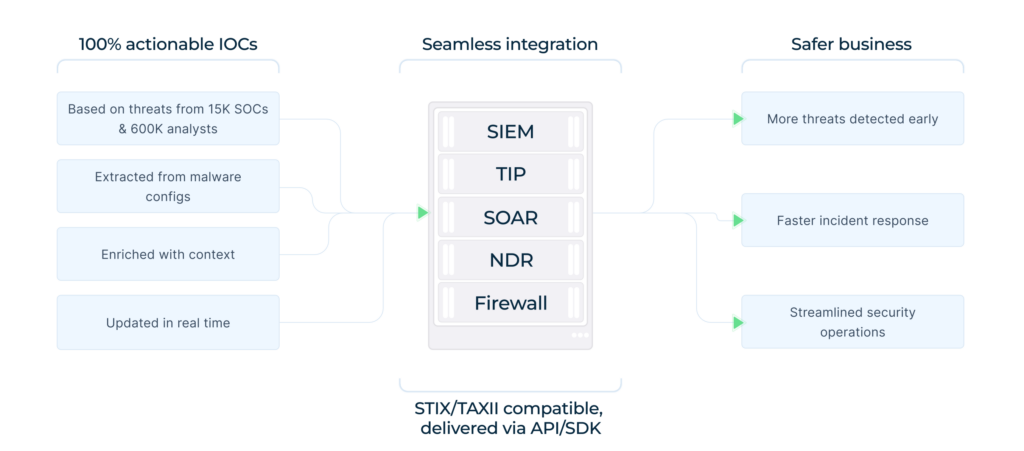
ANY.RUN’s TI Feeds can support triage, incident response, threat hunting, detection engineering, and SIEM/SOAR enrichment. Teams can use the context to reduce manual enrichment, improve alert quality, create better detection logic, and pass clearer information to the next stage of response.
Step 4: Turn Findings into a Clear Triage Decision
After behavior validation and threat context enrichment, analysts need to make the final triage call: close the alert, continue monitoring, escalate the case, or move it toward response.
At this stage, speed still matters, but clarity matters even more. A triage decision should explain what was observed, why it matters, how serious the threat is, and what the next team should do with the case.
ANY.RUN helps turn investigation results into clear, structured evidence. Instead of manually collecting screenshots, copying IOCs, and rewriting behavior notes, analysts can use Tier 1 Reports to summarize the key findings from the sandbox analysis.
Give Tier 1 Analysts a Clearer Decision Path
Tier 1 Reports help analysts quickly understand the verdict, malicious activity, IOCs, behavioral indicators, MITRE ATT&CK techniques, and recommended next steps.
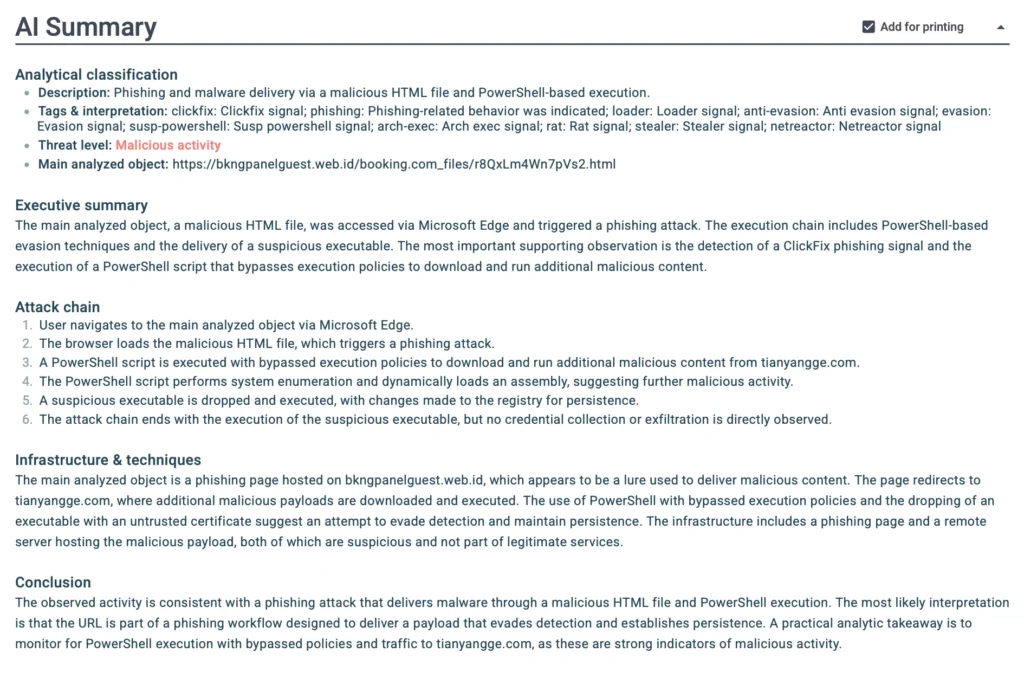
This supports faster and more confident decisions during early triage. Analysts can see whether the alert should be closed as benign, escalated for deeper investigation, or treated as a confirmed threat that needs response.
Make Escalation Cleaner
When escalation is needed, the next team should not receive a vague alert with limited context. They need evidence.
With structured reporting, Tier 1 teams can pass a clearer case summary to Tier 2, incident response, or detection engineering. The report shows what happened during execution, which indicators were involved, and which behaviors made the case suspicious or malicious.
This reduces back-and-forth, saves senior specialists time, and helps the investigation move forward faster.
Help Leaders See the Risk Behind the Alert
For SOC leaders and MSSP managers, structured triage output also improves visibility. Clear reports make it easier to understand which threats were validated, how severe they were, what actions were taken, and where the team may need more coverage or support.
This turns triage from a fast technical check into a measurable security process. Teams can track outcomes, improve consistency, and show how daily alert handling contributes to risk reduction.
In short, this step helps teams move from “we found the evidence” to “we know what decision to make and how to move the case forward.”
Building a More Consistent Triage Practice
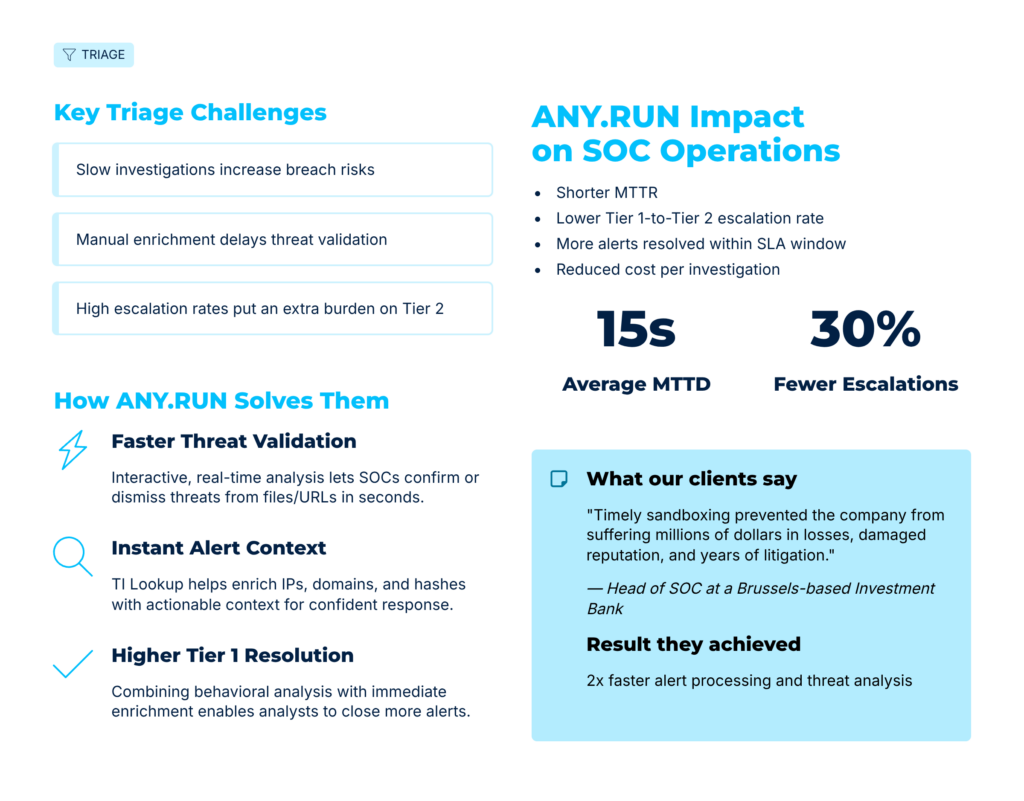
Expert triage is not only about one strong investigation. It is about making good decisions repeatable across analysts, shifts, and alert types.
When every analyst follows a different path, triage becomes hard to measure and harder to improve. One person may escalate too early, another may spend too much time on low-risk alerts, and another may miss useful context before closing a case.
A stronger approach is to standardize how alerts are reviewed, validated, documented, and escalated.
Define What “Ready for Escalation” Means
Tier 2 and IR teams should not receive alerts with missing context. Before escalation, analysts should be able to show what triggered the alert, what behavior was confirmed, which indicators were involved, and why the case needs deeper investigation.
This helps reduce back-and-forth and keeps senior specialists focused on cases that truly need their attention.
Create Clear Rules for Closing Alerts
Closing an alert should be just as structured as escalating one. Teams need clear criteria for when an alert can be marked as benign, suspicious, or confirmed malicious.
This protects the SOC from two common problems: wasting time on weak signals and closing risky cases too early.
Make Triage Knowledge Reusable
Every completed investigation can help the next one. Useful IOCs, behavior patterns, screenshots, ATT&CK techniques, and verdict reasoning should not stay inside one analyst’s notes.
When findings are documented clearly, they can support future triage, detection engineering, threat hunting, and training for newer team members.
Review the Process, Not Just the Alert
Improving triage means looking beyond individual cases. SOC leaders should review where analysts spend the most time, which alert types create unnecessary escalations, where false positives come from, and which steps slow the team down.
This turns triage into a process that can be measured and improved over time.
Keep the Workflow Practical
The best triage process is the one analysts can actually follow during a busy shift. It should reduce manual work, make evidence easier to collect, and help teams move from alert to decision without adding extra complexity.
That is how triage becomes more than a daily task. It becomes a repeatable SOC capability that improves speed, accuracy, and confidence across the whole team.
Conclusion: Turn Alert Triage into Measurable SOC Value
Alert triage is where SOC teams decide what to close, escalate, or move toward response. When that process is slow or inconsistent, teams waste time, senior specialists get overloaded, and real threats can stay unresolved longer.
ANY.RUN helps SOCs and MSSPs validate threats faster, reduce manual investigation work, improve escalation quality, and give teams clearer evidence for response.
For security leaders, this means better use of analyst capacity, faster incident handling, stronger SLA performance, and clearer visibility into operational risk.
With ANY.RUN, triage becomes more than alert handling. It becomes a faster, more consistent process for reducing risk and proving SOC impact.
About ANY.RUN
ANY.RUN helps SOC teams, MSSPs, and enterprises investigate cyber threats faster through interactive malware analysis and threat intelligence.
Its cloud-based Interactive Sandbox enables security teams to safely analyze suspicious files, URLs, and emails in real time, observe attack behavior as it unfolds, and collect actionable evidence for rapid response.
ANY.RUN’s Threat Intelligence solutions provide additional context around threats, infrastructure, and attacker activity, helping organizations enrich investigations, streamline security workflows, and improve threat detection. Together, these capabilities enable faster triage, more informed decision-making, and more efficient security operations at scale.

0 comments