Black friday Up to 3 extra licenses FOR FREE + Special offer for TI LOOKUP Get it now
Webinar
February 26
Better SOC with Interactive Sandbox Practical Use Cases
Register now

SmartLoader

53
Global rank
59 infographic chevron month
Month rank
65 infographic chevron week
Week rank

SmartLoader is a Windows malware loader that uses multi-stage execution to deliver secondary payloads. It supports system discovery, screenshot capture, persistence through scheduled tasks, C2 communication, and anti-analysis techniques.

Loader
Type
Unknown
Origin
1 June, 2023
First seen
24 September, 2026
Last seen

How to analyze SmartLoader with ANY.RUN

Type
Unknown
Origin
1 June, 2023
First seen
24 September, 2026
Last seen

IOCs

IP addresses
172.64.154.167
150.171.109.104
150.171.27.10
142.250.154.101
142.251.14.94
20.184.175.6
48.209.6.48
217.119.129.119
2.20.180.154
150.171.27.11
2.21.239.135
34.54.88.138
142.251.127.155
20.190.159.0
88.221.110.90
185.199.108.153
208.95.112.1
74.178.240.61
95.100.102.101
150.171.28.11
Hashes
1967da158234d42db7bddffea780b95eacb916af2731194a2369650ac66ae7ba
e2e4d97c20d4478e8e947480c8f6c71a2c795776d405366be70db82e4ea4ba77
eb754c962296c277074e5873d0e35f79b8171b257a775b067e4802c48b5bb51e
fc525b684be2945a43ca04de402d74a1ea1901c48bf2eafe5fa814bfccfb4378
b9fa2d52a4ffabb438b56184131b893b04655b01f336066415d4fe839efe64e7
49bd0b79d9e7628533517f5daea1aaf32982a166e224a441a0fc8138adf7face
3a5078b626e41d20117d260d8b825b039884cfe062c6d462432216d9b07d82b5
16246554944c2cf7c340e2cbbd21b7e49a604d8556466aafa8534bacc925c6ea
75da533888189d13fc340d40637b9fc07a3f732e3fcf33ec300f4c7268790a62
907f2709d1d3c8fa26294938f4080bc477e62281c4c50a082c22db0195cda663
22ca9415e294d9c3ec3384b9d08cdaf5164af73b4e4c251559e09e529c843ea6
474d668707f1cb929fef1e3798b71b632e50675bd1a9dceaab90c9587f72f680
3d0361a85adfcd35d0de74135723a75b646965e775188f7dcdd35e3e42db788e
6028bd681dbf11a0a58dde8a0cd884115c04caa59d080ba51bde1b086ce0079d
9c70f766d3b84fc2bb298efa37cc9191f28bec336329cc11468cfadbc3b137f4
eacd09517ce90d34ba562171d15ac40d302f0e691b439f91be1b6406e25f5913
3dbd2c90050b652d63656481c3e5871c52261575292db77d4ea63419f187a55b
fbcfe23a2ecb82b7100c50811691dde0a33aa3da8d176be9882a9db485dc0f2d
b3ece279943b28c8d855ec86ac1ce53bdfb6a709240d653508764493a75f7518
4ecedb9c1f3dd0d0e3aeb86146561b3d7e58656cbdbed1a39b91737b52ec7f2c
Domains
ntp.msn.com
img-s-msn-com.akamaized.net
r.msftstatic.com
copilot.microsoft.com
edge.microsoft.com
www.google-analytics.com
th.bing.com
www.virustotal.com
nexusrules.officeapps.live.com
fonts.googleapis.com
polygon.drpc.org
vcf.bing.com
login.live.com
fonts.gstatic.com
api.edgeoffer.microsoft.com
msedge.b.tlu.dl.delivery.mp.microsoft.com
fe3cr.delivery.mp.microsoft.com
region1.analytics.google.com
settings-win.data.microsoft.com
recaptcha.net
URLs
http://crl.microsoft.com/pki/crl/products/microoceraut2011_2011_03_22.crl
http://www.microsoft.com/pkiops/crl/microsoft%20secure%20server%20ca%202026.crl
http://ocsp.digicert.com/mfewtzbnmeswstajbgurdgmcgguabbq50otx%2fh0ztl%2bz8sipi7wewvxdlqqutijuibiv5unu5g%2f6%2brks7qyxjzkceaz1vqyrvgl0erhqlcpm8gy%3d
http://edge.microsoft.com/browsernetworktime/time/1/current?cup2key=2:oikcjrkir7y9syrdka3yn60fh8y21zzsgqq6ndrglzw&cup2hreq=e3b0c44298fc1c149afbf4c8996fb92427ae41e4649b934ca495991b7852b855
https://login.live.com/ppsecure/deviceaddcredential.srf
https://copilot.microsoft.com/c/api/user/eligibility
https://edge.microsoft.com/serviceexperimentation/v3/?osname=win&channel=stable&osver=10.0.19045&devicefamily=desktop&installdate=1661339457&clientversion=133.0.3065.92&experimentationmode=2&scpguard=0&scpfull=0&scpver=0
https://isixmartins-hub.github.io/
https://config.edge.skype.com/config/v1/edge/133.0.3065.92?clientid=4489578223053569932&agents=edge%2cedgeconfig%2cedgeservices%2cedgefirstrun%2cedgefirstrunconfig&osname=win&client=edge&channel=stable&scpfre=0&osarch=x86_64&osver=10.0.19045&wu=1&devicefamily=desktop&uma=0&sessionid=72&mngd=0&installdate=1661339457&edu=0&soobedate=1504771245&bphint=2&fg=1&lbfgdate=1766137499&lafgdate=0
https://settings-win.data.microsoft.com/settings/v3.0/flightsettings/fsservice?processorclockspeed=3094&isretailos=1&oemmanufacturername=dell&flightingpolicyvalue=3&enablepreviewbuilds=4294967295&osversionfull=10.0.19045.4046.amd64fre.vb_release.191206-1406&managepreviewbuilds=3&branchreadinesslevelsource=0&attrdataver=186&processorcores=6&branchreadinesslevelraw=16&totalphysicalram=6144&tpmversion=0&oemmodelnumber=dell&systemvolumetotalcapacity=260281&deviceid=s%3abad99146-31d3-4ec6-a1a4-be76f32ba5d4&app=fss&appver=10.0&smartactivehoursstate=1&activehoursstart=20&securebootcapable=0&activehoursend=13&devicefamily=windows.desktop
https://api.edgeoffer.microsoft.com/edgeoffer/pb/experiments?appid=edge-extensions&country=us
https://isixmartins-hub.github.io/favicon.ico
https://www.bing.com/bloomfilterfiles/expandeddomainsfilterglobal.json
https://xpaywalletcdn.azureedge.net/mswallet/expresscheckout/v1/getglobalconfig?edgechannel=stable&edgeversion=133.0.3065.92&configversion=0
https://config.edge.skype.com/config/v1/edge/133.0.3065.92?clientid=4489578223053569932&agents=edgeruntime%2cedgeruntimeconfig%2cedgedomainactions&osname=win&client=edge&channel=stable&scpfre=0&osarch=x86_64&osver=10.0.19045&wu=1&devicefamily=desktop&uma=0&sessionid=72&mngd=0&installdate=1661339457&edu=0&soobedate=1504771245&bphint=2&fg=1&lbfgdate=1766137499&lafgdate=0
https://edge.microsoft.com/extensionwebstorebase/v1/crx?os=win&arch=x64&os_arch=x86_64&nacl_arch=x86-64&prod=edgecrx&prodchannel=&prodversion=133.0.3065.92&lang=en-us&acceptformat=crx3,puff&x=id%3djmjflgjpcpepeafmmgdpfkogkghcpiha%26v%3d1.2.1%26installedby%3dother%26uc%26ping%3dr%253d279%2526e%253d1
https://www.bing.com/api/shopping/v1/user/shoppingsettings?enabledservicefeaturesv2=edgeserverux.shopping.cashbackeumarkets,edgeserverux.shopping.msedgeshoppingcashbackdismisstimeout2s
https://update.googleapis.com/service/update2/json?cup2key=14:ervovfjy30l-5-xzqp_7hcm9cxxg88cux2el9_lago0&cup2hreq=ef7e3bb3c2eba8afdd18dbe19852b916555d0d77b836d4663ff6738e7a9643a3
https://github.com/isixmartins-hub/isixmartins-hub.github.io/raw/refs/heads/main/crinula/github-isixmartins-hub-io-v2.2.zip
https://edge.microsoft.com/entityextractiontemplates/api/v1/assets/find-assets?name=arbitration_priority_list&version=24.*.*&channel=stable&key=d414dd4f9db345fa8003e32adc81b362
Last Seen at

Recent blog posts

post image
ANY.RUN at RootedCON Valencia 2026: Where Cyb...
watchers 769
comments 0
post image
Phishing Risk Across 5 Key US Industries: ANY...
watchers 5619
comments 0
post image
CSuite Targets US and EU Organizations with D...
watchers 11500
comments 0

Key Takeaways

  • Payload Delivery: SmartLoader is a malware loader used to deliver and execute additional payloads.

  • System Fingerprinting: SmartLoader collects information about the compromised Windows environment.

  • IP and Geolocation Discovery: The loader can obtain public IP and geolocation information.

  • Network Communication: SmartLoader communicates with external infrastructure to support its operation.

  • Loader Functionality: SmartLoader can serve as an initial stage for delivering and executing additional malware.

  • ANY.RUN’s Interactive Sandbox analysis reveals a sequence involving command-script execution, system fingerprinting, public IP and geolocation discovery, and subsequent network communication.
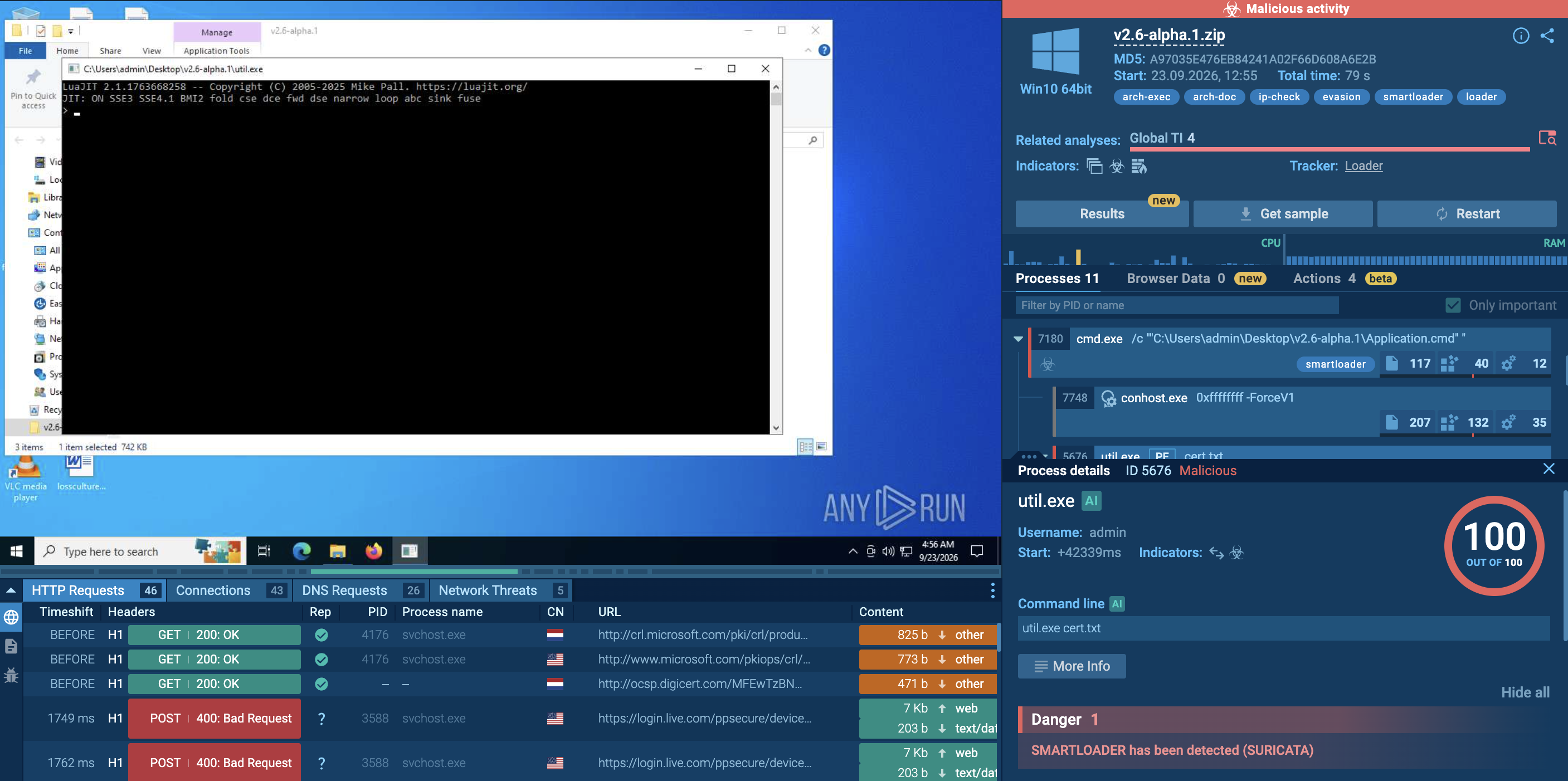
    SmartLoader detonated inside ANY.RUN’s Interactive Sandbox

SmartLoader detonated inside ANY.RUN’s Interactive Sandbox

What is SmartLoader?

SmartLoader is a Windows malware loader designed to execute additional components while collecting information about the compromised environment.

The analyzed sample is distributed as a ZIP archive containing the files required for execution. Its observed execution begins with a command script that launches the loader executable and passes a configuration-related file as an argument.

During execution, SmartLoader performs basic host profiling and gathers system identifiers before communicating with external infrastructure. The observed sample also retrieves public IP and geolocation information, providing the operator with additional context about the infected system.

SmartLoader's behavior can therefore be summarized as a relatively short chain involving command-script execution, system fingerprinting, external IP discovery, and C2-related network communication.

How SmartLoader Impacts Businesses and Organizations

A SmartLoader infection can create several business risks, such as:

  • Credential exposure: The malware can collect credentials from compromised systems, potentially exposing access to corporate services and applications.
  • Payload delivery: As a loader, SmartLoader can serve as an initial execution stage for additional malware or components.
  • System reconnaissance: Collection of system identifiers and security settings can provide attackers with information about the compromised environment.
  • Network exposure: Communication with external infrastructure can provide a channel for retrieving or transmitting additional data.
  • Geolocation discovery: Public IP and geolocation information can help identify the approximate location and network context of an infected host.
  • Follow-on activity: Loader activity may precede the execution of additional payloads, meaning the initial SmartLoader process may not represent the full scope of an infection.
  • Endpoint visibility: SmartLoader activity can generate multiple artifacts, including command scripts, executables, and network connections, that may require investigation during an incident.

Get started today for free

Analyze malware and phishing in a fully-interactive sandbox

Create free account

Victimology: Who Is at Risk?

SmartLoader attacks Windows systems, making organizations that use Windows workstations and endpoints potentially exposed.

The observed behavior does not indicate a restriction to a particular industry. The collection of basic system information and network details can be useful during attacks against a broad range of corporate environments.

Because SmartLoader functions as a loader, activity following its execution may depend on the payloads or instructions associated with a particular sample or campaign.

How Does SmartLoader Function?

Observing a SmartLoader sample inside ANY.RUN’s Interactive Sandbox shows a compact execution chain focused on launching the loader, profiling the host, discovering its public network information, and communicating with external infrastructure.

The analyzed sample is delivered in the v2.6-alpha.1.zip archive. After extraction, Application.cmd is launched through Command Prompt and starts util.exe with cert.txt as an argument.

The general execution flow is:

ZIP archive → Application.cmd → util.exe → system profiling → IP/geolocation discovery → network communication

Stage 1: Archive Extraction

The analyzed SmartLoader sample is delivered as v2.6-alpha.1.zip.

After the archive is extracted, the included command script becomes the starting point for execution.

The use of an archive allows multiple files required by the loader to be packaged together and delivered as a single object.
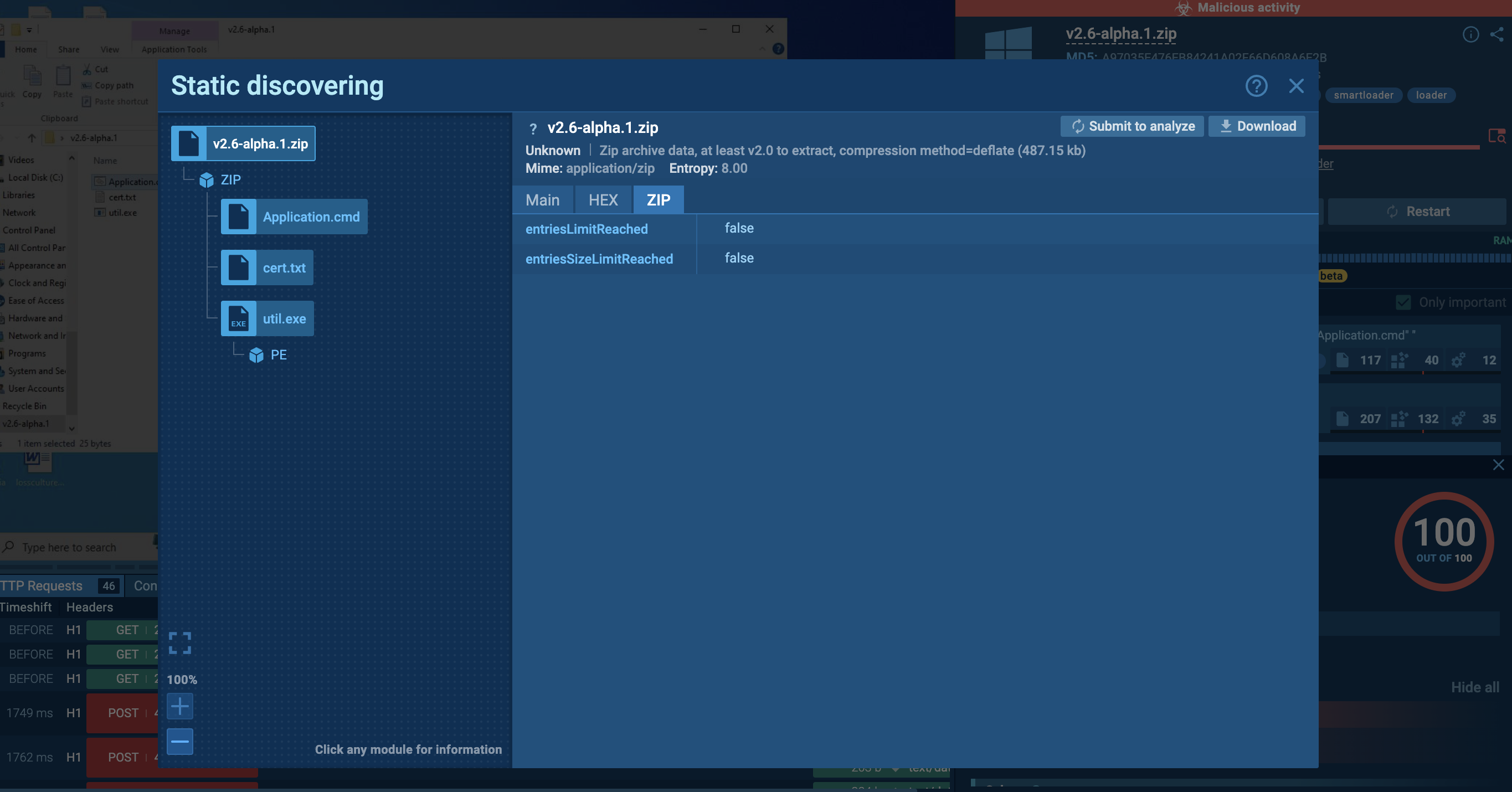
SmartLoader sample delivered as an archive

SmartLoader sample delivered as an archive

Stage 2: Command-Based Execution

The extracted Application.cmd file is launched through Command Prompt. The script starts util.exe with cert.txt provided as an argument:

util.exe cert.txt

This creates the primary execution chain observed in the sandbox:

Application.cmd → util.exe → cert.txt

The command script acts as the initial launcher, while util.exe performs the subsequent SmartLoader activity.
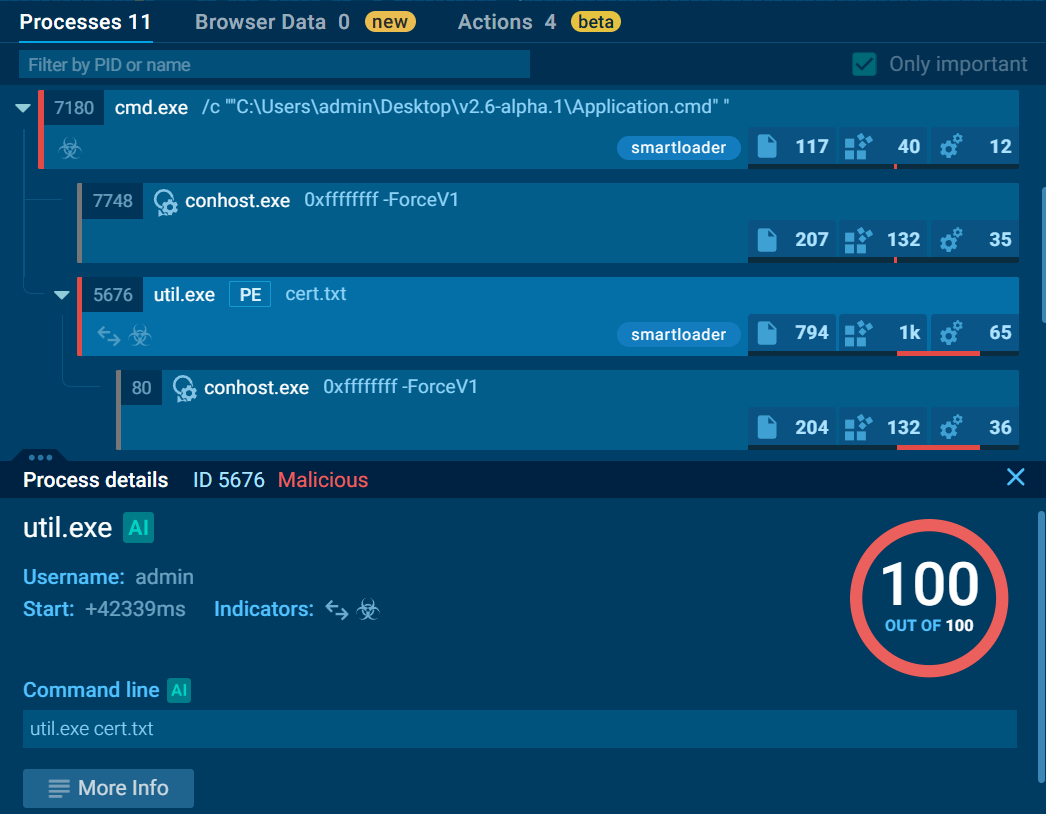
Application.cmd starts util.exe with cert.txt as an argument

Application.cmd starts util.exe with cert.txt as an argument

Stage 3: System Profiling

Once running, util.exe collects information about the host environment.

Observed checks include:

  • Supported system languages
  • Computer name
  • Internet Explorer security settings
  • System MachineGuid

These values provide SmartLoader with basic identifiers and information about the environment in which it is executing.

The collection of multiple system attributes can also help distinguish individual systems or provide context for subsequent activity.
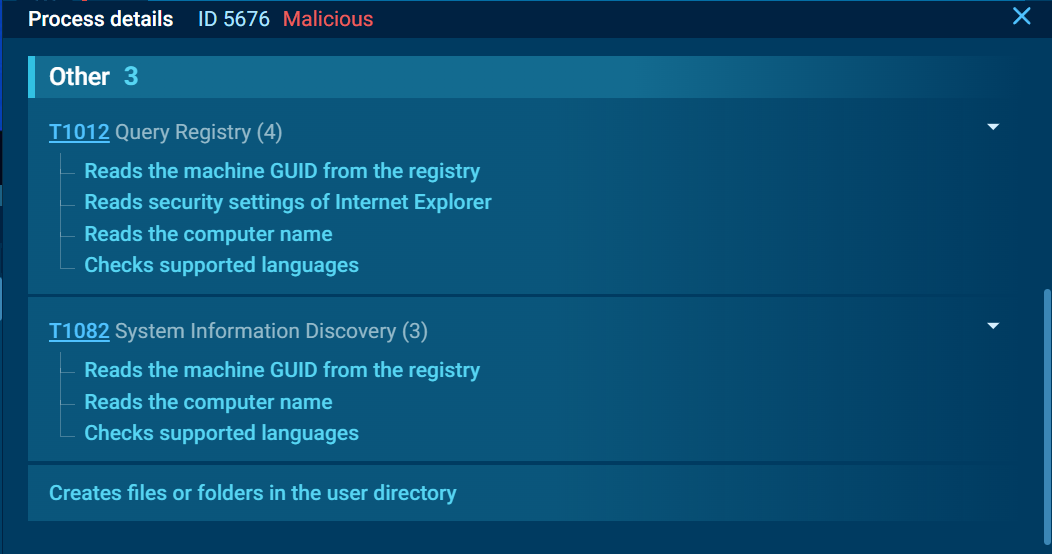
SmartLoader collecting basic system identifiers

SmartLoader collecting basic system identifiers

Stage 4: Public IP and Geolocation Discovery

SmartLoader also requests information from ip-api.com/json/.

The request provides public IP and geolocation information associated with the infected system.

This allows the loader to obtain network-level context that may not be available through local system information alone.

SmartLoader checking public IP and geolocation information

SmartLoader checking public IP and geolocation information

Stage 5: HTTPS Communication

After collecting host information, util.exe sends an HTTPS POST request to polygon.drpc.org.

The observed communication demonstrates that the loader contacts external infrastructure after performing its initial system profiling.

The use of HTTPS provides encrypted transport for the network request.

Stage 6: HTTP Communication

Later, util.exe communicates with 185.10.68.110 over HTTP and sends a POST request to an /api/ path.
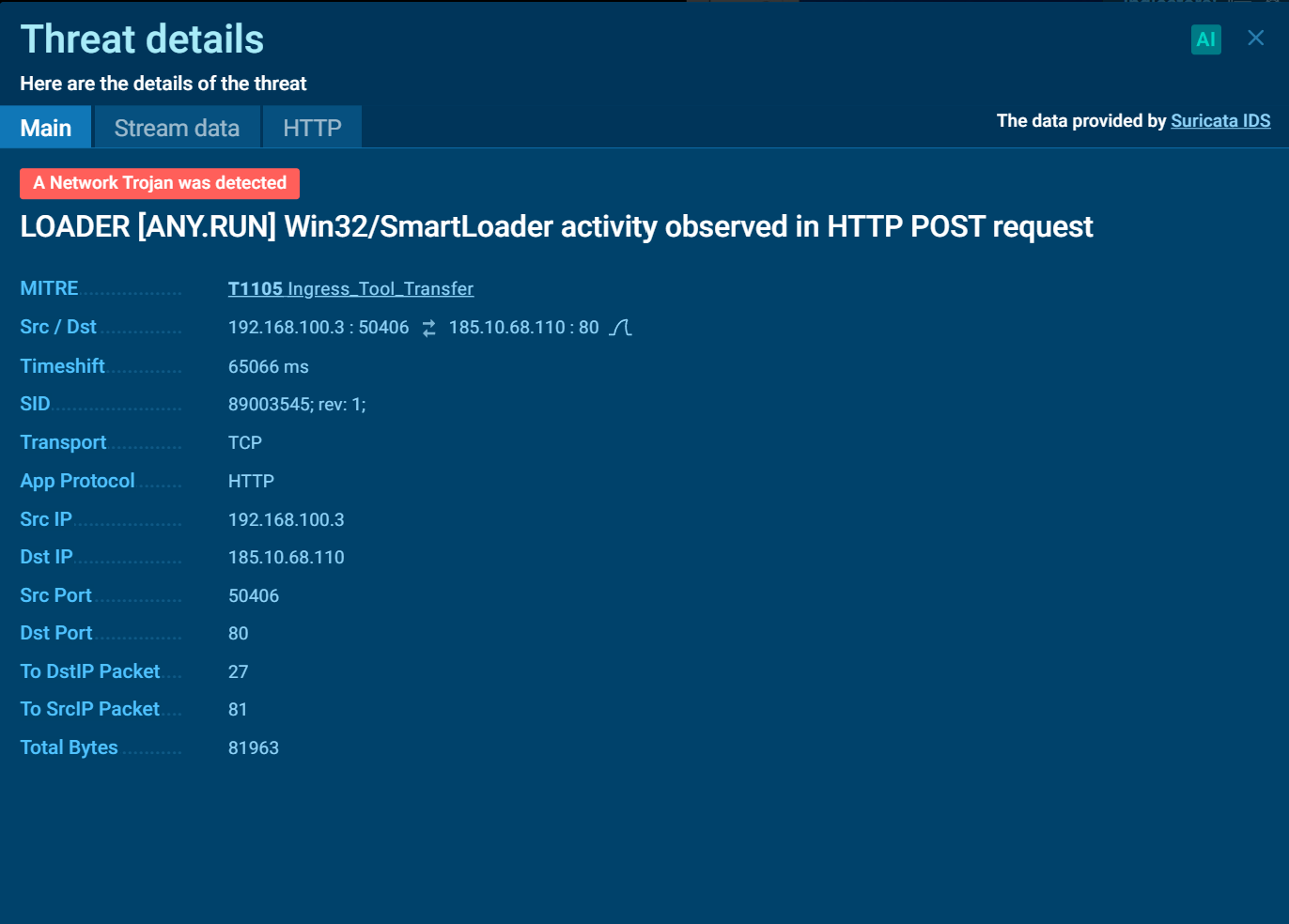
ANY.RUN Interactive Sandbox detecting an HTTP POST request as SmartLoader traffic

ANY.RUN Interactive Sandbox detecting an HTTP POST request as SmartLoader traffic

ANY.RUN’s Interactive Sandbox detects this traffic using the SMARTLOADER has been detected (SURICATA) signature.

The request body is approximately 3.1 MB, and the server responds with HTTP 200.

This network activity represents one of the clearest behavioral indicators associated with the analyzed SmartLoader sample.

Stage 7: Persistence

No persistence mechanism was observed during the analyzed execution.

Unlike malware families that create scheduled tasks, registry Run keys, services, or other startup mechanisms, this SmartLoader sample remained focused on its immediate execution chain and network activity.

The absence of observed persistence does not necessarily mean that every SmartLoader variant behaves identically. Different samples or campaigns may use different configurations or additional components.

SmartLoader Behavior at a Glance

The analyzed sample demonstrates several distinct stages of activity:

  • Archive delivery provides the initial SmartLoader files.
  • Command-script execution launches util.exe through Application.cmd.
  • System profiling collects language, computer name, Internet Explorer security settings, and MachineGuid.
  • IP discovery retrieves public IP and geolocation information through ip-api.com.
  • HTTPS communication occurs with polygon.drpc.org.
  • HTTP communication occurs with 185.10.68.110 through an /api/ endpoint.
  • Large data transfer is observed in an approximately 3.1 MB POST request.
  • No persistence is detected in the analyzed run. Together, these behaviors show a loader focused on establishing execution, fingerprinting the host, and communicating with external infrastructure.

How Organizations Can Use ANY.RUN’s Threat Intelligence to Investigate SmartLoader

SmartLoader samples may differ in their delivery method, configuration, infrastructure, and subsequent payload activity. As a result, relying exclusively on static indicators such as hashes may provide limited visibility into related activity.

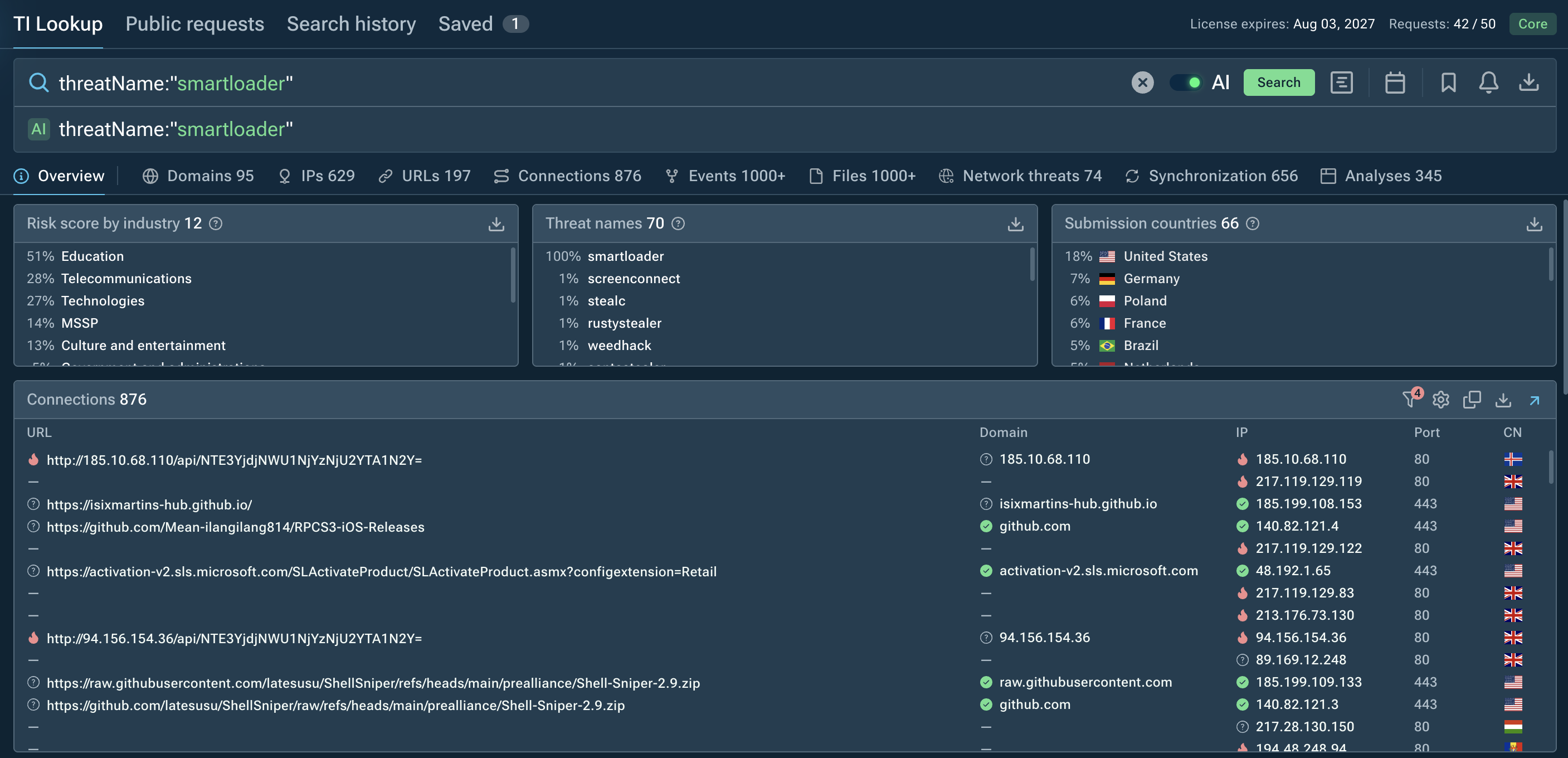
ANY.RUN’s Threat Intelligence can help analysts investigate SmartLoader by connecting observed samples with behavioral indicators, network infrastructure, and previous sandbox executions.

Threat Intelligence Lookup can be used to pivot from a suspicious SmartLoader sample or network indicator toward related activity, including:
  • Related SmartLoader samples
  • Associated IP addresses and domains
  • Network requests and endpoints
  • Similar command-script execution chains
  • Shared behavioral indicators
  • Previous sandbox executions
  • Potential follow-on payloads

threatName:"smartloader"

Searching for SmartLoader in ANY.RUN’s TI Lookup

Searching for SmartLoader in ANY.RUN’s TI Lookup

Behavioral Indicators to Monitor

Defenders investigating potential SmartLoader activity can monitor for:

  • Suspicious archive files containing command scripts and executables
  • Command scripts launching unexpected executables
  • Loader processes collecting system and hardware information
  • Collection of unique system identifiers and security settings
  • Requests to external services for public IP or geolocation information
  • Unexpected outbound connections from newly executed loader processes
  • HTTP or HTTPS communication with suspicious or previously unseen infrastructure
  • Large or unusual outbound data transfers associated with suspicious processes
  • Execution of additional payloads following initial loader activity

These behaviors can help identify SmartLoader activity even when specific filenames, hashes, domains, or IP addresses change between samples.

Responding to a SmartLoader Infection

If SmartLoader is identified on a corporate endpoint, investigate both the loader and any activity that followed its execution.

Recommended actions include:

  • Isolate the affected endpoint where appropriate.
  • Preserve relevant forensic evidence.
  • Identify the original archive and extracted files.
  • Review Application.cmd and util.exe execution.
  • Investigate associated network connections and infrastructure.
  • Determine whether additional payloads were downloaded or executed.
  • Search other endpoints for matching behavioral indicators.
  • Review endpoint and authentication telemetry for suspicious follow-on activity.

Because SmartLoader can act as a delivery mechanism for additional malware, removing the initial loader alone may not fully address the compromise.

Integrate ANY.RUN’s threat intelligence solutions in your company

Contact us

Conclusion

SmartLoader demonstrates a compact Windows malware execution chain centered on payload delivery, system fingerprinting, public IP discovery, and network communication.

For defenders, monitoring suspicious command-script execution, unusual system profiling, external IP discovery, large outbound POST requests, and unexpected connections from loader processes can provide useful behavioral indicators for identifying SmartLoader activity beyond simple hash-based detection.

Frequently Asked Questions: SmartLoader

1. What is SmartLoader?

SmartLoader is a Windows malware loader that executes additional components while collecting information about the compromised system and communicating with external infrastructure.

2. How does SmartLoader work?

SmartLoader can use command scripts or other launch mechanisms to execute its loader components. Its activity may include system discovery, network communication, and delivery of additional payloads.

3. What information can SmartLoader collect?

SmartLoader can gather information about the Windows environment, including system identifiers, configuration details, security settings, and network information such as public IP and geolocation data.

4. Does SmartLoader communicate with external infrastructure?

Yes. SmartLoader can communicate with attacker-controlled or otherwise associated external infrastructure to support its operation and potentially facilitate additional payload delivery.

5. Does SmartLoader establish persistence?

Persistence may vary between SmartLoader samples. Some variants or associated payloads may use persistence mechanisms, while others may focus on short-term execution and payload delivery.

6. How can interactive sandboxing and threat intelligence help investigate SmartLoader?

Interactive sandboxing allows analysts to observe SmartLoader behavior in a controlled environment, including execution chains, system discovery, network activity, and potential payload delivery.

Threat intelligence can then help connect these indicators with related samples and infrastructure.
HAVE A LOOK AT

DoubleTrouble screenshot
DoubleTrouble
doubletrouble
DoubleTrouble is a new-generation Android malware designed to quietly infiltrate mobile devices, harvest sensitive data, hijack financial operations, and maintain long-term persistence. Unlike commodity Android trojans, it blends advanced evasion, dual-stage infection, and dynamic payload updates, making it a rising mobile threat for both consumers and organizations.
Read More
Spynote screenshot
Spynote
spynote
SpyNote, also known as SpyMax and CypherRat, is a powerful Android malware family designed primarily for surveillance and data theft, often categorized as a Remote Access Trojan (RAT). Originally emerged in 2016, SpyNote has evolved significantly, with new variants continuing to appear as recently as 2023–2025.
Read More
Stealer screenshot
Stealer
stealer
Stealers are a group of malicious software that are intended for gaining unauthorized access to users’ information and transferring it to the attacker. The stealer malware category includes various types of programs that focus on their particular kind of data, including files, passwords, and cryptocurrency. Stealers are capable of spying on their targets by recording their keystrokes and taking screenshots. This type of malware is primarily distributed as part of phishing campaigns.
Read More
BlackMoon screenshot
BlackMoon
blackmoon
BlackMoon also known as KrBanker is a trojan aimed at stealing payment credentials. It specializes in man-in-the-browser (MitB) attacks, web injection, and credential theft to compromise users' online banking accounts. It was first noticed in early 2014 attacking banks in South Korea and has impressively evolved since by adding a number of new infiltration techniques and information stealing methods.
Read More
Trojan screenshot
Trojan
trojan trojan horse
Trojans are a group of malicious programs distinguished by their ability to masquerade as benign software. Depending on their type, trojans possess a variety of capabilities, ranging from maintaining full remote control over the victim’s machine to stealing data and files, as well as dropping other malware. At the same time, the main functionality of each trojan family can differ significantly depending on its type. The most common trojan infection chain starts with a phishing email.
Read More
Qilin Ransomware screenshot
Qilin ransomware (predecessor known as “Agenda”) is a rapidly evolving ransomware-as-a-service (RaaS) operation targeting organizations worldwide. Known for double extortion tactics (encrypting files while also threatening to leak stolen data) Qilin has quickly gained notoriety for its customization, flexibility, and impact on critical infrastructure.
Read More