



A new large-scale phishing campaign is targeting U.S. organizations with fake event invitations that lead to credential theft, OTP interception, or RMM tool installation.
ANY.RUN researchers found that the campaign uses a repeatable phishing framework to create event-themed lure pages at scale. Some pages steal email credentials and OTP codes, while others deliver legitimate remote management tools such as ScreenConnect, ITarian, Datto RMM, ConnectWise, and LogMeIn Rescue.
For CISOs, the risk is not just another phishing wave. It is the combination of credential theft, trusted remote access tools, and infrastructure designed to look legitimate. That mix can delay detection, stretch SOC triage, weaken response confidence, and create a path to remote access before the business fully understands what happened.
Key Takeaways
- A large-scale fake invitation phishing campaign is targeting U.S. organizations: ANY.RUN researchers found nearly 160 suspicious links related to the campaign and around 80 phishing domains.
- The campaign creates more than one access risk: Some lure pages steal email credentials and OTP codes, while others deliver legitimate RMM tools for remote management.
- The early attack flow can look routine: Victims see a CAPTCHA check and an event invitation page before the campaign moves toward credential theft or RMM delivery.
- Repeatable infrastructure gives SOC teams huntable signals: Shared URL patterns, fixed resource paths such as
/Image/*.png, and requests to/favicon.icoand/blocked.htmlhelp connect related activity. - For CISOs, the risk is delayed detection and response: One fake invitation can lead to mailbox compromise, OTP interception, or remote access before the business has clear evidence of impact.
- ANY.RUN helps CISOs strengthen phishing response readiness: SOC teams get the visibility to validate threats faster, reduce gray-zone investigations, and contain risk before it becomes account compromise or remote access.
The Phishing Blind Spot CISOs Need to Close
Most enterprise security programs are built to catch obvious signs of compromise: known malicious domains, suspicious payloads, credential abuse, or unauthorized remote access. This campaign creates a harder problem because the early stages can look like normal user behavior.
The attack starts with a CAPTCHA check and a fake event invitation. From there, it can lead to credential theft, OTP interception, or the installation of a legitimate RMM tool. Each step may look harmless inisolation, but together they create a path to account compromise or remote access.
For CISOs, the risk is clear: if the SOC only reacts after credentials are stolen or remote access is established, the organization is already behind the attack.
The outcome can be serious:
- Slower detection because early phishing signals look routine
- Greater chance of unauthorized access through legitimate RMM tools
- Higher risk of credential and OTP compromise
- More pressure on SOC teams to connect fragmented signals quickly
- Delayed containment when domains and lure pages keep changing
- Weaker confidence that phishing activity is being caught before business impact
High-Exposure Sectors for This Campaign
ANY.RUN’s Threat Intelligence shows that most analysis tasks related to this campaign came from the United States, suggesting that U.S. organizations may be the primary target.
As of April 27, nearly 160 suspicious links related to this campaign had been analyzed in ANY.RUN’s sandbox, with around 80 phishing domains identified. Most of these domains were registered underthe .de top-level domain, starting from December 2025.
TI Query: url:”/blocked.html” AND url:”/favicon.ico” and url:”/Image/*.png”
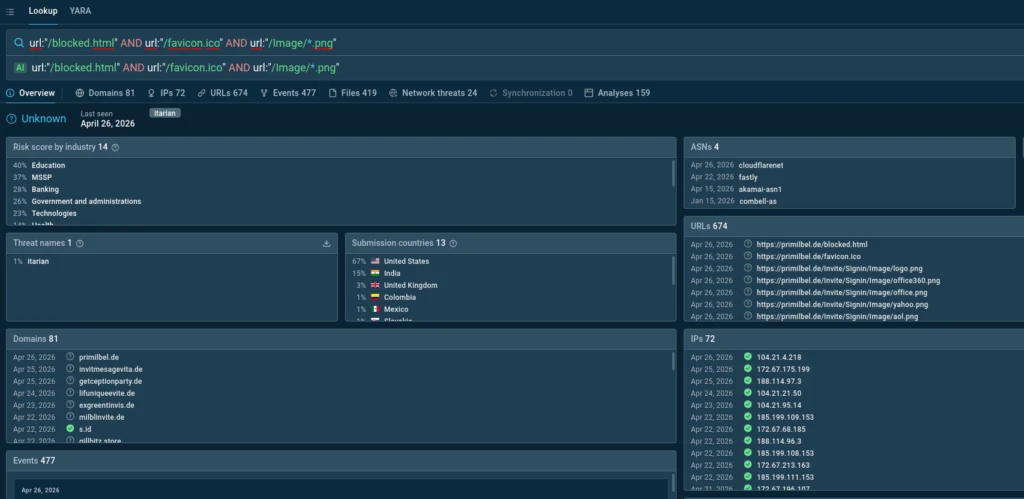
The most affected industries include Education, Banking, Government, Technology, and Healthcare — sectors where email access, identity, and remote administration are part of everyday operations.
For CISOs in these sectors, the concern is practical: one fake invitation can lead to stolen mailbox access, intercepted OTP codes, or a remote access tool running inside the environment.
The campaign also shows signs of scale. Threat actors appear to use a single framework to mass-deploy event-themed lure sites, while some page elements suggest possible AI-assisted generation. For security teams, this means the attack surface can change quickly, but the repeatable structure creates detection opportunities. When SOC teams can catch these patterns early, they can reduce investigation uncertainty, validate threats faster, and contain phishing activity before it turns into account compromise or remote access.
How the Campaign Moves From Lure to Access
On April 22, 2026, ANY.RUN researchers identified a phishing campaign targeting email service credentials and, in some cases, delivering remote management software.
Fake Invitation Pages as the Entry Point
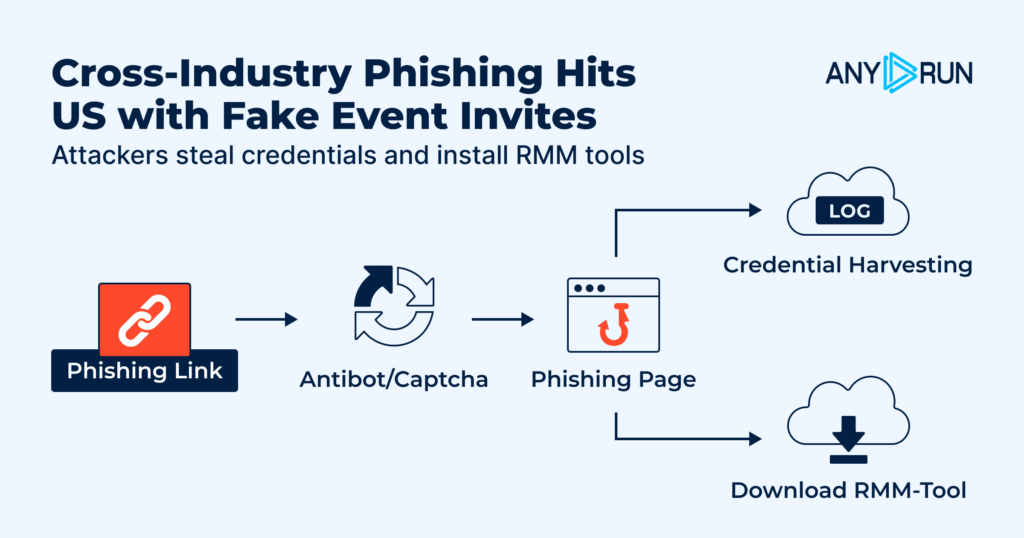
The campaign uses fake event invitation pages as the main lure. Victims are first taken through a CAPTCHA check, most often from Cloudflare, although other providers also appear in some cases. After that, they land on a phishing page telling them they have received an invitation.
From there, the campaign can move in two directions. Some pages are built to steal credentials. Others are designed to deliver remote management tools.
In the RMM delivery flow, the page may show a single download button or skip the button entirely and start the download automatically. In one ANY.RUN analysis session, the lure page starts the download without requiring further action from the user:
View analysis session with lure

In another session, the page includes a download button, but the file still begins downloading automatically:
View analysis session with download button
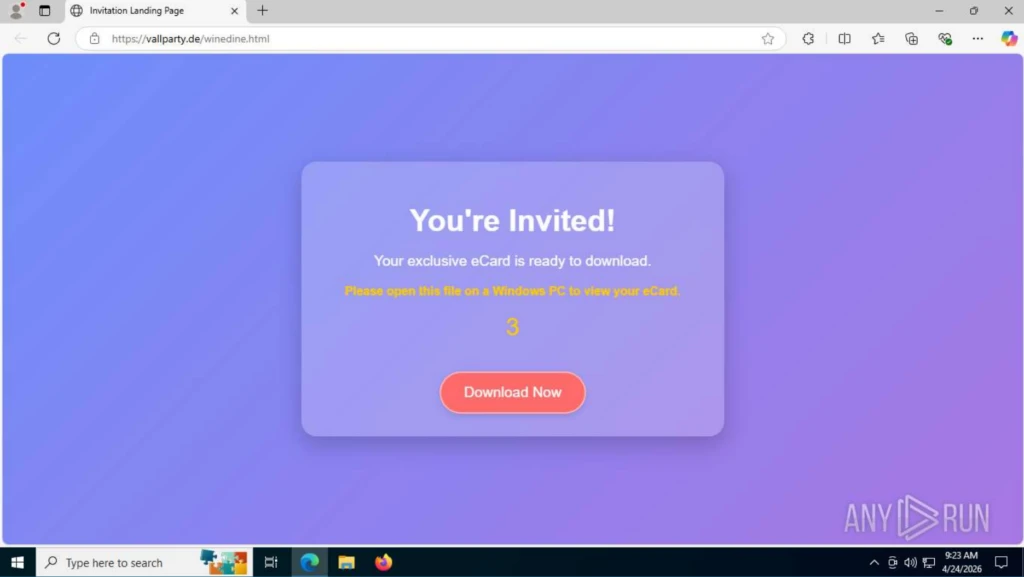
Additional lure pages following the same pattern were also observed:
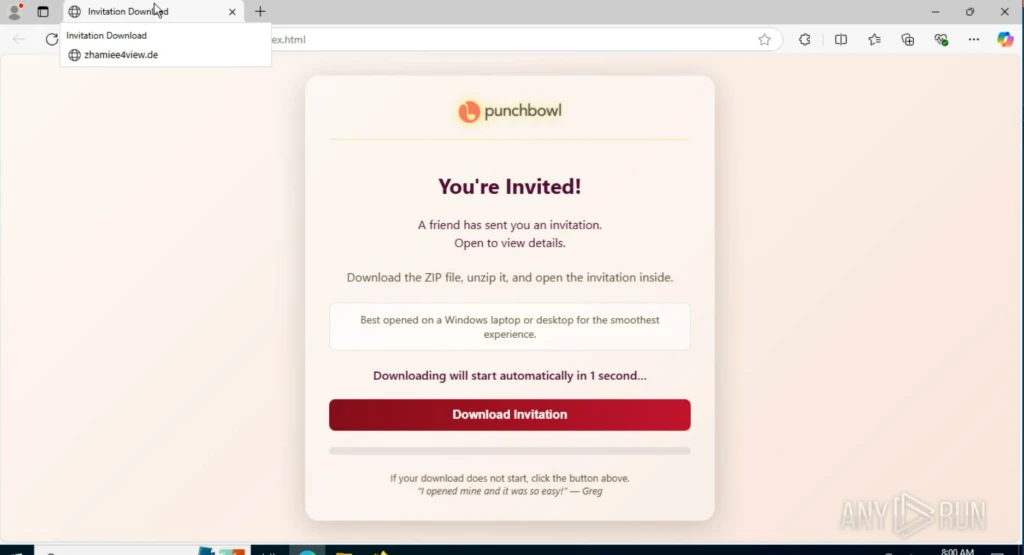
Check out other sandbox sessions with the fake invitation:
ANY.RUN researchers also found signs that some pages were created using a shared phishing site toolkit, or phish kit. The code in several sessions contained instructions for the campaign operator on how to edit the page, suggesting a reusable setup for building and launching new lure sites quickly:
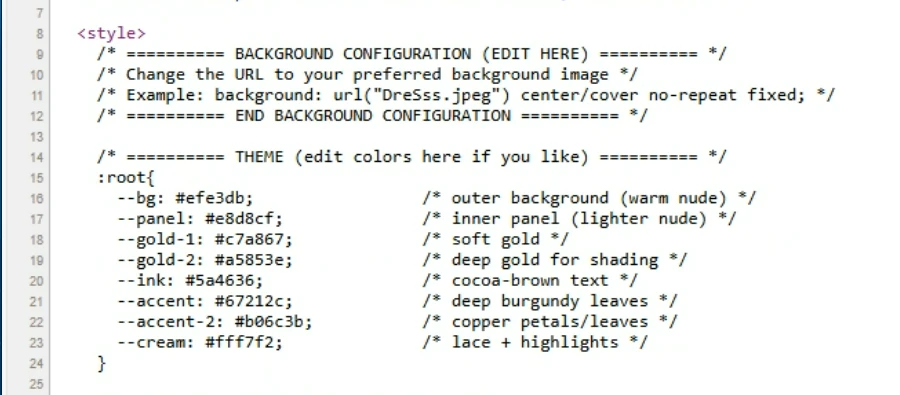
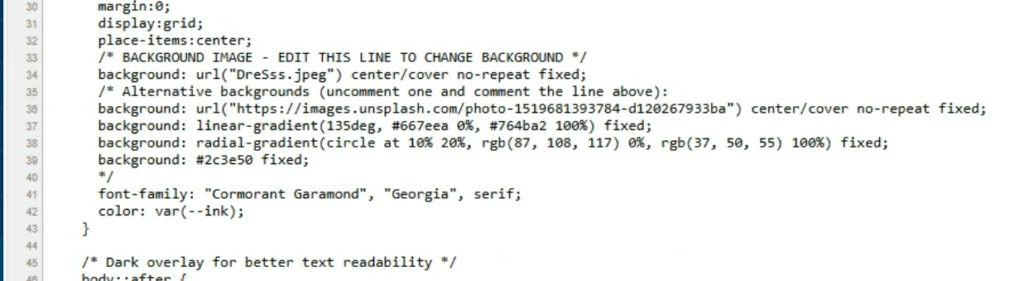
The examples above represent a sample of the activity observed by ANY.RUN researchers and illustrate the common structure used in phishing pages that deliver RMM tools.
The remote management tools most often installed in these campaigns include ScreenConnect, ITarian, Datto RMM, ConnectWise, and LogMeIn Rescue.
When the goal is credential theft, the page changes, but the entry point stays the same. In this analysis session, the chain also begins with a CAPTCHA check:
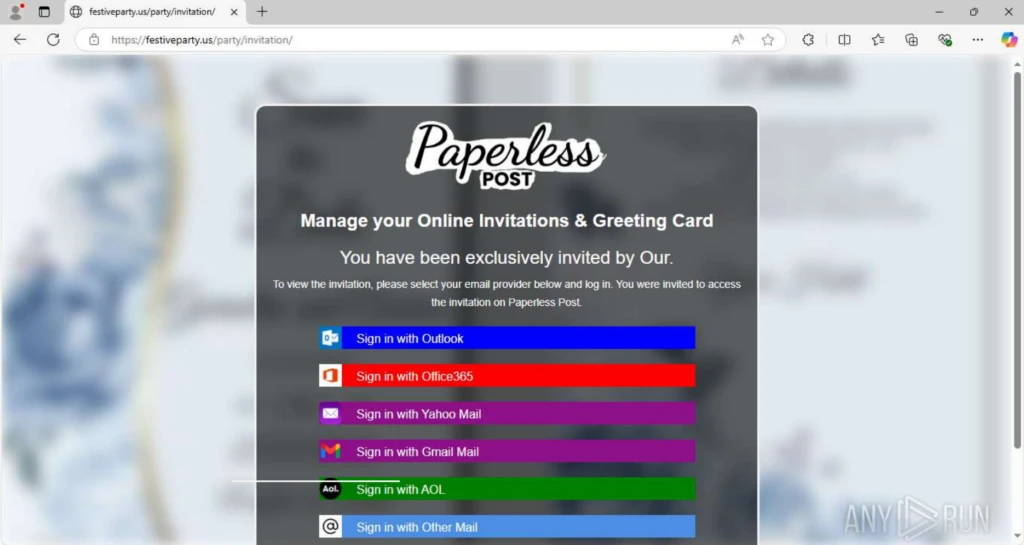
After the check, the user is shown an event invitation message and prompted to sign in with one of the available services. An example of this message is shown below:
Reusable phishing infrastructure
The credential theft pages follow a consistent structure across the phishing domains. In most cases, only the logo at the top of the page changes.
The phishing URLs also follow a repeatable format: https://<phish-site>/<url-pattern>/<endpoint>
Domain names often include words related to events, invitations, greetings, parties, and similar themes. Examples include festiveparty.us, getceptionparty[.]de, and celebratieinvitiee[.]de, all of whichwere observed in related ANY.RUN analysis sessions:
Another campaign marker is the way service icons are loaded on the phishing page. The icons are consistently stored under the same path: /Image/*.png
The typical icon set includes:
- office360.png
(SHA-256 887bc414bdb32b83dcfccdd3c688e90d9a87a0033e3756a840f9bdd2d65c5c74); - office.png
(SHA-256 6eaa0a448f1306bcf4159783eeafe5d37243bd8ca2728db7d90de1929241dd29); - yahoo.png
(SHA-256 4c373bc25cb71dbb75e73b61dff25aa184be8d327053a97202a6b1a5919cab0d); - google.png
(SHA-256 a838f99537d35e48e479a34086297f76db5d3363b0456f23d10d308f0d30ed82); - aol.png
(SHA-256 8e94c18bbcad0644c4b04de4356fe37da9996fdf1c99bc984ba819862a9b1889); - email.png
(SHA-256 9a53e032a6e3e79861d28568c3b6ffc97f4f3c1d3af65a703ec12966420503d9).
Another distinctive feature of this campaign is the sequential request for the following resources: <evilsite>/favicon.ico <evilsite>/blocked.html
As a result, when a user opens the phishing link, the following request chain is always observed:
GET /
  ├─ GET /favicon.ico
  ├─ GET /blocked.html
  └─ GET /<url-pattern>/Image/*.png
This request chain can be observed in the following ANY.RUN analysis session:
Check analysis with observed request chain
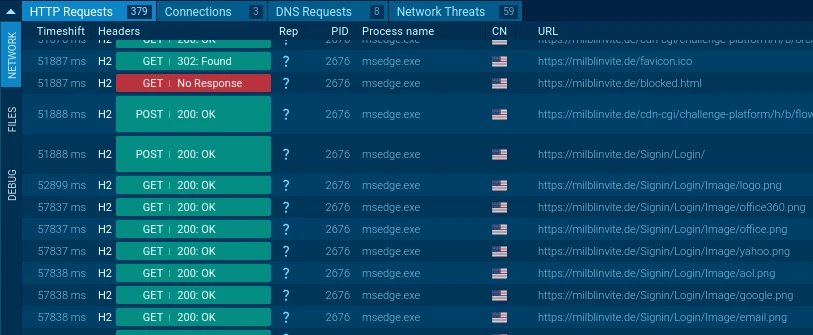
<url-pattern> is unique for each domain, but it often follows the same naming logic and includes repeated event-related keywords.
Analysts can use this pattern to find related phishing domains in ANY.RUN’s Threat Intelligence Lookup with the following query: url:”/blocked.html” AND url:”/favicon.ico” and url:”/Image/*.png”
Credential Interception Flows
The campaign uses two credential interception flows: one for Google accounts and another for non-Google services. The following ANY.RUN analysis session shows both flows in action:
Check analysis session with both interception flows
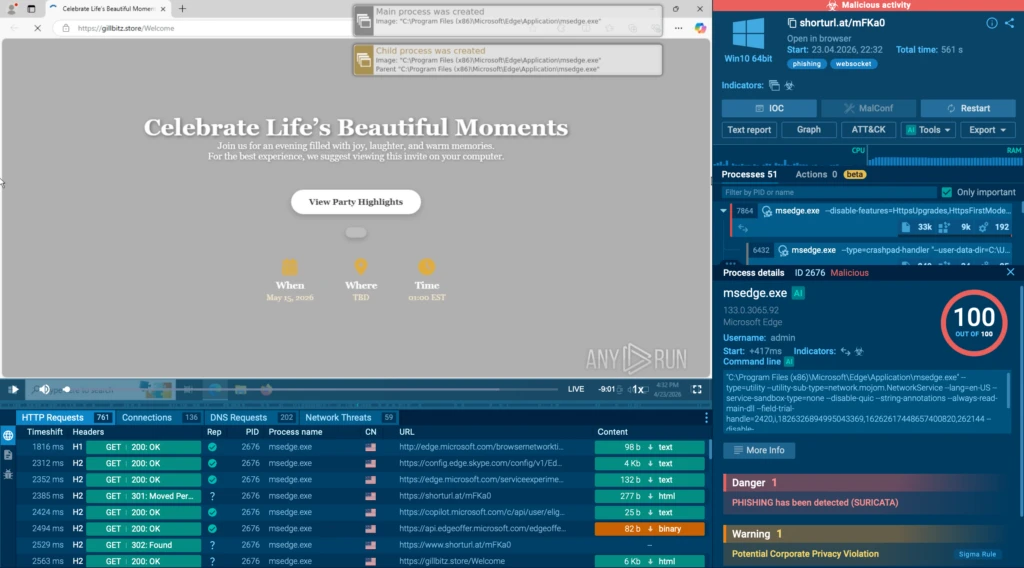
Non-Google credential interception
When the user selects any service other than Google, the phishing page opens a login window asking for an email address and password, as shown below.
After the first password entry, the page always displays an “Incorrect Password” message. This prompts the user to enter the password again, helping the attackers capture a second attempt in case the first one contained a typo.
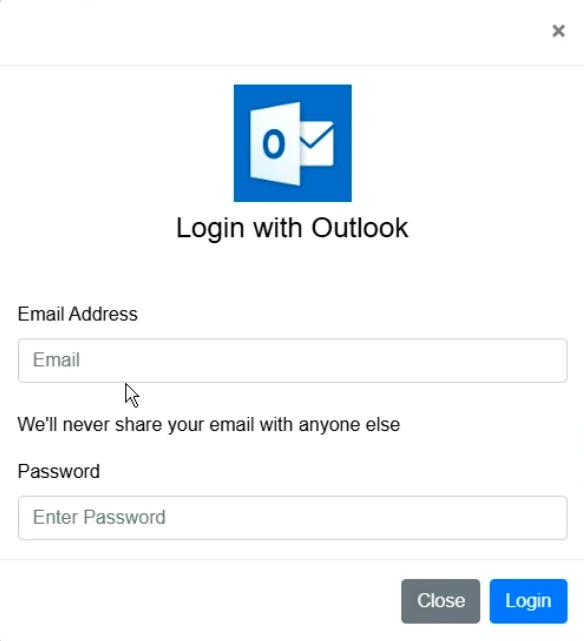
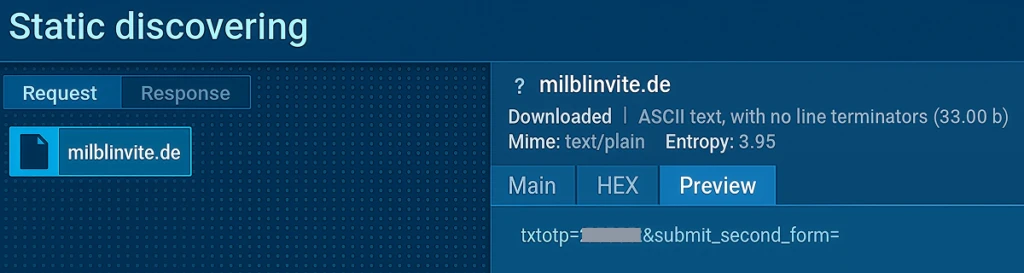
When the user enters their credentials and clicks Login, the page sends a POST request to the same server at the /processmail.php endpoint, submitting the email address and password.
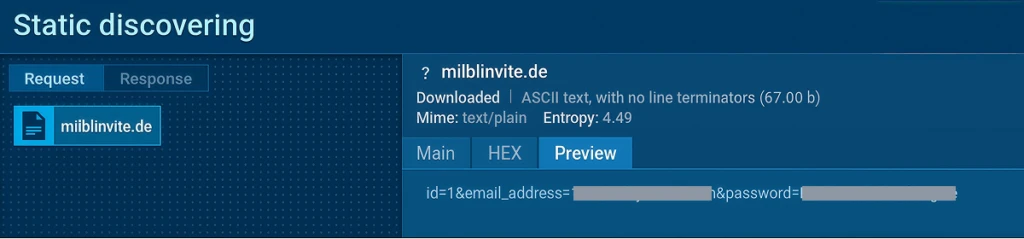

Then, an OTP code entry form appears. This form is also the same across all phishing sites used in this campaign.
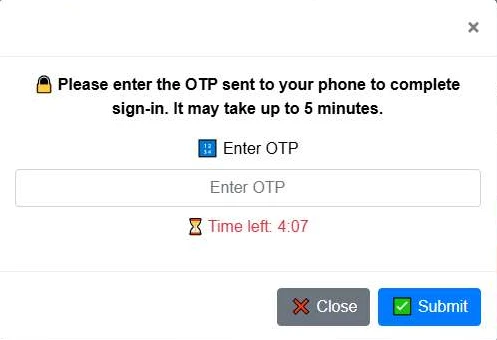
When the user enters the code and clicks Submit, the page sends a POST request to the same server at the /process.php endpoint, submitting the OTP code.

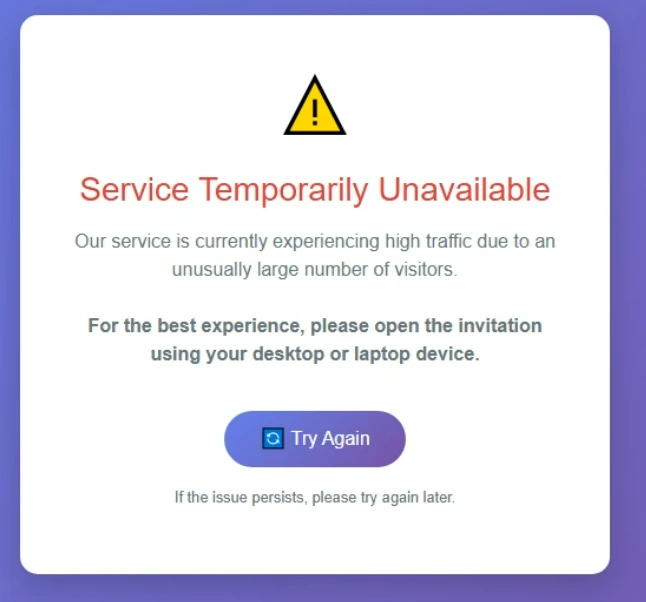
After the OTP is entered, the page displays a placeholder message, as shown in the image below. At this stage, the credentials needed to access the service are already in the attacker’s hands.
Google credential interception
When the user selects Gmail as the login method, a different chain is observed. First, the user is redirected to a page disguised as a Google authorization form.
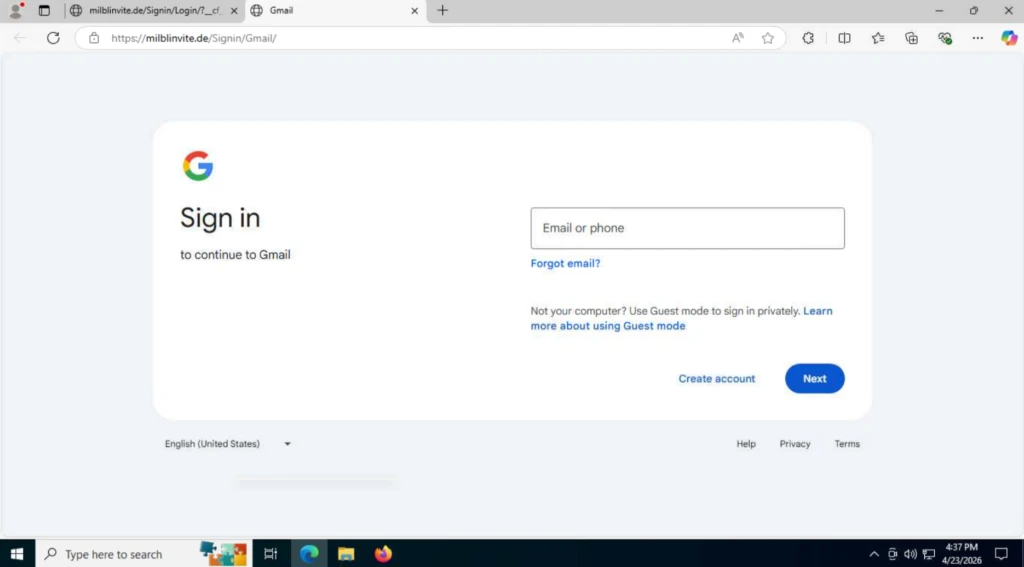
When the user enters their login and password, the page sends POST requests to the /pass.php and /mlog.php endpoints.

The request to /pass.php sends the login and the request to /mlog.php sends the password:

Then, the page sends a request to the `/check_telegram_updates.php` endpoint, with the user ID included in the request body.
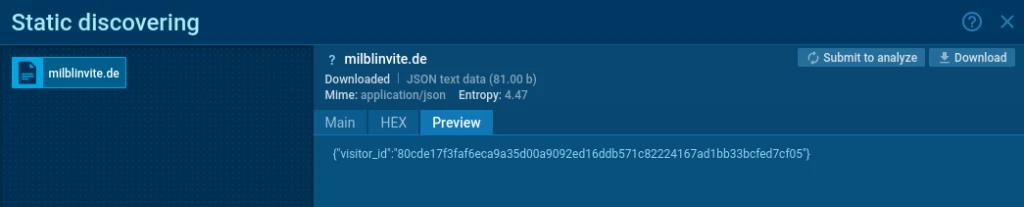
At the end of the chain, the victim is redirected to the legitimate google.com page.
How CISOs Can Reduce the Risk Behind Fake Invitation Campaigns
Campaigns like this are difficult because they do not create one obvious security event. The same lure can lead to credential theft, OTP interception, or remote access tool installation. For SOC teams, that means the risk is spread across several small signals that need to be connected quickly.
To reduce exposure, security leaders need visibility earlier in the chain, before stolen credentials are used, before OTP codes are intercepted, and before a remote access tool becomes a foothold inside the environment.
ANY.RUN brings that visibility into the full SOC investigation process. During triage, analysts can open suspicious links safely inside a cloud-based, interactive sandbox and quickly confirm whether the page leads to a fake invitation, credential form, OTP prompt, or RMM download. During behavioral analysis, they can observe network requests, credential submission endpoints, file downloads, execution behavior, and remote access activity as it happens.
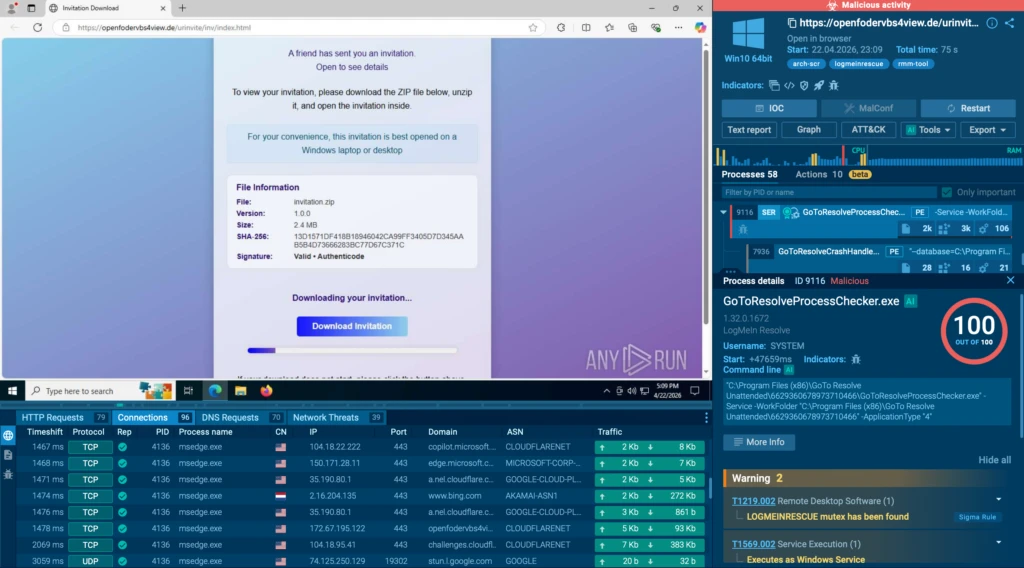
That visibility gives teams a stronger basis for response. Teams will understand what was exposed, whether access was attempted, and which containment steps are needed. With ANY.RUN Threat Intelligence, they can extend the investigation into threat hunting by finding related domains, repeated URL patterns, shared phishing infrastructure, and similar analyses across industries.
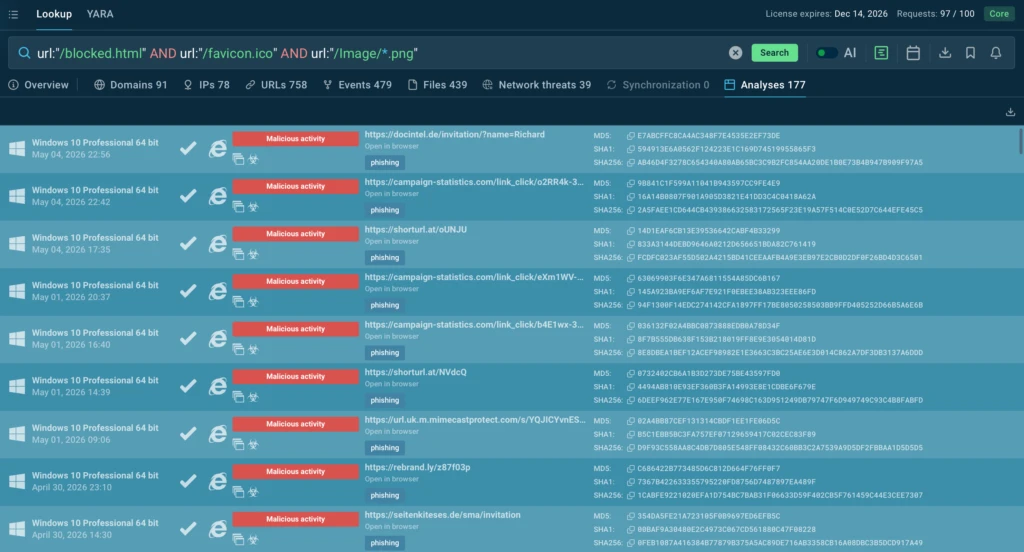
For CISOs, this supports the outcomes that matter most:
- Fewer gray-zone investigations where teams struggle to prove whether activity is malicious
- Faster threat confirmation before credentials, OTP codes, or remote access are abused
- Clearer containment decisions based on visible attack behavior, not assumptions
- Stronger phishing coverage across both credential theft and RMM delivery paths
- Better confidence in SOC readiness when phishing campaigns scale across domains and industries
About ANY.RUN
ANY.RUN, a leading provider of interactive malware analysis and threat intelligence solutions, helps security teams detect, investigate, and respond to threats faster.
ANY.RUN solutions include Interactive Sandbox, Threat Intelligence Lookup, Threat Intelligence Feeds, and integrations for SOC workflows across SIEM, SOAR, EDR, and other security tools. Together, they help teams safely analyze suspicious links, files, and scripts, uncover phishing behavior, trace credential theft and remote access activity, and enrich investigations with real-world threat context.
Built for security-conscious organizations, ANY.RUN is SOC 2 Type II attested and supports enterprise-ready controls such as SSO, MFA, granular privacy settings, and AES-256-CBC encryption.
Trusted by more than 15,000 organizations and 600,000 security professionals worldwide, ANY.RUN gives SOC teams the visibility they need to move from uncertain alerts to evidence-based decisions.
Indicators of Compromise
URL patterns:
hxxps://<phish_site>/<url-pattern>/Image/office360.png
hxxps://<phish_site>/<url-pattern>/Image/office.png
hxxps://<phish_site>/<url-pattern>/Image/yahoo.png
hxxps://<phish_site>/<url-pattern>/Image/google.png
hxxps://<phish_site>/<url-pattern>/Image/aol.png
hxxps://<phish_site>/<url-pattern>/Image/email.png
hxxps://<phish_site>/blocked.html
hxxps://<phish_site>/<url-pattern>/processmail.php
hxxps://<phish_site>/<url-pattern>/process.php
hxxps://<phish_site>/<url-pattern>/pass.php
hxxps://<phish_site>/<url-pattern>/mlog.php
hxxps://<phish_site>/<url-pattern>/check_telegram_updates.php
Domains:
The current list of domains can be retrieved using the following query in ANY.RUN Threat Intelligence Lookup: url:”/blocked.html” AND url:”/favicon.ico” and url:”/Image/*.png”



0 comments