



Editor’s note: This research was conducted by Himanshu Anand, an independent cybersecurity researcher (follow Himanshu on X).
During Cybersecurity Awareness Month, ransomware remains one of the clearest examples of how a cyber incident can become a business continuity issue. IronChain shows why. It puts business-critical data at risk of permanent loss and can bring operations to a halt. Even paying the ransom may not give victims a reliable way to recover their files, making the impact especially serious for organizations that depend on fast restoration and access to critical systems.
Discover how IronChain’s drivers, encryption logic, and supporting components work together, where the damage happens, and what defenders should watch for when assessing the threat and its potential impact.
Key Takeaways
- IronChain has a destructive encryption path: Its file-handling logic can leave affected data without a reliable recovery route.
- Several drivers support the attack chain: The malware uses separate components for different low-level operations, which makes the overall workflow more complex.
- Recovery is not guaranteed after payment: The available artifacts do not provide enough information for deterministic restoration of encrypted files.
- The build behaves more like wiper-like ransomware: The ransom note suggests recovery, but the technical design can result in permanent data loss.
- Driver and CVE connections matter: Understanding which components are used and how they interact can help defenders spot related activity earlier.
- The business risk is direct: Permanent file loss can lead to downtime, interrupted operations, and expensive recovery efforts.
A Fresh Build of an Existing Family
On September 12, 2026, a new IronChain executable appeared in public malware telemetry. It was compiled only 42 seconds before its first observed VirusTotal submission. The file is a 9.7 MB unsigned, 64-bit Windows program packaged with PyInstaller.
The sample is fresh, but the family is not. Public IronChain files and reports go back to February 2026. Derp and RansomLook had already described its ransom screen, destructive file handling, persistence, disk damage, and weak recovery design.
The September build is still worth studying because it changes the technical picture. It carries four kernel drivers, creates a SYSTEM scheduled task, and contains several programming mistakes that change which actions can run.
| Sample property | Value |
|---|---|
| SHA-256 | 09b550d66b7ce269fa577edcac54d6ba3e0f3cb5b660a2921b9372d37d52e254 |
| MD5 | 2ac6ca0dd3cc83f5a12d12742d539fc9 |
| Size | 9,699,466 bytes |
| Format | PE32+ x64, PyInstaller |
| PE timestamp | 2026-09-12 15:38:46 UTC |
| Public analysis | ANY.RUN sandbox session de26bdeb |
The public analysis shows the process tree, network activity, dropped files, and system changes. ANY.RUN’s Interactive Sandbox turns that dense trace into a timeline for deeper reverse engineering, meanwhile the Threat Intelligence supports pivots from hashes, domains, IP addresses, and behavior.
Check sandbox session with IronChain attack
Where IronChain Creates the Biggest Business Risk
- Permanent data loss: IronChain’s file-handling and encryption logic can leave critical files without a reliable recovery path.
- Longer downtime: SYSTEM-level persistence and destructive activity can make containment, cleanup, and restoration more difficult.
- More complex incident response: Four kernel drivers add several low-level components that defenders need to identify, analyze, and contain.
- Unpredictable damage: Programming mistakes may stop some actions from running, but they do not remove the threat. The working parts of the chain can still disrupt systems and destroy data.
- Recovery costs can rise quickly: If critical endpoints, shared files, or recovery systems are affected, organizations may face extended outages, lost productivity, and a much heavier restoration effort.
What IronChain Tries to Do
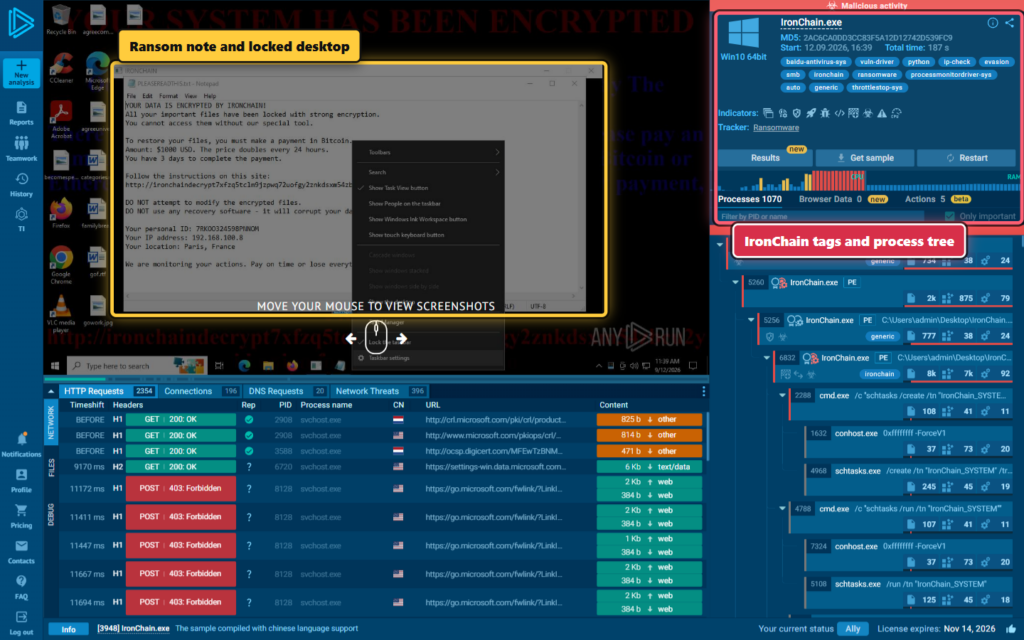
After unpacking the PyInstaller container, we recovered 80 main archive entries, 279 Python modules, the main IronChain.pyc, and four Windows drivers. Static bytecode reconstruction revealed an oversized payload that tries to do nearly everything at once.
Its intended chain asks for administrator rights, creates IronChain_SYSTEM, relocates the executable, starts four driver services, impairs defenses and recovery, encrypts user files, attempts raw disk damage, spreads through shares and removable media, probes networks, and finally blocks input and forces a shutdown.
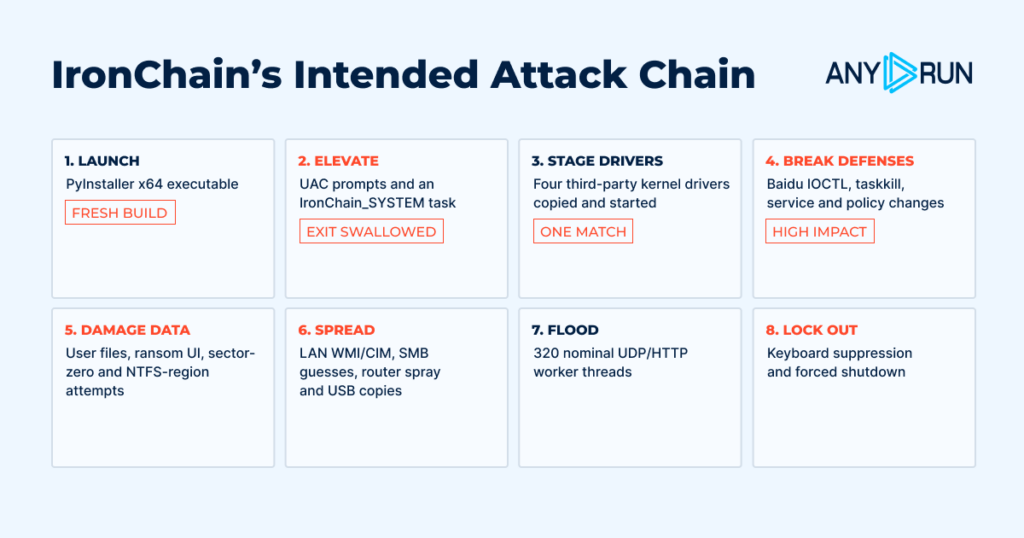
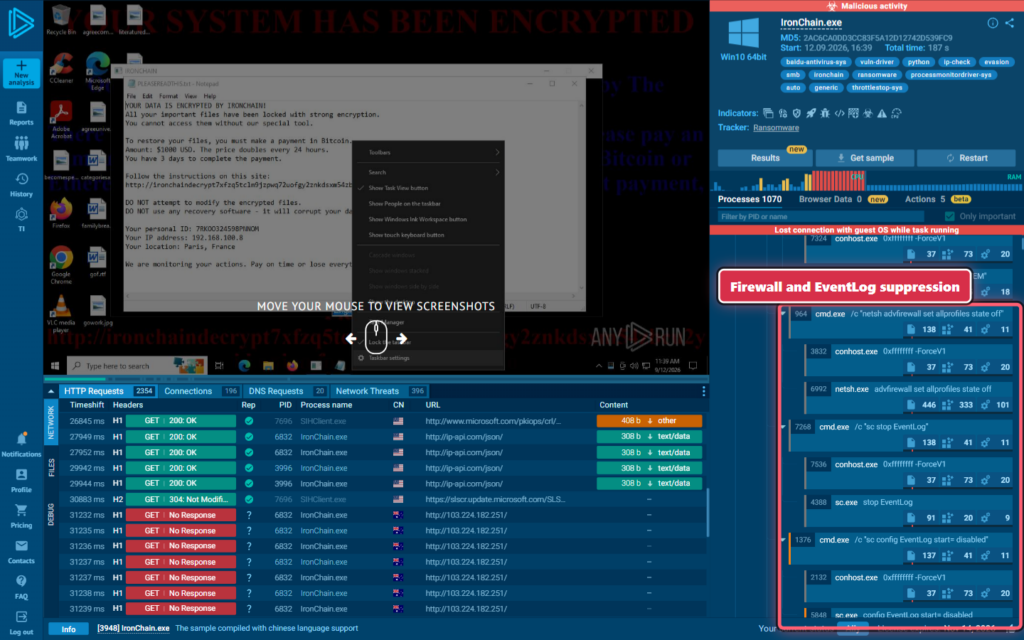
ANY.RUN recorded several early parts of that plan. The session shows the creation and execution of IronChain_SYSTEM, attempts to disable the firewall, and attempts to stop or disable EventLog and Resmon.
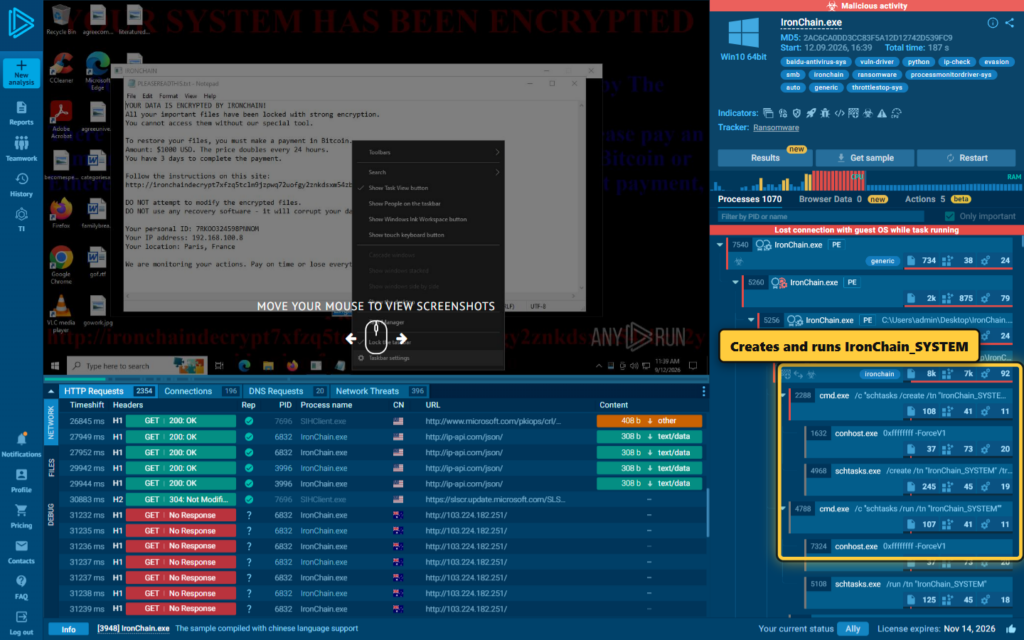
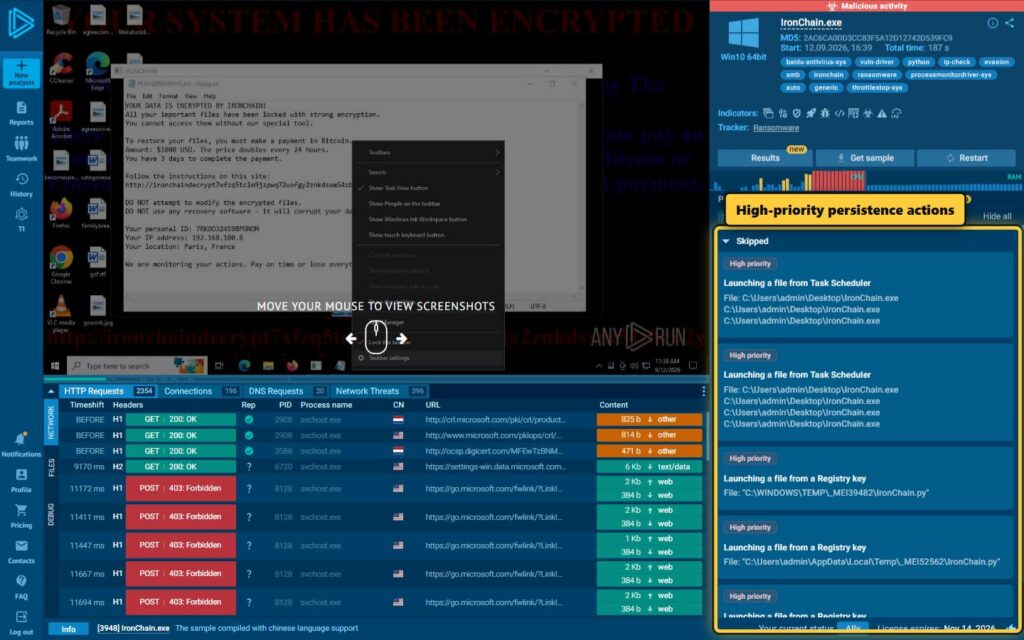
The actions panel also summarizes persistence behavior. These observations helped prioritize the tasking, service, and driver code during static analysis.
A Bug That Keeps the Payload Alive
At first glance, IronChain seems to stop its original process after three important transitions: requesting UAC elevation, launching the SYSTEM task, and starting its relocated copy. Each path calls sys.exit(0).
But the exits sit inside bare exception handlers.
In Python, sys.exit() raises SystemExit. A bare handler catches that exception unless the program treats it separately. IronChain does not. Its handler removes the exception and returns, so normal module execution continues.
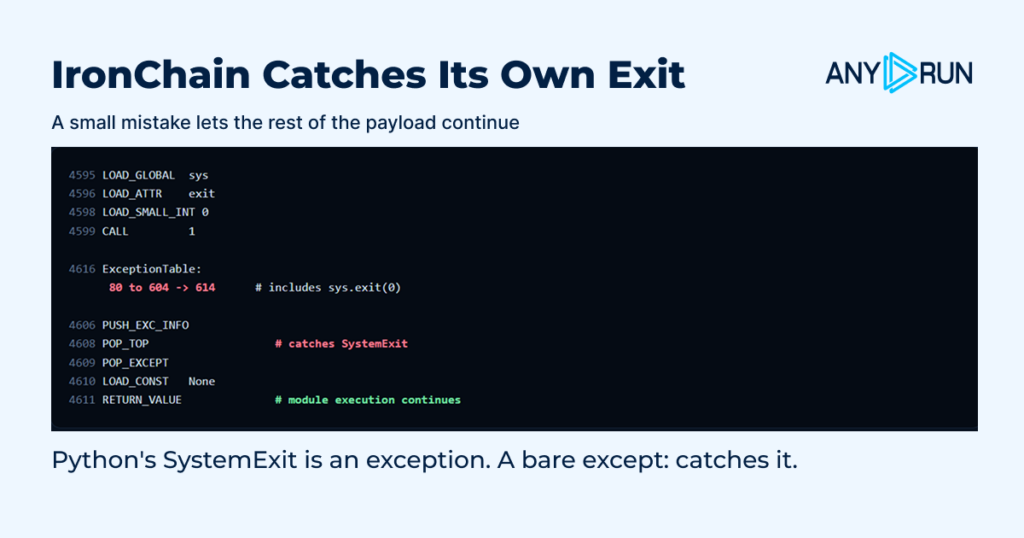
The result is that:
- an elevated process can create and run the SYSTEM task, then continue into the payload;
- a non-administrator process can finish its UAC attempts and still continue, although privileged actions may fail;
- the original process can remain alive after starting the relocated copy;
- repeated task creation and overlapping processes are possible.
Static analysis proves continued reachability. It does not tell us exactly how many processes existed during a particular infection. That depends on privileges, task settings, command success, and the host’s security controls.
Four Drivers, but Only One Correct Interface
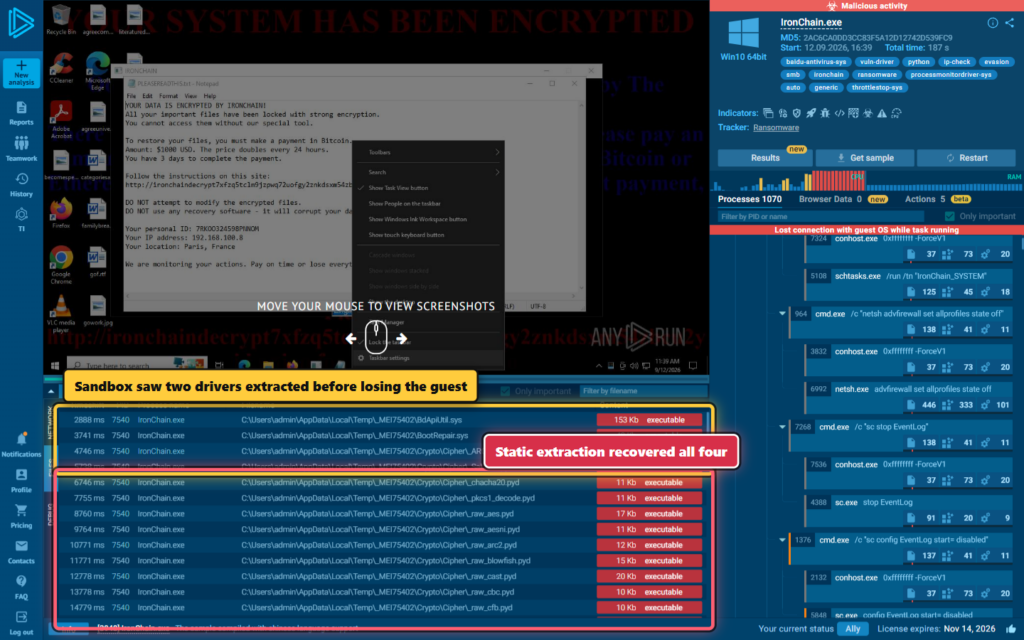
The public sandbox file view exposed two driver drops before the guest connection ended. Static extraction found two more, bringing the total to four.
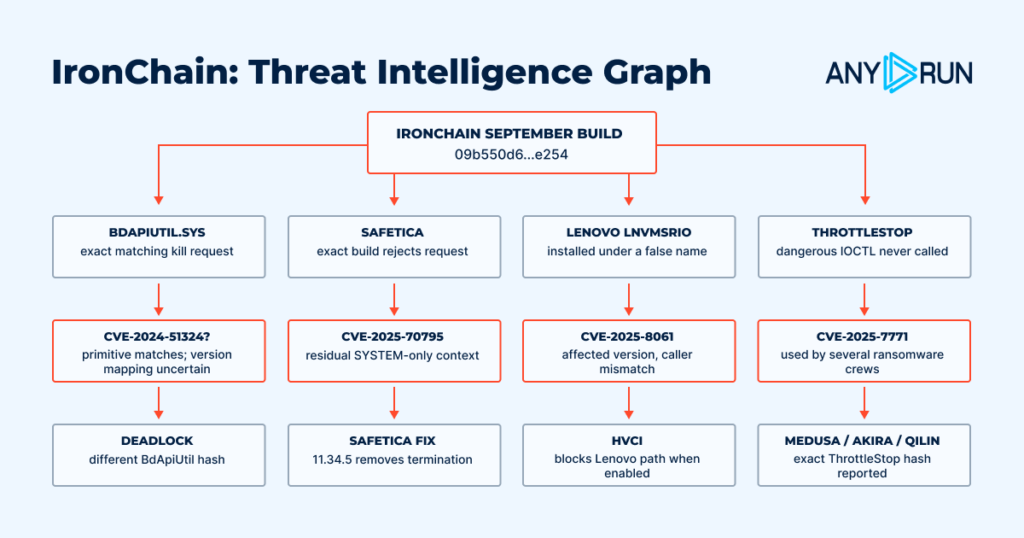
Bundling a vulnerable driver does not automatically mean malware can use it. The caller must open the device name that the driver creates, send a supported IOCTL control code, and provide the exact input structure expected by the handler. We compared those details on both sides.
| Bundled driver | Malware's request | Result against the exact file |
|---|---|---|
| Baidu BdApiUtil.sys 4.6.1.65082 | \\.\BdApiUtil, 0x800024B4, 4-byte PID | Matches end to end |
| SafeticaProcessMonitorDriver.sys11.26.18 | \\.\STProcessMonitorDriver, 0xB822200C, 4-byte PID | Wrong IOCTL and too short |
| Lenovo LnvMSRIO.sys 3.1.0.29, stored as BootRepair.sys | \\.\BootRepair, 0x00222014, 4-byte PID | Wrong device and IOCTL family |
| ThrottleStop ThrottleStop.sys3.0.0.0 | Configures 0x8000649C | Never sends it |
The recovered configuration confirms that IronChain treats all four as potential low-level helpers, but its process-kill routine selects only entries marked for process operations.
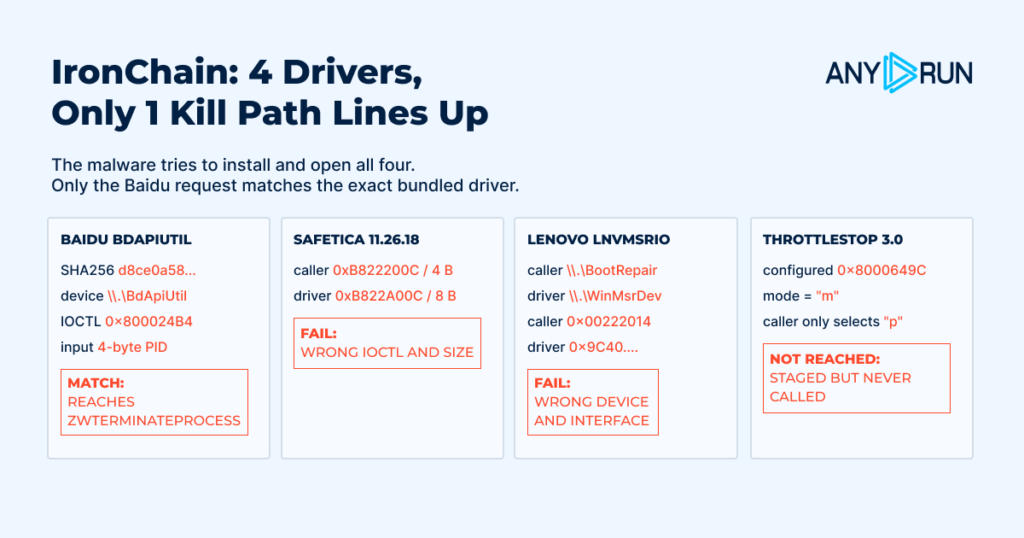
Baidu: A Coherent Process-Kill Chain
Baidu’s driver is the only exact match. IronChain opens \\.\BdApiUtil, sends IOCTL 0x800024B4, and supplies a four-byte process identifier. The driver’s device-control dispatch recognizes that value, requires exactly four input bytes, rejects protected PIDs 0 and 4, obtains a process handle, and reaches ZwTerminateProcess.
The full static chain is:
TEXT
security-process list -> tasklist PID parsing -> DeviceIoControl
-> \\.\BdApiUtil + 0x800024B4 + 4-byte PID
-> driver dispatch -> PsLookupProcessByProcessId
-> ObOpenObjectByPointer -> ZwTerminateProcess
This is strong evidence of an implemented BYOVD-style process-kill path, not proof of runtime success. IronChain ignores service-start and DeviceIoControl return values, while Windows policy or application controls may block driver loading.
The primitive is consistent with public research in GoodBaiii and the Baidu driver entry in LOLDrivers. Cisco Talos has also documented a different BdApiUtil hash in DeadLock ransomware. NVD’s CVE-2024-51324 description names a different Baidu Antivirus product version, so mapping this exact hash to that CVE should remain qualified even though the process-kill primitive itself is clear.
Safetica: Close, but Rejected Twice
Safetica’s driver exposes the expected device name, but IronChain appears to use an older request contract. The exact 11.26.18 driver requires IOCTL 0xB822A00C and at least eight input bytes. IronChain sends 0xB822200C with four bytes.
Both checks fail before the process termination. This is important because the bundled driver still has a termination operation, but malware possession of that driver is not the same as successful use. Safetica’s CVE-2025-70795 advisory explains the residual BYOVD exposure and its removal in later versions; CERT/CC VU#818729 provides related background.
Lenovo: The Name and Protocol Do Not Match
IronChain stores Lenovo’s LnvMSRIO.sys as BootRepair.sys and tries to open \\.\BootRepair. The exact driver creates \\.\WinMsrDev. Its useful low-level requests also belong to the 0x9C40…. family, not IronChain’s 0x00222014 request.
Version 3.1.0.29 falls in the range discussed in LEN-200860 and Quarkslab’s CVE-2025-8061 analysis. It has powerful low-level operations, but IronChain does not speak its interface. Calling this CVE exploitation would be inaccurate.
ThrottleStop: Dangerous Value, Missing Call
The fourth driver is ThrottleStop 3.0.0.0. IronChain includes the dangerous-looking 0x8000649C value in configuration, but no recovered Python call site sends it. The malware stages and tries to open the driver, then leaves the configured operation unused.
Public work, including Kaspersky’s ThrottleStop analysis and NVD CVE-2025-7771, makes the driver relevant to defenders. It does not fill in a missing call in this sample.
Encryption Without a Recovery Path
IronChain shows a ransom demand, but its cryptography does not preserve what a reliable decryptor would need.
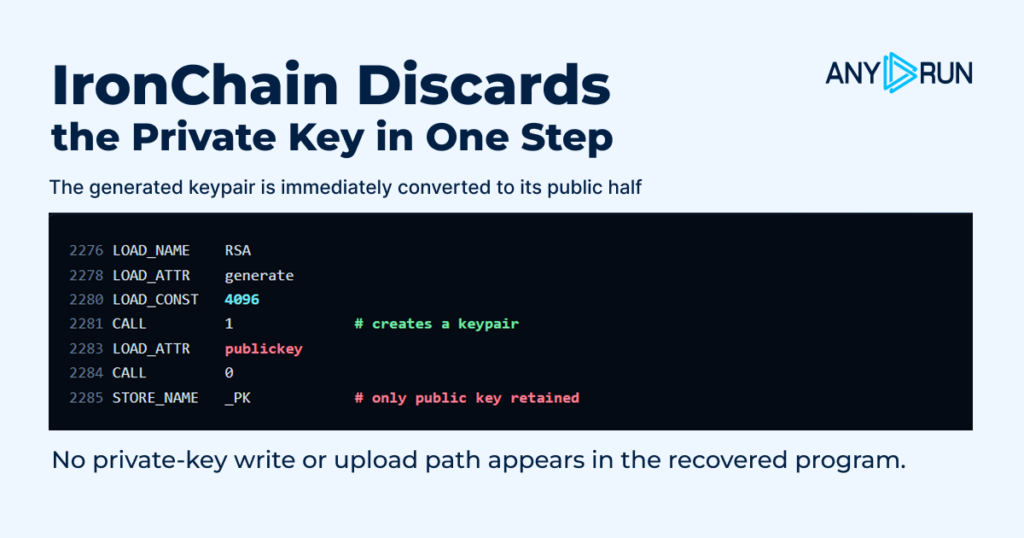
At startup it generates an RSA-4096 key pair and immediately keeps only the public part:
PYTHON
_PK = RSA.generate(4096).publickey()
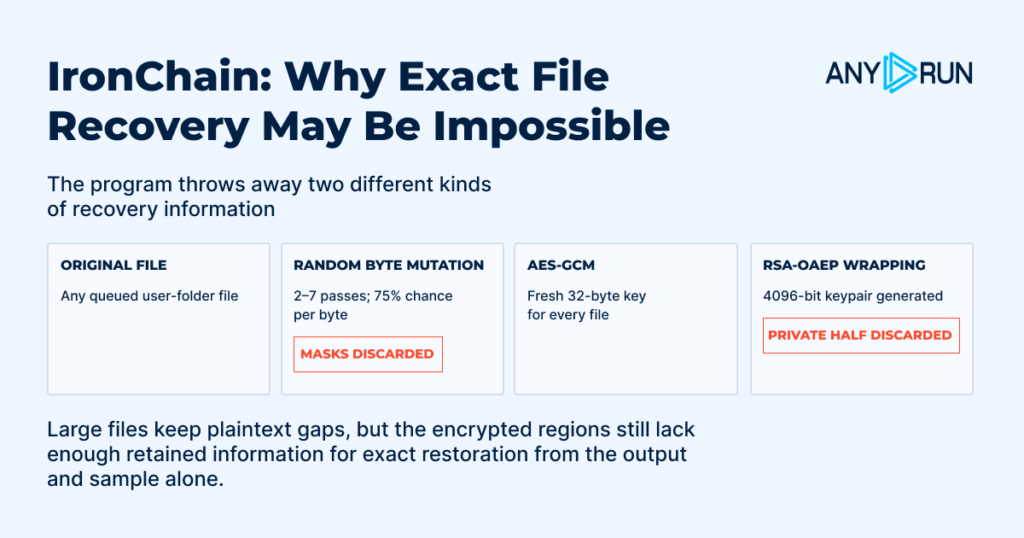
There is no recovered path that exports, stores, or sends the private component. Each file gets a fresh 32-byte AES key. IronChain wraps that key with RSA-OAEP, then applies two to seven randomized byte-mutation passes before AES-GCM encryption.
The mutation stage discards both the chosen shifts and the per-byte selection masks. Even possession of the missing RSA private key would reveal the mutated data, not necessarily the original bytes.
Large files are handled differently. IronChain encrypts the first 512,000 bytes, a random 51,200-byte middle section, and the final 512,000 bytes, leaving plaintext gaps between them. This can make files unusable while reducing processing time. Those gaps, backups, storage carving, or live-memory remnants may still help incident responders recover some data.
The encrypted output and supplied program artifacts do not contain enough information for deterministic, exact restoration. Payment therefore offers no technical guarantee of recovery. This supports classifying the build as wiper-like destructive malware with ransomware presentation.
Another Bug Narrows File Encryption
IronChain first walks common user folders such as Desktop, Documents, Downloads, Pictures, Videos, and Music. It submits files to a 48-worker pool. It then calls a function intended to build a wider target list covering Windows, application directories, AppData, and other drives.
That second function stores %SystemRoot% in local variable _rt, but immediately tries to read global variable rt. The global does not exist, so normal Python name lookup raises NameError.
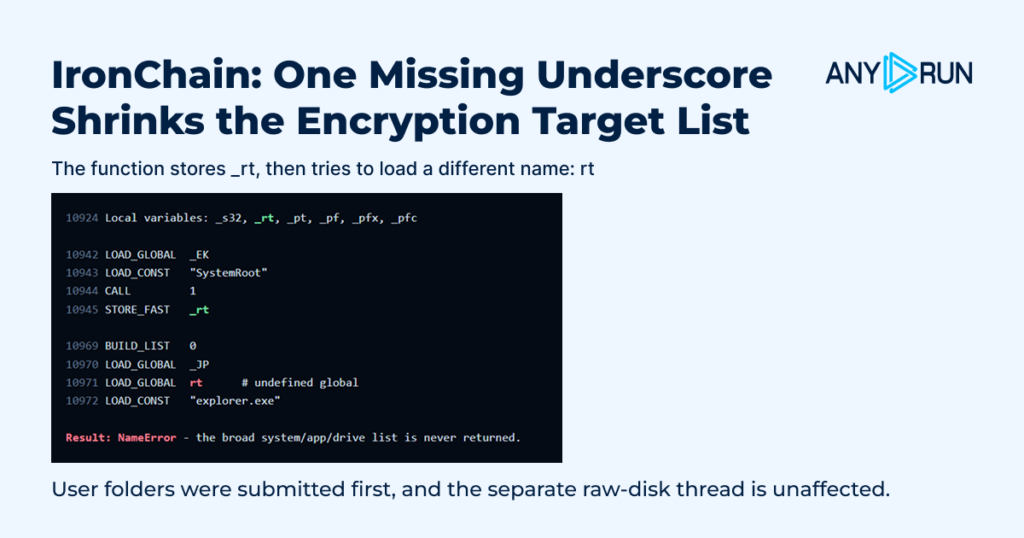
Another broad handler catches the error and returns. Files already queued from user folders can still be processed, but the later explicit system/application list and non-C drives are normally skipped. The separate raw-disk thread starts earlier and is unaffected by this bug.
This is a useful reminder: a long feature list is not the same as a working feature list. Reverse engineering must follow control flow and data contracts, not just collect suspicious strings.
Network Evidence Needs Context
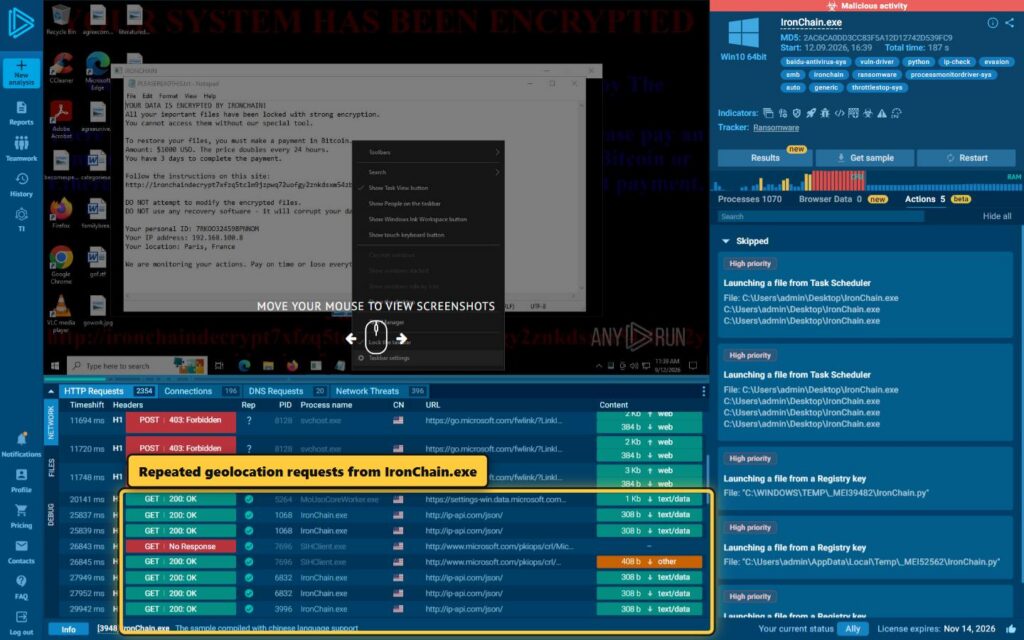
The sample contains cleartext requests to http://ip-api.com/json/ so the ransom interface can display a city and country. ANY.RUN recorded repeated requests from IronChain.exe.
The public session also associated repeated no-response requests to 103.224.182.251 with the sample.
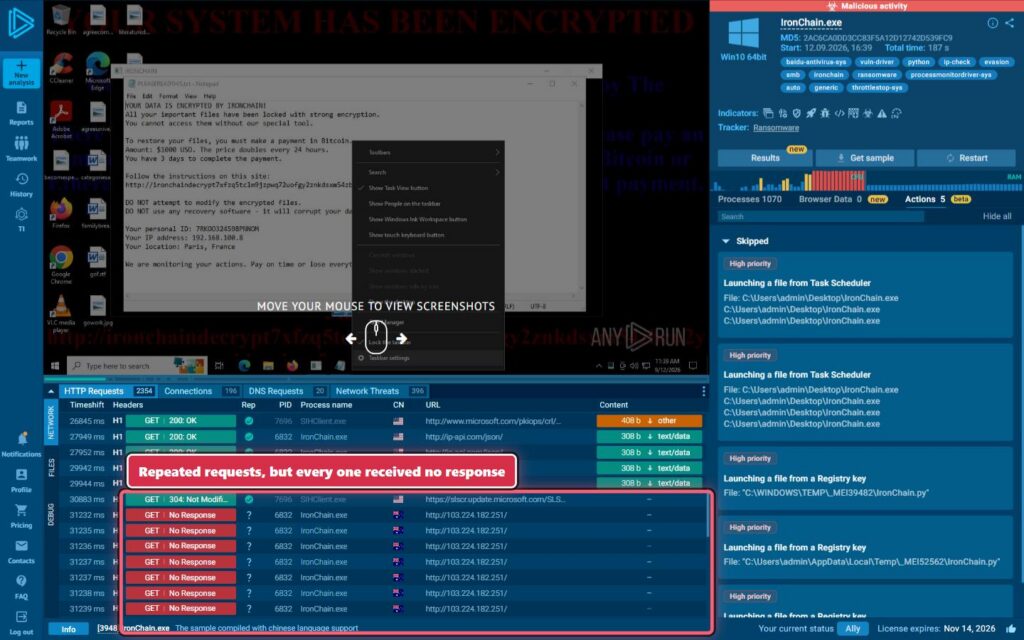
That address is absent from the recovered Python bytecode. Passive records place it in shared Trellian/Above.com domain-parking infrastructure with many unrelated hostnames. There was no response, tasking, key exchange, Host header, or recovered command channel. It should not be labeled embedded IronChain C2, and co-hosted domains should not be clustered as malicious.
Other embedded destinations support flooding, route selection, and SSDP discovery. None establishes an operator-controlled command server.
Detection and Response
The strongest detection is the combined pattern, not one generic filename or shared IP. High-value signals include:
- SHA-256 09b550d66b7ce269fa577edcac54d6ba3e0f3cb5b660a2921b9372d37d52e254;
- extraction of all four driver resources from an unsigned or PyInstaller-hosted process;
- scheduled task IronChain_SYSTEM or service IronChainSecurity;
- kernel services BdApiUtil, STProcessMonitor, LenovoBootRepair, and ThrottleStop appearing together;
- Lenovo driver content written under the misleading name LenovoBootRepair.sys;
- \\.\BdApiUtil plus IOCTL 0x800024B4 and a four-byte PID;
- attempted requests 0xB822200C and 0x00222014, even when they fail;
- file marker CHAINED_6617-382+819=;
- IronChain.hta, IronChainBg.bmp, and %ProgramData%\IRONCHAIN\time.dat;
- recovery deletion, firewall shutdown, EventLog suppression, and raw access to \\.\PhysicalDrive0 in one short sequence.
The research package includes a YARA rule and four Sigma documents for these clusters. Defenders should test and tune them before production deployment. The IP 103.224.182.251 and ip-api.com should not be globally blocked based on this case alone.
If IronChain is suspected, isolate the host from networks and removable media, but avoid a routine reboot until responders assess boot-disk damage. Preserve memory, disk images, and unallocated space where policy permits. Rebuild from known-good media if raw writes may have succeeded.
Use Microsoft’s vulnerable-driver blocklist, the Defender ASR rule for abused drivers, WDAC or App Control policies, and Core Isolation Memory Integrity where compatible. Inventory the four driver families, accounting for legitimate installations.
Final Assessment
IronChain’s September build is ambitious but uneven. Broad exception handling accidentally keeps the main payload reachable. Four drivers are present, but only Baidu’s interface forms a coherent process-termination chain. The Safetica request is rejected by both control-code and length checks; the Lenovo device and protocol do not match, and the ThrottleStop operation is never called.
Its encryption is more troubling than polished. The program discards the RSA private component and the random mutation state needed for exact reversal. At the same time, a one-character variable error narrows ordinary file traversal. It is destructive code with ransomware theater, not evidence of a dependable decrypt-for-payment service.
There is no evidence here of a zero-day, a named threat actor, a nation-state link, a verified victim, or a working C2 server. There is also no runtime proof that a driver loaded, a process was killed, or a disk write succeeded. Keeping those boundaries visible makes the useful findings stronger: one exact kernel kill path, three broken or unused integrations, continued payload reachability, and a recovery design that fails by construction.
How Organizations Can Reduce the Risk from IronChain
IronChain combines destructive file handling, kernel-level components, persistence, and a recovery design that may leave encrypted data permanently inaccessible. Reducing the damage requires visibility before execution, enough threat context to find related activity, and fresh indicators that can be pushed into existing security controls.
Analyze Suspicious Files Before They Reach Production
Unknown executables, archives, and scripts should be investigated in an isolated environment before they are allowed onto business systems.
With IronChain, early analysis can reveal dropped drivers, scheduled tasks, persistence attempts, file changes, process activity, and network connections before analysts have to deal with the same behavior on a production endpoint.
ANY.RUN’s Interactive Sandbox gives analysts a full view of the execution chain and helps them quickly identify the behaviors that matter most for containment.
This is especially important for samples like IronChain, where destructive activity may leave little room for recovery once execution has progressed far enough.
Use Threat Intelligence to Find the Wider IronChain Footprint
The main ransomware executable is only one indicator. IronChain also gives defenders hashes, dropped drivers, filenames, infrastructure, and behavioral artifacts that can be used to search for related activity.
ANY.RUN Threat Intelligence Lookup lets analysts pivot from one of these indicators to connected samples, domains, IP addresses, URLs, and historical observations.
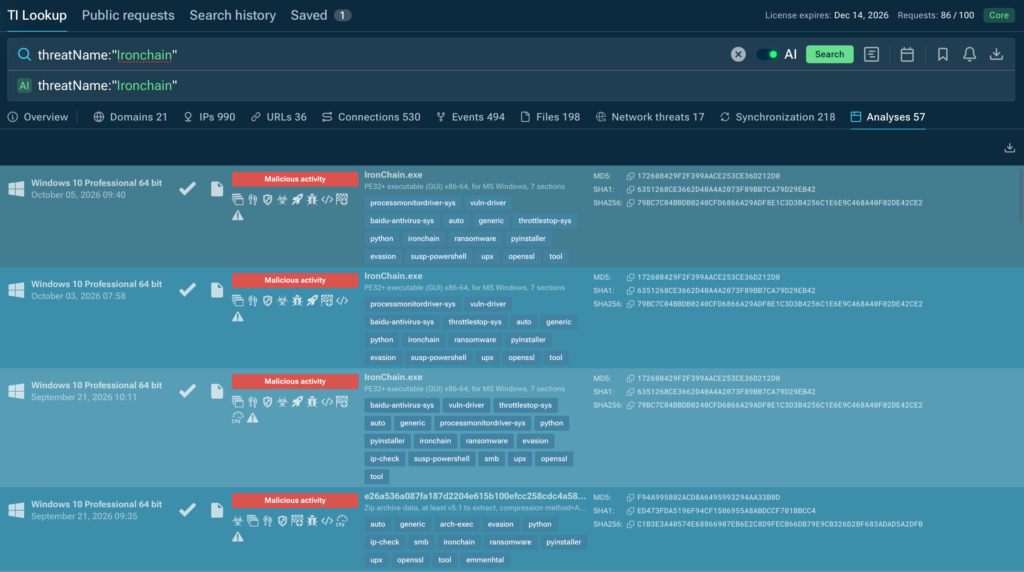
That can help answer a much bigger question during an investigation: is this one infected endpoint, or part of activity already visible elsewhere in the environment or across other incidents?
Analysts can also use recurring driver hashes, filenames, or infrastructure patterns to build stronger hunting queries and connect activity that may initially look unrelated.
Push Fresh IronChain Indicators into Existing Controls
IronChain indicators can change as new builds and infrastructure appear. Relying only on manually maintained blocklists can leave detection gaps between one incident and the next.
ANY.RUN Threat Intelligence Feeds can deliver fresh malicious IPs, domains, URLs, hashes, and other IOCs directly into SIEM, EDR, firewalls, and other security tools.
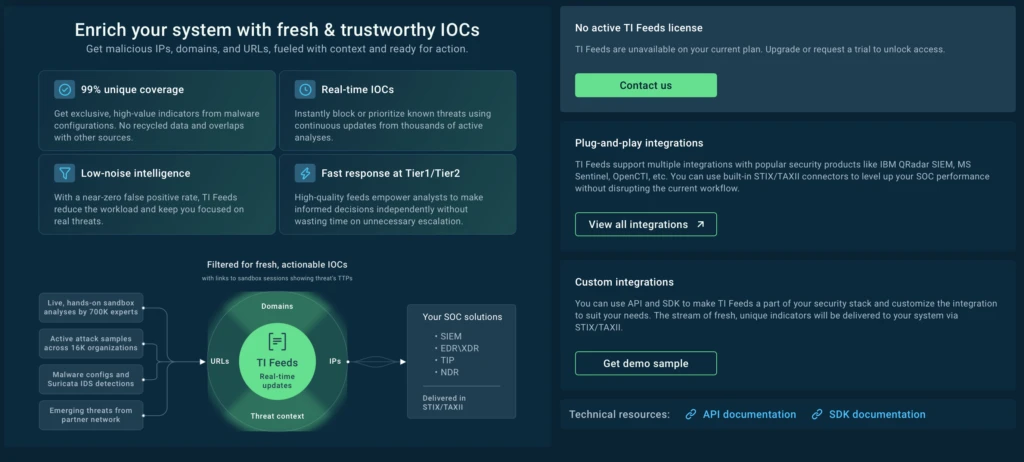
This gives security teams a way to turn what is learned from one IronChain investigation into broader protection across the environment, without waiting for analysts to manually transfer every new indicator.
Watch Closely for Drivers and SYSTEM-Level Persistence
IronChain’s September build contains four kernel drivers and creates a scheduled task with SYSTEM privileges. New or unexpected drivers, services, and privileged scheduled tasks should receive immediate attention during triage.
Catching those changes early can help defenders isolate the endpoint before destructive activity reaches more files, connected systems, or shared resources.
Keep Recovery Independent from the Attacker
IronChain’s recovery design provides no technical guarantee that encrypted files can be restored. Organizations should maintain tested, isolated backups and confirm that critical systems can be recovered without relying on ransom payment or attacker-provided tooling.
Recovery plans should also define which systems need to return first, how long restoration is expected to take, and whether backup infrastructure itself is protected from compromised endpoints.
About ANY.RUN
ANY.RUN is a leading provider of interactive malware analysis and threat intelligence solutions trusted by 16,000+ organizations and 700,000+ security professionals worldwide, including 74% of the Fortune 100.
Its Interactive Sandbox and Threat Intelligence solutions help SOC teams analyze suspicious files and URLs, uncover malicious behavior, enrich alerts with actionable context, and connect related activity across files, infrastructure, and campaigns. This helps teams investigate threats faster, make more confident response decisions, and contain malicious activity before it creates wider business impact.
IOCs
Primary hashes and artifacts:
| Indicator | Role |
|---|---|
| 09b550d66b7ce269fa577edcac54d6ba3e0f3cb5b660a2921b9372d37d52e254 | September IronChain executable |
| d8ce0a5866178495a66d23c9587822164966111fcd34764011e907951c599711 | Baidu BdApiUtil.sys |
| 5b4f59236a9b950bcd5191b35d19125f60cfb9e1a1e1aa2e4f914b6745dde9df | Safetica ProcessMonitorDriver.sys 11.26.18 |
| 977d3b78bdf5723430e2e21cf1eb515a2335a0e370c76fa2dda4315ba062f429 | Lenovo LnvMSRIO.sys 3.1.0.29 |
| 16f83f056177c4ec24c7e99d01ca9d9d6713bd0497eeedb777a3ffefa99c97f0 | ThrottleStop 3.0.0.0 |
| ironchaindecrypt7xfzq5tclm9jzpwq72uofgy2znkdsxm54zbcu2yid.onion | Ransom portal shown to the user |
This research used static artifacts only. We did not execute, import, emulate, debug, fuzz, or detonate the sample. We did not load its drivers, issue their control requests, perform destructive file operations, or contact destinations found in the malware. Behavioral screenshots in this article come from a pre-existing public ANY.RUN sandbox session, not a new execution by the author. Malware should be handled only in an isolated environment by trained analysts.

Himanshu Anand
Himanshu is a security researcher with 10+ years in the field spanning both red and blue teams.



0 comments