Webinar
February 26
Better SOC with Interactive Sandbox
Practical Use Cases

Oyster (also seen in reporting as Broomstick or CleanUpLoader) is a Windows backdoor/loader actively used in multi-stage intrusion campaigns. Recent campaigns weaponize SEO-poisoning and malvertising to trick IT and dev users into downloading trojanized installers (PuTTY, WinSCP, Microsoft Teams, etc.), which then drop Oyster to establish a persistent foothold and load additional payloads (often leading to data theft or ransomware).
|
Backdoor
Type
:
|
Unknown
Origin
:
|
|
1 September, 2023
First seen
:
|
14 July, 2026
Last seen
:
|
|
Type
:
|
Unknown
Origin
:
|
|
1 September, 2023
First seen
:
|
14 July, 2026
Last seen
:
|

 230
230
 0
0
 2820
0
2820
0
 4352
0
4352
0
View Oyster backdoor in action:.
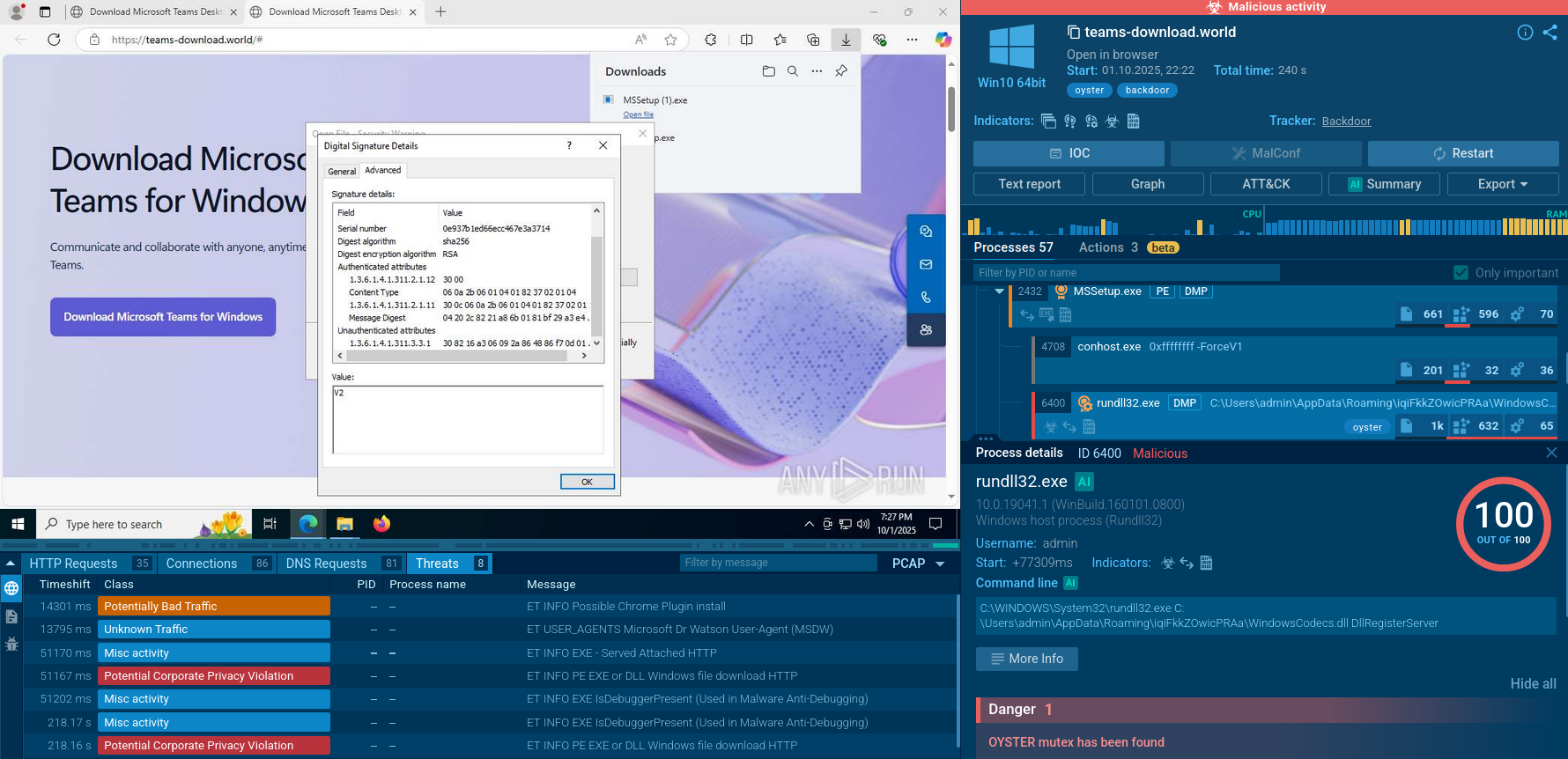 Oyster Backdoor in the Sandbox: processes, connections, files, IOCs, and more
domainName:"partycybertrap.com""
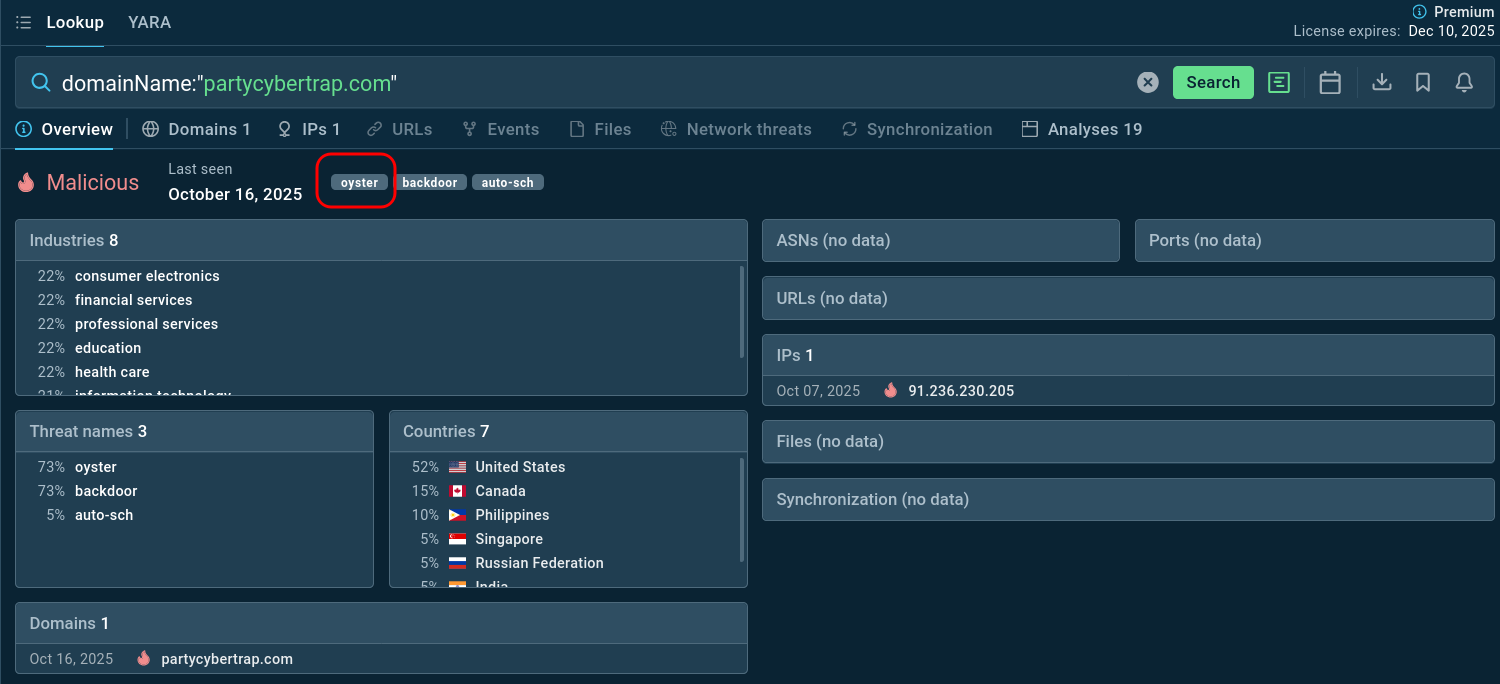 Domain tagged by TI Lookup as Oyster backdoor infrastructure
Oyster Backdoor represents a modular, multistage threat designed for stealth and versatility in cybercriminal operations. First identified by IBM researchers in September 2023 (though samples date back to July) it functions as a loader and backdoor, allowing attackers to establish command-and-control (C2) communications while blending into normal system activity.
Its common behaviors include: creating persistence (scheduled tasks), executing a malicious DLL via rundll32 (DLL registration/export abuse), communicating with command-and-control (C2) over HTTPS, using string obfuscation and process injection to evade detection, and acting as a staging loader for follow-on payloads (credential stealers, Cobalt-like tools, ransomware). Analysts have observed operators using Oyster to perform reconnaissance and hands-on-keyboard activity after initial deployment.
Unlike more rudimentary malware, Oyster's lightweight design supports a range of post-exploitation activities, from reconnaissance to payload delivery, making it a favorite among ransomware affiliates. Its evolution includes updated variants in 2024 and 2025, incorporating encrypted C2 protocols and reduced obfuscation for faster deployment. Linked to groups like ITG23 (also known as Wizard Spider or Periwinkle Tempest), Oyster has been commoditized as Malware-as-a-Service (MaaS), lowering the barrier for less sophisticated actors to launch targeted intrusions.
By masquerading as trusted applications like Microsoft Teams, Google Chrome, PuTTY, and WinSCP, Oyster exploits user trust to gain initial access to corporate environments, making it a significant threat to organizations across all sectors.
Oyster infiltrates via social engineering, exploiting malvertising and SEO poisoning on search engines like Google and Bing. Users searching for "Teams download" or "PuTTY installer" encounter sponsored ads or top results leading to spoofed sites. These host signed EXEs mimicking legitimate installers (e.g., MSTeamsSetup.exe), which drop the DLL post-execution while launching the real app to avoid suspicion.
Spread occurs laterally via RCE: attackers scan RDP ports, create admin accounts, and deploy to connected endpoints. No self-propagation like worms; reliance on human error and network traversal amplifies its reach in enterprise
Oyster primarily targets Windows users worldwide, with a focus on English-speaking regions such as the United States, United Kingdom, Germany, France, and Italy. Its campaigns disproportionately affect IT professionals and organizations in sectors vulnerable to ransomware, including healthcare, education, academia, legal services, and manufacturing. For instance, Rhysida ransomware operators known for hitting education (30% of victims) use Oyster to breach academic institutions.
Healthcare stands out due to targeted lures like fake PuTTY and WinSCP installers aimed at admins managing sensitive networks. Broader campaigns via fake Teams or Chrome downloads ensnare general users, but corporate endpoints provide the real value for lateral movement and extortion
Understanding Oyster's technical operation provides insights into detection and prevention strategies.
Initial Execution
The infection begins when a victim downloads and executes a trojanized installer from a malicious website. Upon execution, the installer extracts embedded resources, including malicious DLL files stored in the resource section of the executable.
Persistence Establishment
Oyster establishes persistence through scheduled tasks created with names like "CaptureService" or similar innocuous identifiers. Some variants use the DllRegisterServer export, while others leverage custom exports for execution. This ensures the malware remains active across system reboots and standard cleanup procedures.
Command and Control Communication
Once established, Oyster initiates communication with hard-coded C2 servers. The malware employs multiple C2 domains for redundancy, ensuring continued operation if one server is taken down. Communication protocols have evolved, with newer versions using substitution ciphers and custom encoding to obfuscate traffic and evade network monitoring.
System Reconnaissance
The malware performs comprehensive system profiling, collecting information about the operating system version, installed software and security products, user accounts and privileges, network configuration and domain membership, running processes and services, and available storage and file systems. This intelligence is transmitted to operators who use it to determine the value of the compromised system and plan subsequent attack stages.
Command Execution
The backdoor supports remote command execution, allowing operators to issue arbitrary commands through cmd.exe. This capability enables a wide range of malicious activities including file manipulation, credential harvesting, lateral movement preparation, security tool disablement, and additional payload deployment.
Payload Delivery
Oyster's modular architecture allows operators to download and execute additional tools based on attack objectives. Documented secondary payloads include Cobalt Strike beacons for hands-on-keyboard operations, PowerShell scripts (SILENTKILL) for defense evasion, credential theft tools, network scanning utilities, and ultimately, Rhysida ransomware binaries.
By detonating an Oyster sample in ANY.RUN’s Interactive Sandbox one can observe it leverage invalid certificates, persistence mechanics and C2 communications.
View a sandbox analysis session of Oyster Backdoor.
Oyster Backdoor in the Sandbox: processes, connections, files, IOCs, and more
Attackers imitate legitimate software download pages to lure users into downloading a malicious app.
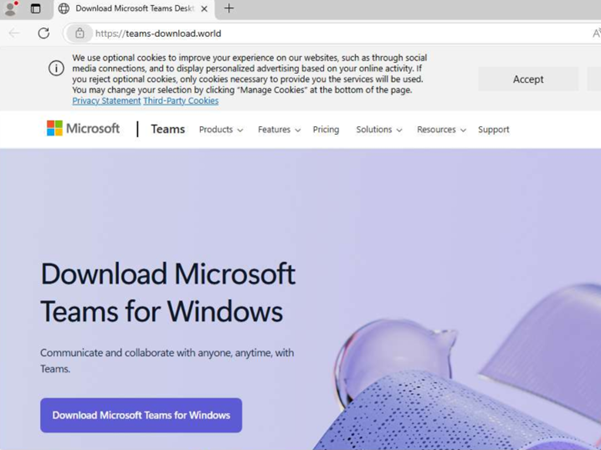 Fake Microsoft Teams page spreading Oyster Backdoor
The apps infected by Oyster usually have a compromised certificate, most often it’s expired, revoked or invalid due to modifications:
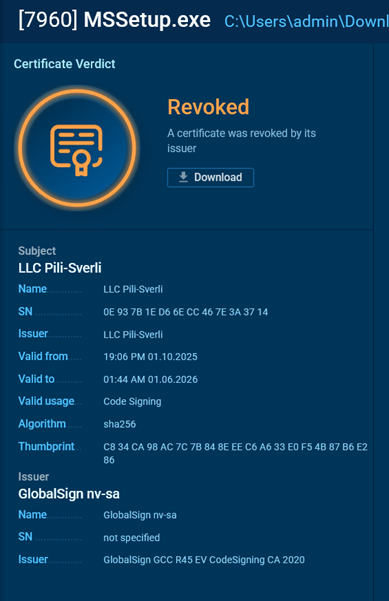 A certificate revoked by issuer
After launching the application, a DLL library is created and executed, serving as the primary component of the backdoor. In this case, the file is disguised as WindowsCodecs.dll.
 Malicious DLL library
Oyster's persistence is achieved through the Windows Task Scheduler. In our example, the task is configured to run every 18 minutes.
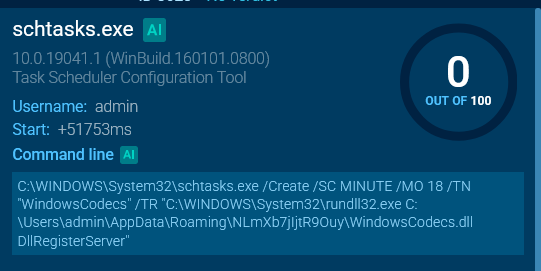 The malware sets up Windows Task Scheduler
Attention should be paid to the mutexes created by instances of this malicious software. They are hardcoded in the code, making them useful indicators of compromise.
 An Oyster Backdoor mutex
Analysis reveals the backdoor's network activity, which is directed toward communication with C2 servers. This activity may vary depending on the state of the C2 server.
In this analysis, data is observed being downloaded with the MIME type application/x-x509-cert, indicating an attempt to exchange certificates or related data for authentication or further commands.
 Oyster Backdoor downloads data
Threat intelligence provides critical capabilities for detecting, preventing, and responding to Oyster backdoor threats. It helps enrich detection rules with specific indicators associated with Oyster.
SIEM systems incorporate IOCs to generate alerts when suspicious activity occurs. EDR platforms leverage threat intelligence to identify malicious processes and network connections. This intelligence-driven approach significantly improves detection accuracy and reduces false positives.
Threat intelligence feeds deliver timely information about emerging Oyster campaigns, including new C2 infrastructure, updated file hashes, malicious domains, and TTPs employed by attackers. Security teams can proactively block known malicious indicators before they impact the organization. Intelligence about typosquatted domains enables preemptive blocking or monitoring, preventing employee exposure to fake download sites.
Use ANY.RUN’s Threat Intelligence Lookup to search IOCs and behavior data linked to Oyster backdoor. Start from querying the threat name to find Oyster's samples that ANY.RUN’s community of 500K professionals and 15K SOC teams has already analyzed. Study TTPs and gather indicators:
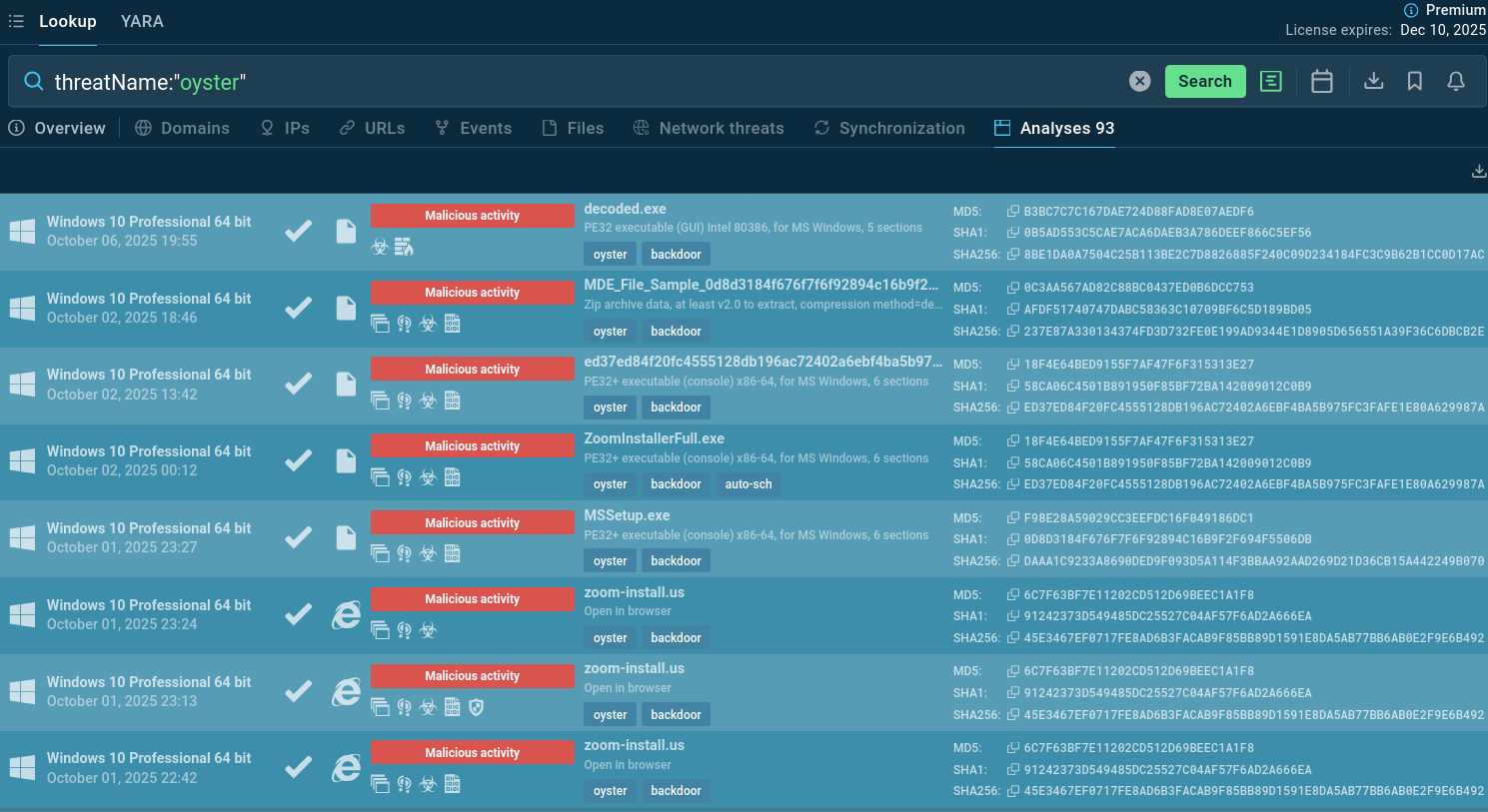 Oyster backdoor sample analyses found via TI Lookup
Add an IOC to the search query to get a selection of indicators to use for monitoring, detection, and alerts:
threatName:"Oyster" and domainName:""
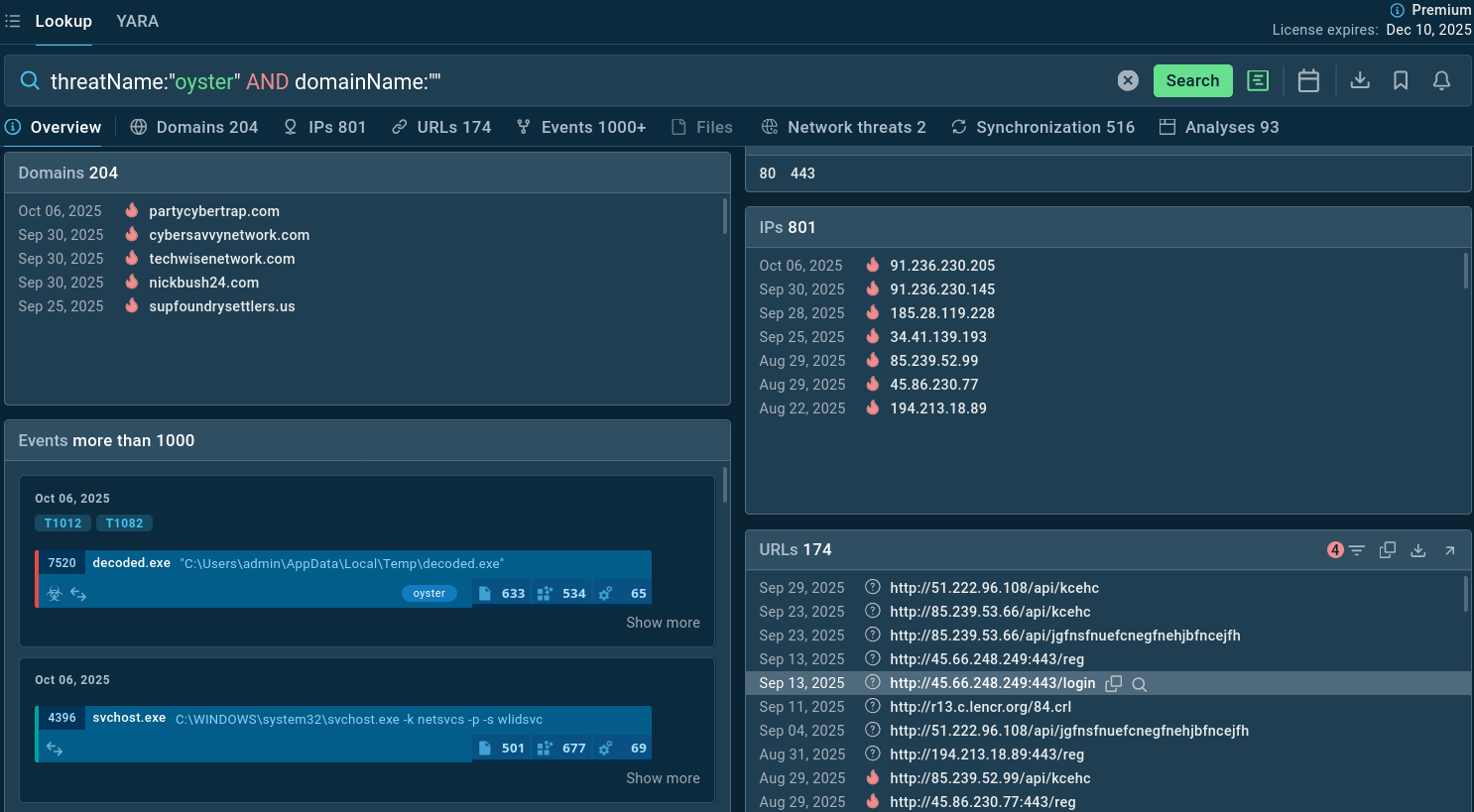 Oyster backdoor sample analyses found via TI Lookup
Oyster Backdoor represents a significant and evolving threat, serving as a critical tool for cybercriminals’ ransomware operations and targeted intrusions. Its distribution through malvertising and SEO poisoning, combined with its modular architecture and evasion capabilities, makes it a formidable challenge for organizations of all sizes and sectors.
Effective defense against Oyster requires comprehensive security strategies spanning multiple domains. Technical controls including endpoint protection, network security, and access management form the foundation. However, human factors remain critical: user education about malvertising threats and software download risks significantly reduces exposure.
Timely intelligence about new campaigns, IOCs, and attacker TTPs enables proactive defense, early detection, and rapid response. Organizations leveraging both commercial and open-source intelligence, integrated into security tools and processes, significantly improve their defensive posture.
Start gathering actionable threat intelligence on Oyster backdoor by signing up to ANY.RUN’s TI Lookup: protect your business with timely detection and response.