Black friday Up to 3 extra licenses FOR FREE + Special offer for TI LOOKUP Get it now
Webinar
February 26
Better SOC with Interactive Sandbox Practical Use Cases
Register now

DragonForce

141
Global rank
103 infographic chevron month
Month rank
98 infographic chevron week
Week rank
0
IOCs

DragonForce is a ransomware strain operating under the Ransomware-as-a-Service (RaaS) model. First reported in December 2023, it encrypts files with ChaCha8, renames them with random strings, and appends “.dragonforce_encrypted.” By disabling backups, wiping recovery, and spreading across SMB shares, DragonForce maximizes damage and pressures victims into multimillion-dollar ransom negotiations. It has targeted manufacturing, construction, IT, healthcare, and retail sectors worldwide, making it a severe threat to modern enterprises.

Ransomware
Type
Unknown
Origin
1 December, 2023
First seen
26 April, 2026
Last seen

How to analyze DragonForce with ANY.RUN

Type
Unknown
Origin
1 December, 2023
First seen
26 April, 2026
Last seen

IOCs

Last Seen at
Last Seen at

Recent blog posts

post image
Margin vs. Madness: Fixing MSSP Top 5 Operati...
watchers 323
comments 0
post image
Phishing-to-RMM Attacks: The Remote Access Bl...
watchers 1755
comments 0
post image
Inside agenteV2: How Brazilian Attackers Use...
watchers 5050
comments 0

What is DragonForce Ransomware?

DragonForce is a ransomware strain operating under the Ransomware-as-a-Service (RaaS) model. First observed in December 2023, it encrypts victim files and demands ransom for decryption keys. DragonForce quickly locks both local and network data while simultaneously disabling recovery options, maximizing pressure on the victim.

Its victims span industries such as manufacturing, construction, IT, healthcare, and retail; sectors where encryption of critical data can halt business operations entirely. Ransom demands vary from hundreds of thousands to millions of dollars, determined by the attackers after assessing the victim’s size and revenue. DragonForce operators also employ double extortion, stealing sensitive data before encryption and threatening to leak it if the ransom is not paid.

Use ANY.RUN free for 14 days

Try the full power of interactive analysis

Start your free trial

DragonForce Victimology

DragonForce does not strike randomly, it chooses victims where disruption brings maximum leverage.

  • Preferred sectors: Manufacturing, healthcare, IT, construction, and retail.
  • Targeting method: Victims are assessed by size and revenue, with ransom demands adjusted accordingly.
  • Tactics: Double extortion (data theft + encryption) ensures both operational and reputational pressure.
  • Geography: Attacks have been reported in North America, Europe, and Asia, showing a broad targeting scope rather than focusing on a single region.

DragonForce Typical Attack Chain

There are numerous DragonForce ransomware samples detonated in ANY.RUN’s Interactive Sandbox and analyzed by SOC teams worldwide. Let’s walk through how a typical infection unfolds.

View analysis session with DragonForce
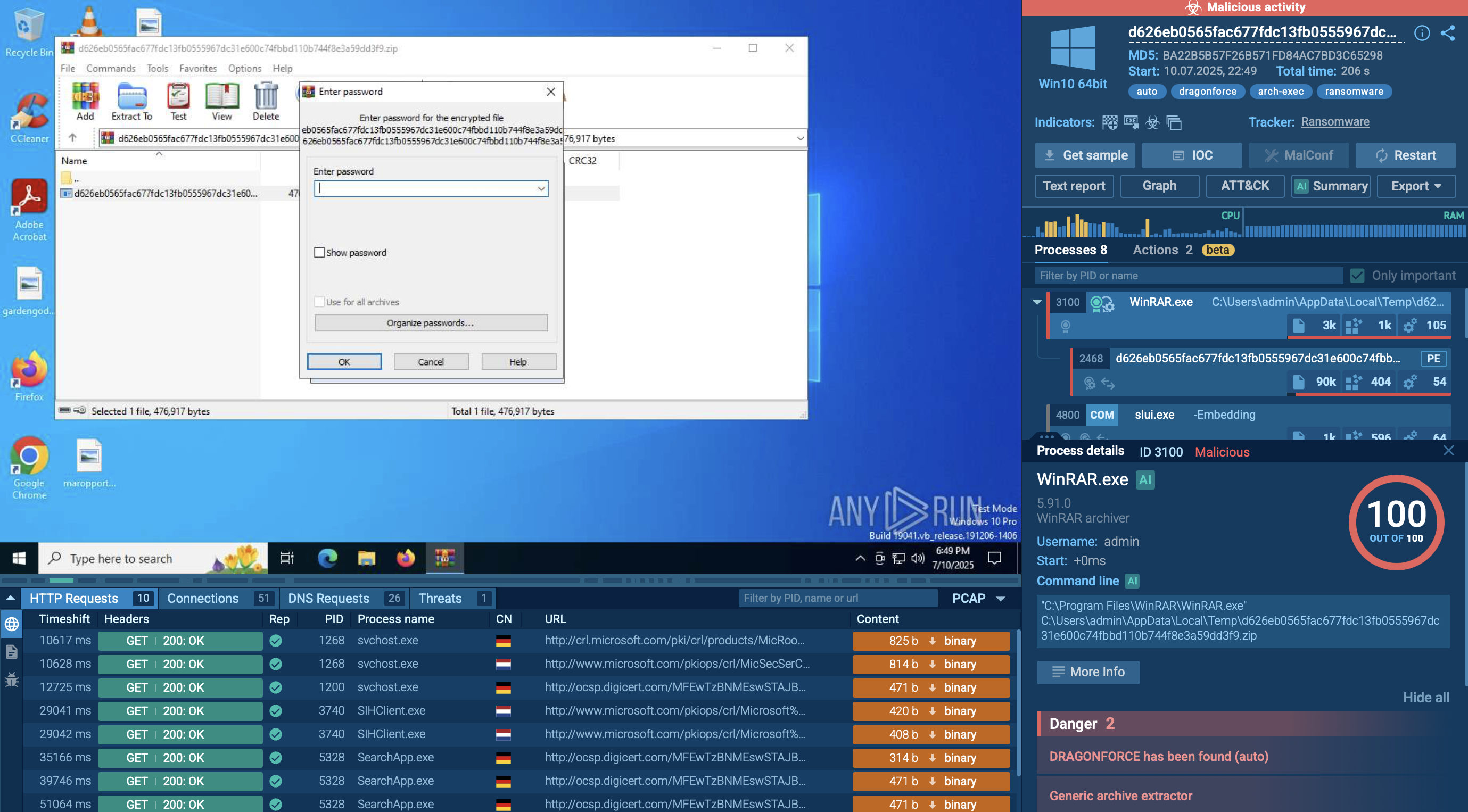
DragonForce analysis in Sandbox DragonForce analyzed inside ANY.RUN sandbox

Once launched, DragonForce first checks the environment for virtual machines and debuggers to avoid analysis. It then creates a unique mutex to prevent reinfection and copies itself into the system directory. Persistence is established by registering for autorun and creating scheduled tasks that ensure execution on reboot.

Next, the ransomware escalates privileges by bypassing UAC and modifying PowerShell settings (ExecutionPolicy Bypass) so its scripts can run without restriction. During the preparation phase, DragonForce deletes shadow copies (vssadmin), removes system backups (wbadmin), disables the Windows Recovery Environment (reagentc), and alters boot configuration (bcdedit) to prevent recovery.

In parallel, it uses taskkill.exe, sc.exe, and net.exe to terminate processes and services that could interfere with encryption, including antivirus tools, SQL databases, and mail servers.
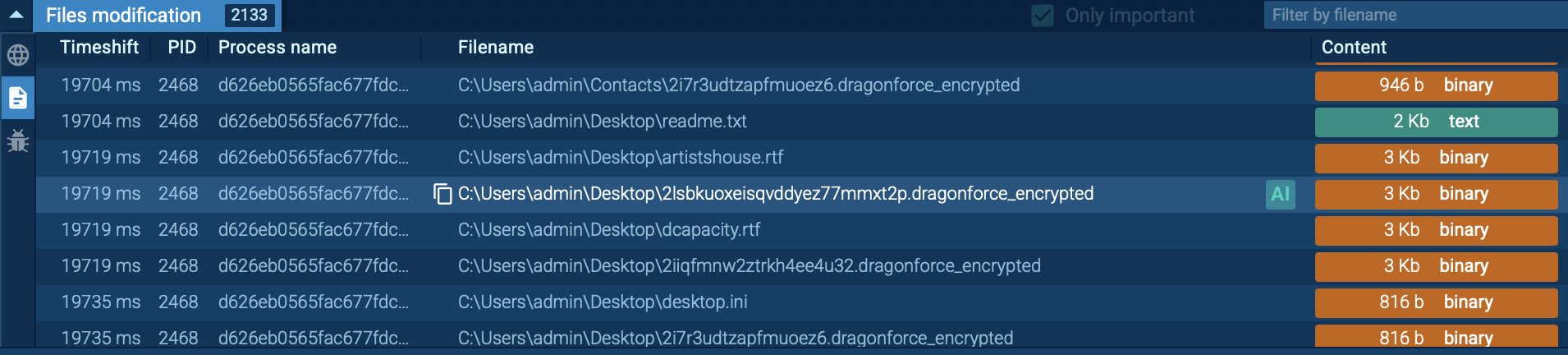
DragonForce renames files with .dragonforce_encrypted DragonForce renames files with the extension “.dragonforce_encrypted”

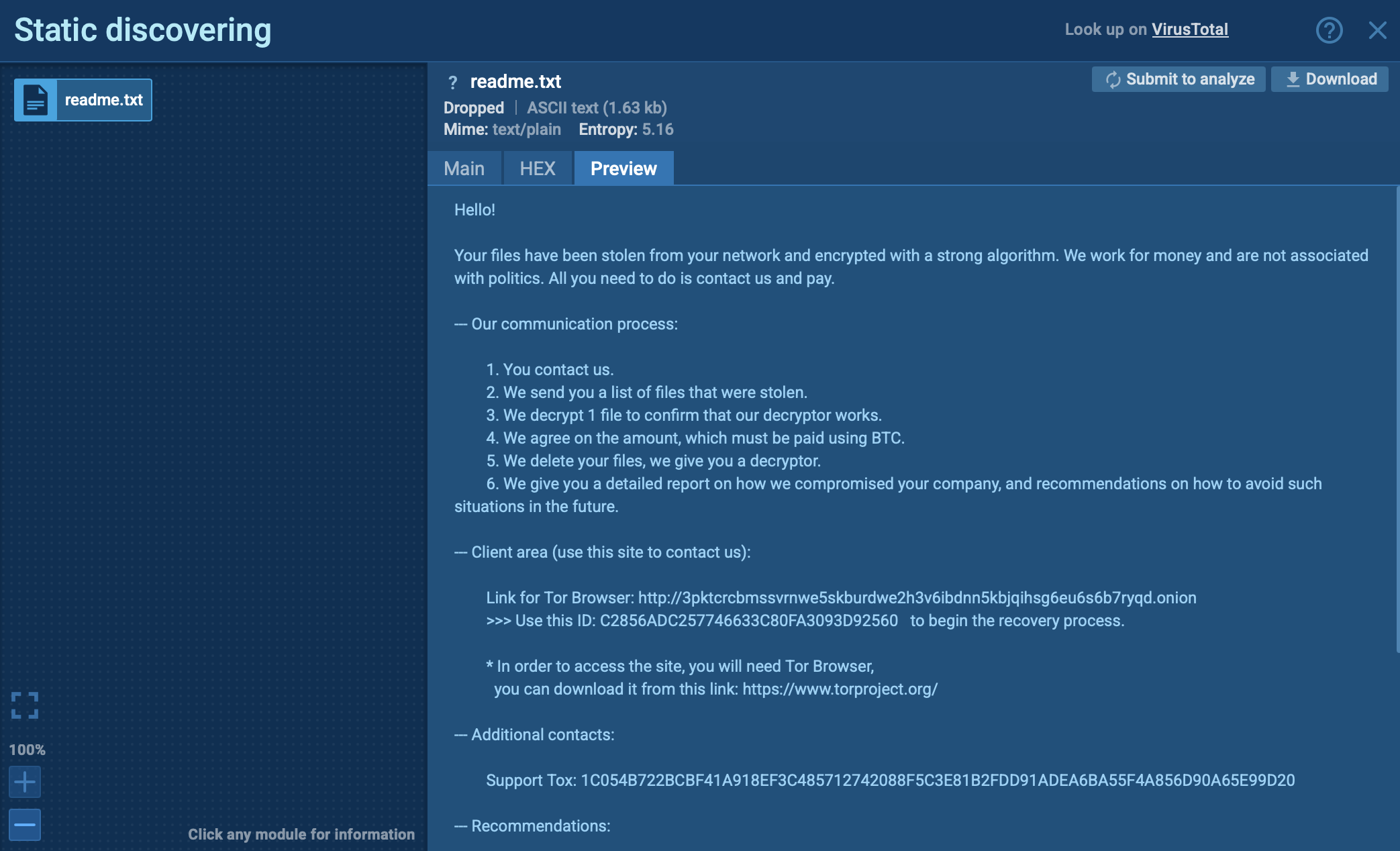
Finally, DragonForce scans local disks, network folders, and NAS devices for files to encrypt. All discovered data is locked with the “.dragonforce_encrypted” extension, and ransom notes (readme.txt) are left in every affected directory with payment instructions.
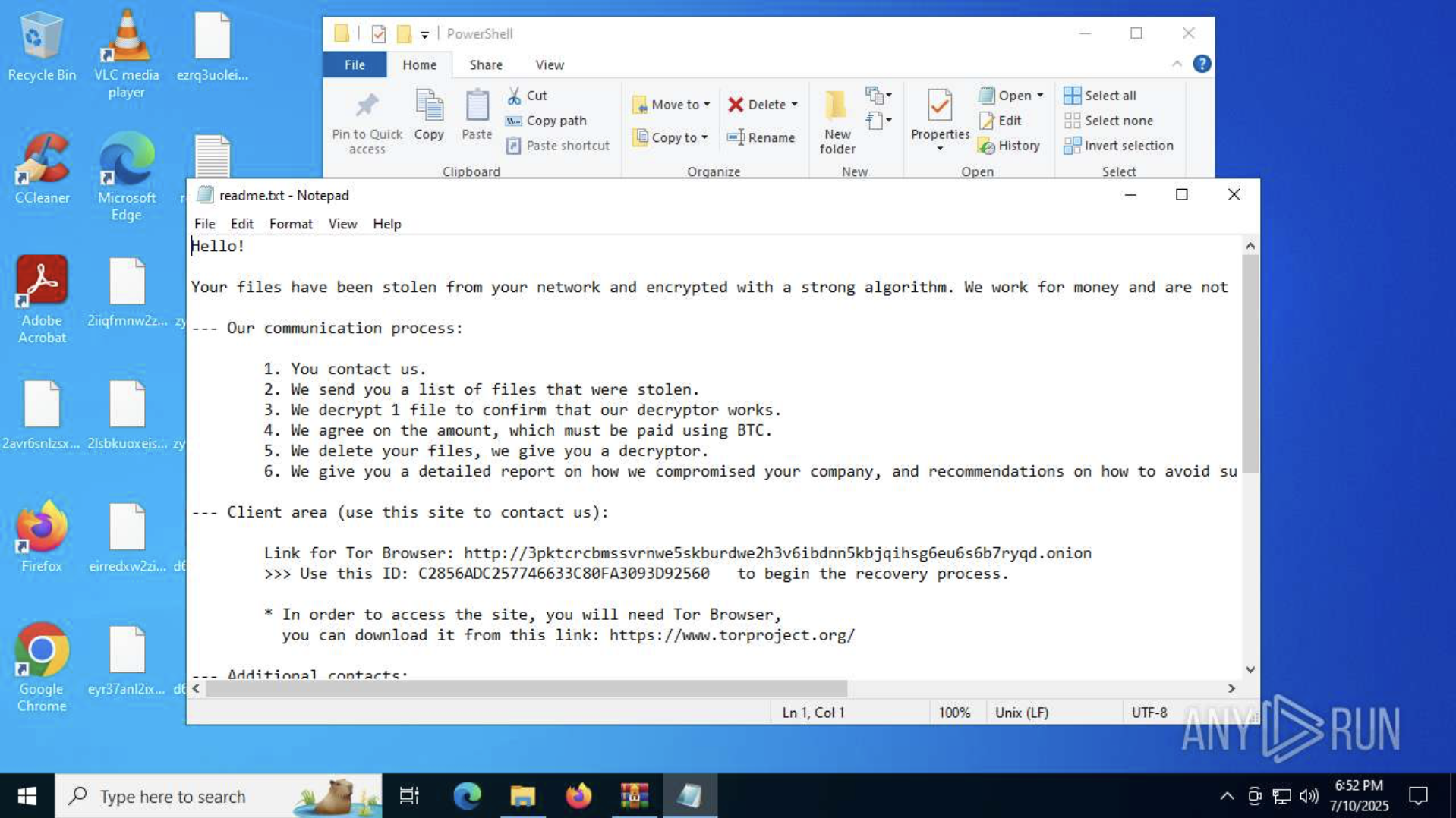
DragonForce ransom note in Sandbox ANY.RUN sandbox reveals the ransom note left with payment instructions

What DragonForce Can Do to a System

DragonForce primarily targets Windows environments (Windows 10/11 and server editions), with support for 64-bit systems and domain-based network resources. Variants have also been observed for Linux and VMware ESXi, signaling the group’s intent to disrupt entire enterprise infrastructures.

The malware executes with the privileges of the current user but actively attempts to escalate to administrative rights. It bypasses User Account Control (UAC), disables protections, and ensures uninterrupted execution even in environments with weak or misconfigured defenses.
  • Stealth and Masquerading: DragonForce hides its activity by running under the names of legitimate Windows processes such as dllhost.exe, audiodg.exe, cmd.exe, conhost.exe, sc.exe, and sppsvc.exe. Copies are placed in the System32 directory to blend in with trusted files. It also creates a unique mutex to prevent reinfection and, in some cases, registers a fake service binary (UI0Detect.exe) to make malicious processes appear like genuine system services.
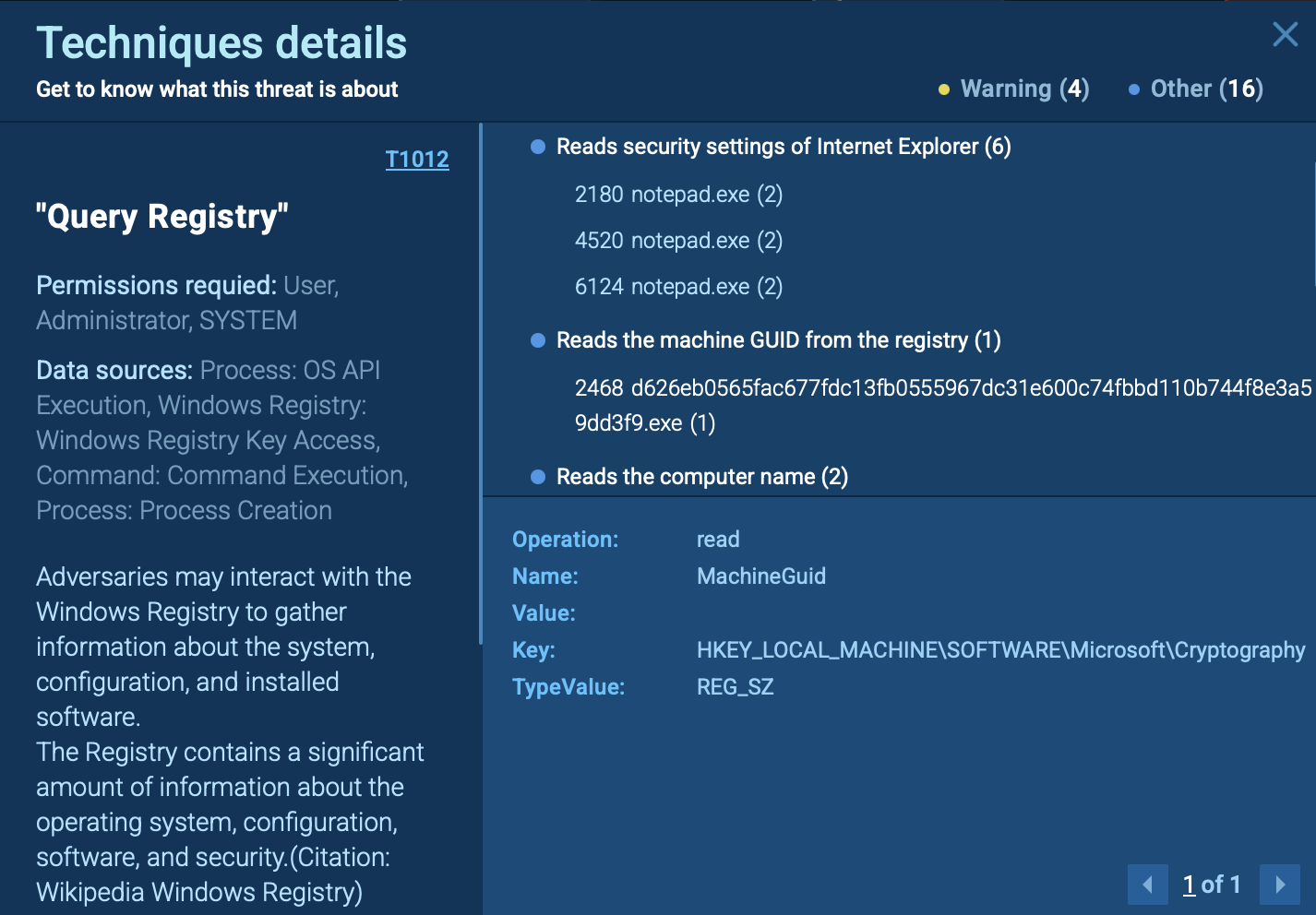
  • System Reconnaissance: The ransomware gathers key identifiers such as the computer name and Machine GUID, then scans both local and network resources for files and accessible hosts. This step helps it map the environment before encryption.

DragonForce query registry in Sandbox DragonForce gathers key system identifiers, such as computer name and Machine GUID

  • Privilege Escalation: DragonForce bypasses UAC to execute commands with elevated privileges. One method involves abusing slui.exe (Windows Activation Client) together with rundll32.exe to load a COM object and perform a UAC bypass. It also changes PowerShell’s execution policy to Bypass, ensuring its scripts run without restriction.

DragonForce uses Rundll3.exe inside ANY.RUN sandbox Rundll32.exe used to load a COM object and perform a UAC bypass
  • Persistence: To maintain access, DragonForce places its copies in System32 under system-like filenames and creates scheduled tasks that trigger on reboot. It can also register or reactivate Windows services such as Interactive Services Detection, linking them to attacker-controlled binaries so the ransomware starts automatically with the system.
  • Recovery Elimination: DragonForce systematically removes recovery options. It deletes shadow copies via vssadmin or WMI, removes backups with wbadmin, disables the Windows Recovery Environment with reagentc, and modifies boot settings through bcdedit. It also clears Windows event logs and temporary files to hide traces of its activity.
  • Service and Process Control: The ransomware forcibly closes applications that might block access to files. Using taskkill.exe and sc.exe, it stops antivirus programs, SQL databases, and mail servers, clearing the way for uninterrupted encryption.
  • Encryption: DragonForce encrypts files with the ChaCha8 algorithm. Once locked, files are renamed with random strings and appended with the extension “.dragonforce_encrypted”. A ransom note (readme.txt) is dropped into directories containing encrypted data, instructing victims on how to pay.

DragonForce note exposed inside ANY.RUN sandbox Ransom note with clear instructions exposed inside ANY.RUN sandbox
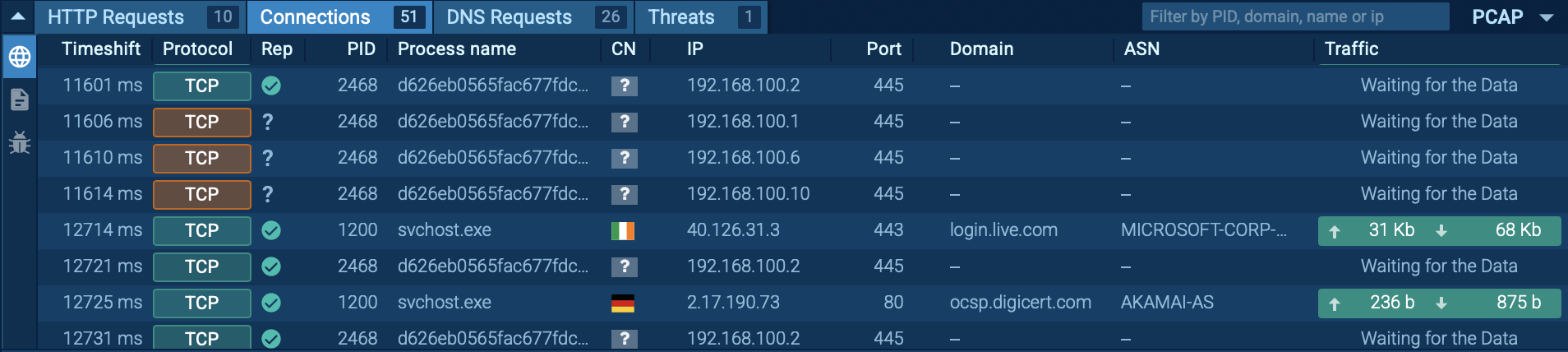
  • Network Activity: Beyond local systems, DragonForce scans SMB shares and network devices, attempting to spread laterally across the network. By targeting additional hosts, it maximizes impact across entire corporate environments.

DragonForce attempts to spread across network DragonForce scans SMB shares and network devices, attempting to spread laterally across the network

How DragonForce Functions

DragonForce is designed for speed, persistence, and maximum disruption. After gaining elevated privileges and disabling recovery options, it quickly encrypts both local and network data using the ChaCha8 algorithm. By renaming files, erasing backups, and spreading across SMB shares, it ensures that victims are left with no recovery path other than ransom negotiations.

How DragonForce Threatens Businesses and Organizations

DragonForce ransomware is engineered to cause rapid and large-scale disruption, leaving organizations with few options beyond ransom negotiations. Its threat profile extends beyond encrypted files to broader operational, financial, and reputational risks.

  1. Business Paralysis: By encrypting local files, network shares, and NAS devices, DragonForce can halt production lines, disrupt IT services, and cut off access to critical business data across entire enterprises.
  2. Loss of Recovery Options: Through systematic deletion of backups, shadow copies, and recovery environments, DragonForce removes every built-in safety net, forcing businesses into ransom negotiations if offline backups are not available.
  3. Double Extortion Pressure: Attackers steal sensitive data before encryption, threatening to leak intellectual property, customer records, or financial information if the ransom is not paid. This creates both an operational crisis and a compliance challenge.
  4. Cross-Platform Risk: With variants targeting Windows, Linux, and VMware ESXi, DragonForce is capable of disrupting mixed and virtualized infrastructures, including data centers and cloud environments.
  5. Financial and Reputational Damage: Ransom demands can reach millions of dollars, and even if paid, victims face regulatory scrutiny, customer distrust, and long-term brand damage.

Gathering Threat Intelligence on DragonForce

Integrating threat intelligence into security operations is important for detecting and mitigating DragonForce attacks. Threat intelligence provides updated indicators of compromise (IOCs), such as malicious file hashes, domains, and network behaviors, which can be used to block activity and uncover infections before encryption begins.

It also supports proactive threat hunting, enabling SOC teams to detect DragonForce based on its known behaviors, including UAC bypass attempts, registry changes for persistence, recovery elimination with tools like vssadmin and wbadmin, and lateral movement through SMB scanning.

Start gathering IOCs and behavioral data with the malware name search request to Threat Intelligence Lookup:
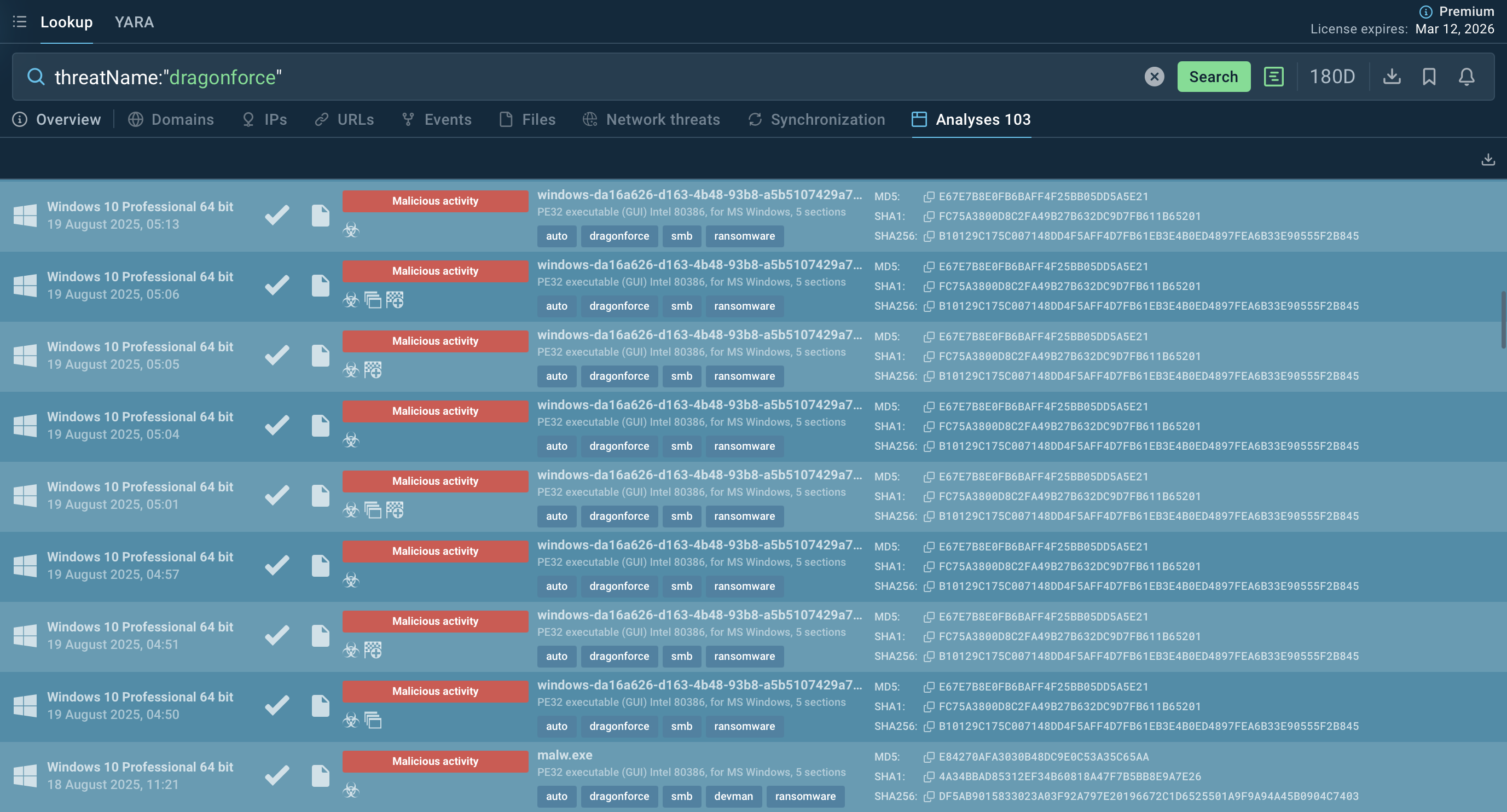
threatName:"DragonForce"

DragonForce samples in TI Lookup DragonForce ransomware samples found via TI Lookup

Integrate ANY.RUN’s threat intelligence solutions in your company

Contact us

Conclusion

DragonForce is a destructive ransomware strain built to paralyze organizations. By wiping recovery options, escalating privileges, and encrypting both local and network data with ChaCha8, it leaves victims with no easy way out. The added pressure of double extortion makes it a severe risk for both operations and reputation.

To defend against it, security teams need early detection of behaviors like shadow copy deletion, UAC bypass, and SMB scanning, well before encryption begins. Actionable threat intelligence from ANY.RUN’s TI Lookup helps SOCs spot these patterns and respond faster.

Gather fresh intelligence via ANY.RUN’s TI Lookup: start with 50 trial requests.
HAVE A LOOK AT

Crypto malware screenshot
Crypto malware
miner xmrig jsminer
Crypto mining malware is a resource-intensive threat that infiltrates computers with the purpose of mining cryptocurrencies. This type of threat can be deployed either on an infected machine or a compromised website. In both cases the miner will utilize the computing power of the device and its network bandwidth.
Read More
Qilin Ransomware screenshot
Qilin ransomware (predecessor known as “Agenda”) is a rapidly evolving ransomware-as-a-service (RaaS) operation targeting organizations worldwide. Known for double extortion tactics (encrypting files while also threatening to leak stolen data) Qilin has quickly gained notoriety for its customization, flexibility, and impact on critical infrastructure.
Read More
Cephalus screenshot
Cephalus
cephalus
Cephalus is a targeted ransomware threat discovered in 2025. It’s known for infiltrating organizations that deal with sensitive data through compromised RDP access. It leverages DLL sideloading with a legitimate SentinelOne executable. Cephalus is able to exfiltrate data and destroy backup options. Its payload is also tailored to each victim, which makes identification and mitigation more complex.
Read More
Oyster screenshot
Oyster
oyster
Oyster (also seen in reporting as Broomstick or CleanUpLoader) is a Windows backdoor/loader actively used in multi-stage intrusion campaigns. Recent campaigns weaponize SEO-poisoning and malvertising to trick IT and dev users into downloading trojanized installers (PuTTY, WinSCP, Microsoft Teams, etc.), which then drop Oyster to establish a persistent foothold and load additional payloads (often leading to data theft or ransomware).
Read More
Bluesky Ransomware screenshot
BlueSky ransomware, first identified in June 2022, shares code similarities with other well-known ransomware families like Conti and Babuk. It primarily spreads via phishing emails and malicious links and can propagate through networks using SMB protocols. BlueSky uses advanced evasion techniques, such as hiding its processes from debuggers via the NtSetInformationThread API, making it difficult for analysts to detect and mitigate its attacks.
Read More
Spynote screenshot
Spynote
spynote
SpyNote, also known as SpyMax and CypherRat, is a powerful Android malware family designed primarily for surveillance and data theft, often categorized as a Remote Access Trojan (RAT). Originally emerged in 2016, SpyNote has evolved significantly, with new variants continuing to appear as recently as 2023–2025.
Read More