Webinar
February 26
Better SOC with Interactive Sandbox
Practical Use Cases

Mirage2FA is a Phishing-as-a-Service toolkit designed to compromise Microsoft 365 accounts and bypass conventional MFA through Adversary-in-the-Middle attacks. It uses malicious HTML, XHTML, and SVG files to deliver JavaScript loaders that connect victims to attacker-controlled phishing infrastructure. The toolkit relays authentication in real time, capturing credentials, 2FA codes, and authenticated session cookies. It also uses browser fingerprinting, WebSockets, obfuscation, and rotating infrastructure to evade detection and maintain access to compromised accounts.
|
Phishingkit
Type
:
|
LinX Coders
Origin
:
|
|
23 September, 2024
First seen
:
|
16 October, 2026
Last seen
:
|
|
Type
:
|
LinX Coders
Origin
:
|
|
23 September, 2024
First seen
:
|
16 October, 2026
Last seen
:
|

 3714
3714
 0
0
 5148
0
5148
0
 11490
0
11490
0
Mirage2FA targets US businesses across technology and manufacturing
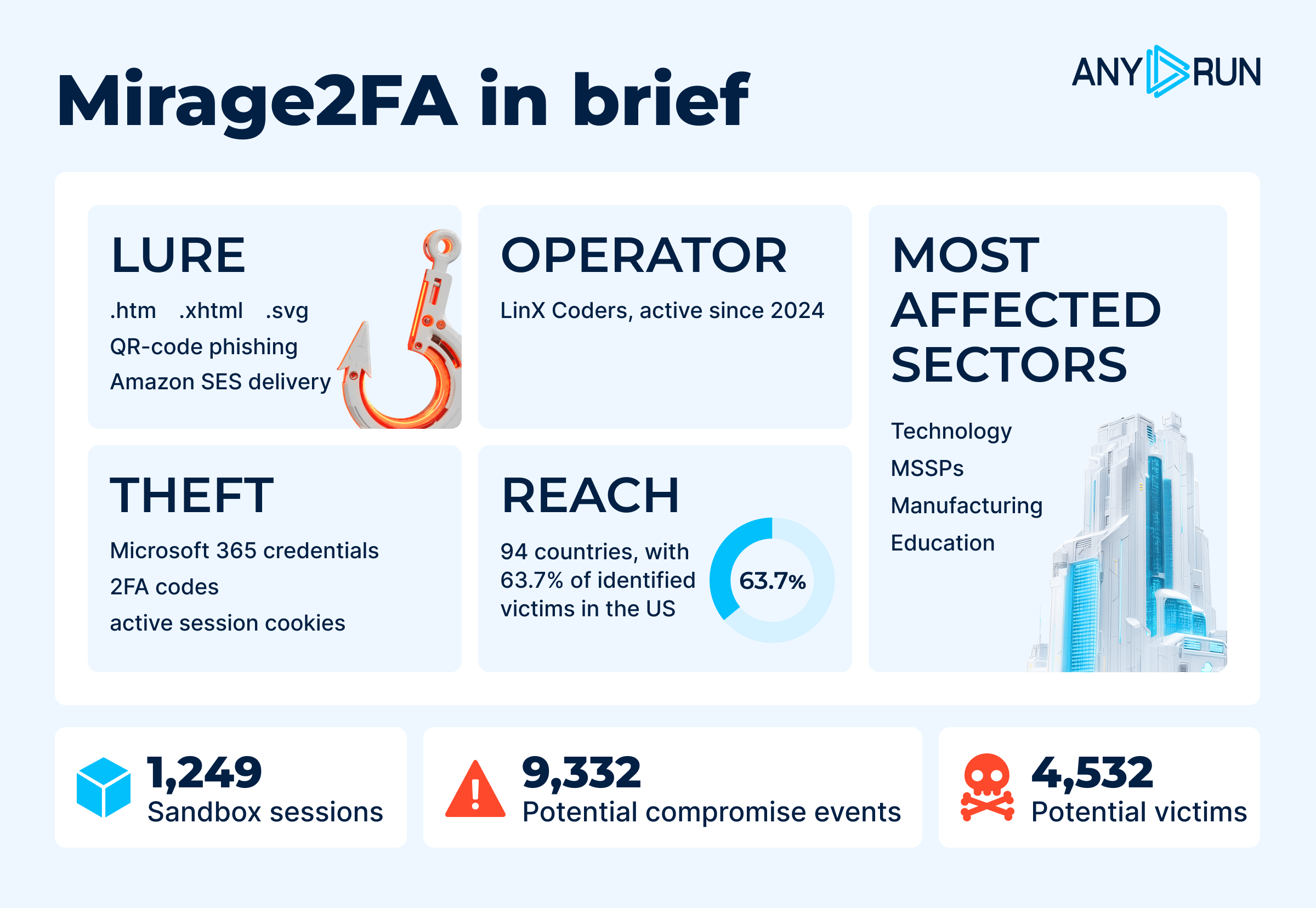
Mirage2FA is a commercial Phishing-as-a-Service (PhaaS) offering designed to compromise corporate Microsoft 365 accounts and active authenticated sessions while bypassing conventional two-factor authentication.
The operator distributes malicious HTML, XHTML, and SVG attachments that execute in the victim’s browser and silently fetch harvesting logic from attacker-controlled infrastructure. Mirage2FA then proxies the Microsoft 365 login and 2FA flow in real time through an Adversary-in-the-Middle (AiTM) attack, capturing credentials, authentication codes, and session cookies.
Unlike traditional credential-stealing phishing, Mirage2FA focuses on session hijacking. Stolen session cookies can potentially allow attackers to access Microsoft 365 and connected cloud services as an already authenticated user, even after the victim has successfully completed MFA.
The toolkit also relies on browser-based delivery rather than conventional executable malware. JavaScript obfuscation, WebSocket communication, browser fingerprinting, and rotating infrastructure help operators evade detection and adapt campaigns.
A successful Mirage2FA infection can create risks beyond the initial account compromise:
Mirage2FA primarily targets organizations that rely heavily on Microsoft 365 for communication, collaboration, and business operations. ANY.RUN telemetry shows the highest exposure in Technology (19.2%), followed by Manufacturing (11.1%), Education (9.9%), Consulting (8.3%), and Telecommunications (6.6%). These sectors provide attackers with access to valuable corporate data, trusted communications, and connected cloud services.
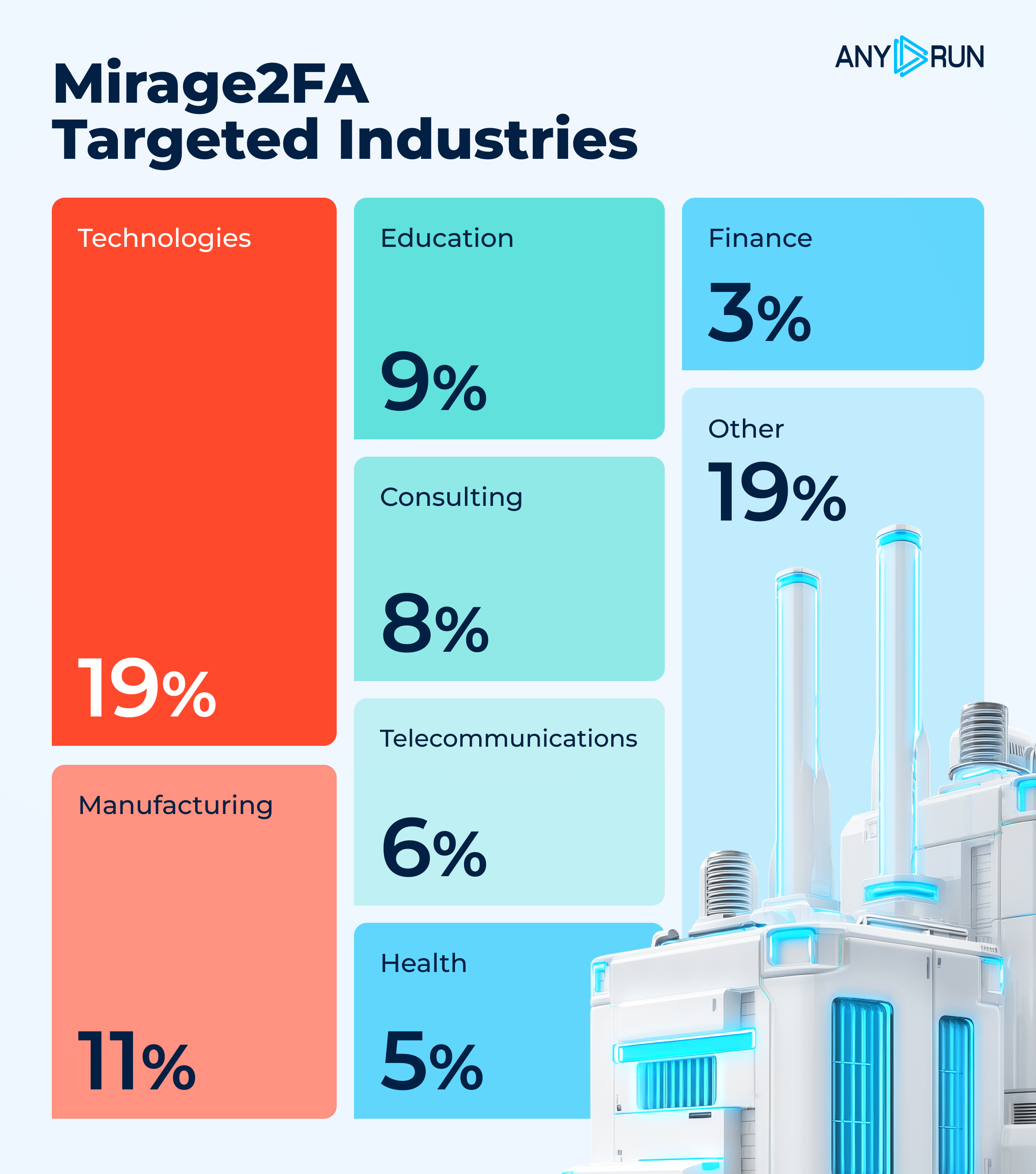
Technology, MSSPs, and Manufacturing face the highest exposure to Mirage2FA
The campaign is strongly concentrated in the United States, which accounts for 2,885 victims (63.7%), while activity was recorded across 94 countries, including India, Singapore, the UK, Canada, Saudi Arabia, and South Africa.
Mirage2FA also showed sustained activity as the campaign progressed. By the end of data collection in July 2026, 445 Mirage2FA sandbox sessions had already been recorded that month, indicating continued operational activity and growing visibility in the wild.
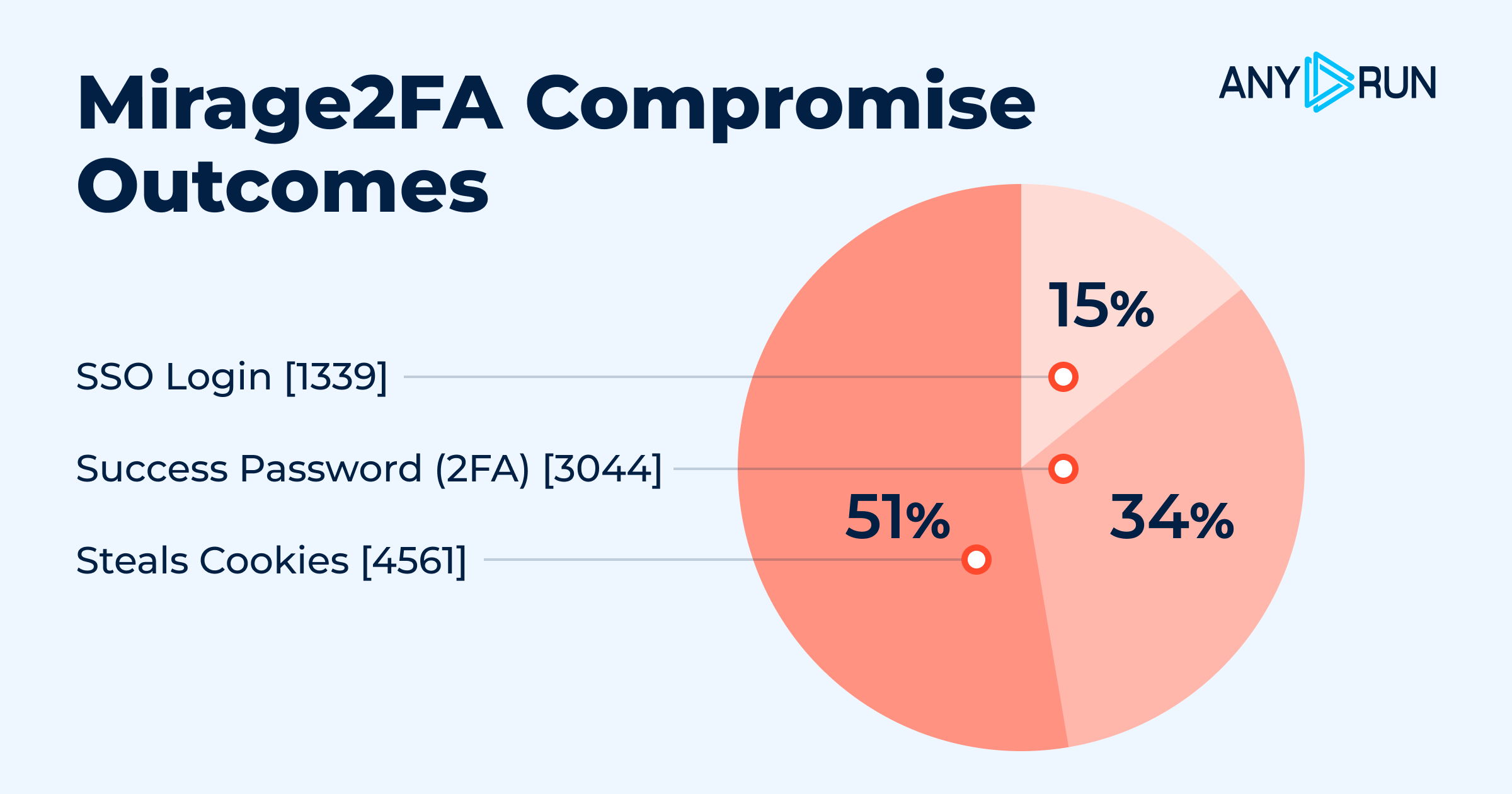
The compromise data highlights the toolkit’s focus on authenticated session theft. Of 9,332 potential compromise events, 4,561 involved session cookie theft, compared with 3,044 password/2FA compromises and 1,339 SSO logins. Mobile devices accounted for 33.3% of successful login events, adding another layer of risk as phishing pages can be harder to scrutinize on smaller screens.
Overall, the data points to a threat focused on high-value corporate identities, where compromising a single Microsoft 365 session can provide attackers with a pathway to broader business access.
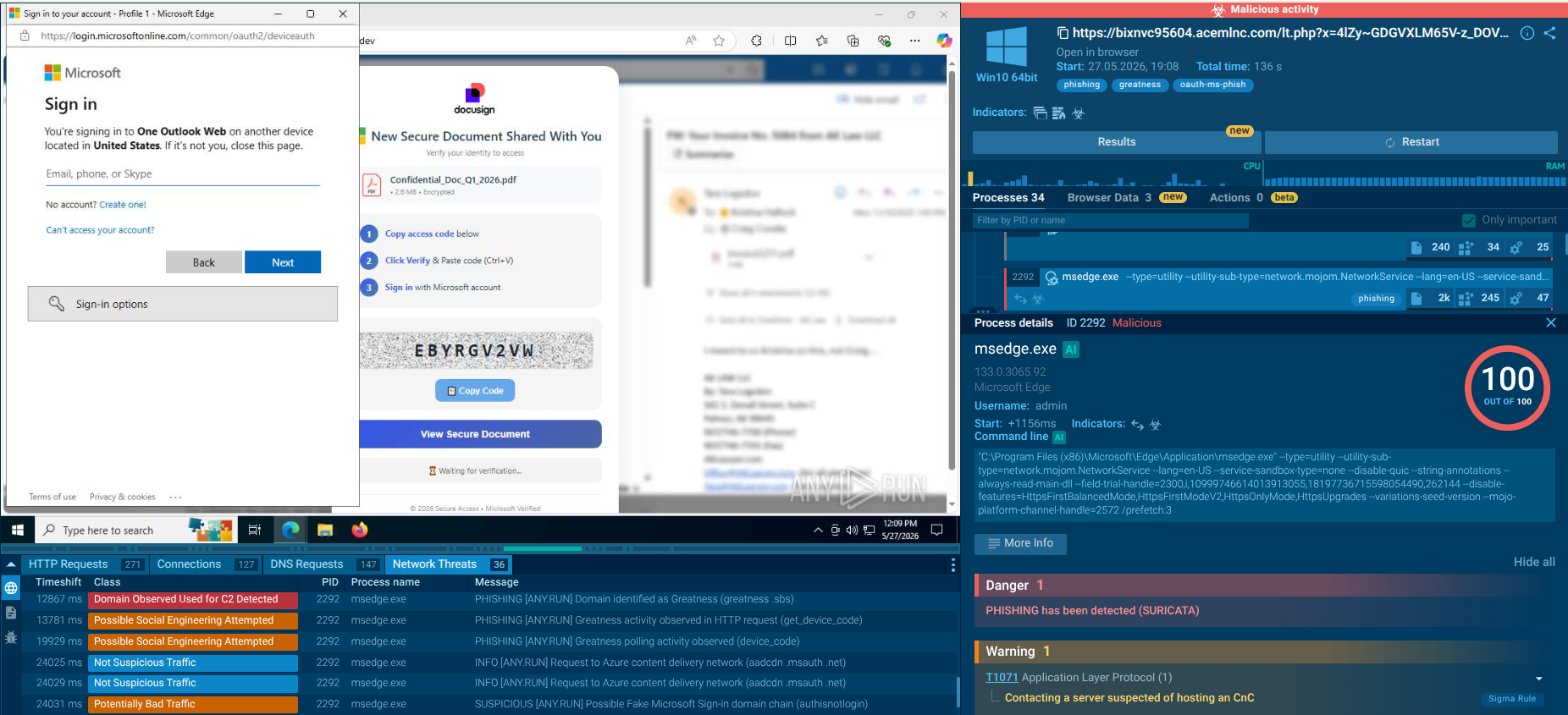
Observing a Mirage 2FA sample inside ANY.RUN’s Interactive Sandbox reveals how the threat moves from a phishing attachment to Microsoft 365 account takeover through browser-based AiTM activity.
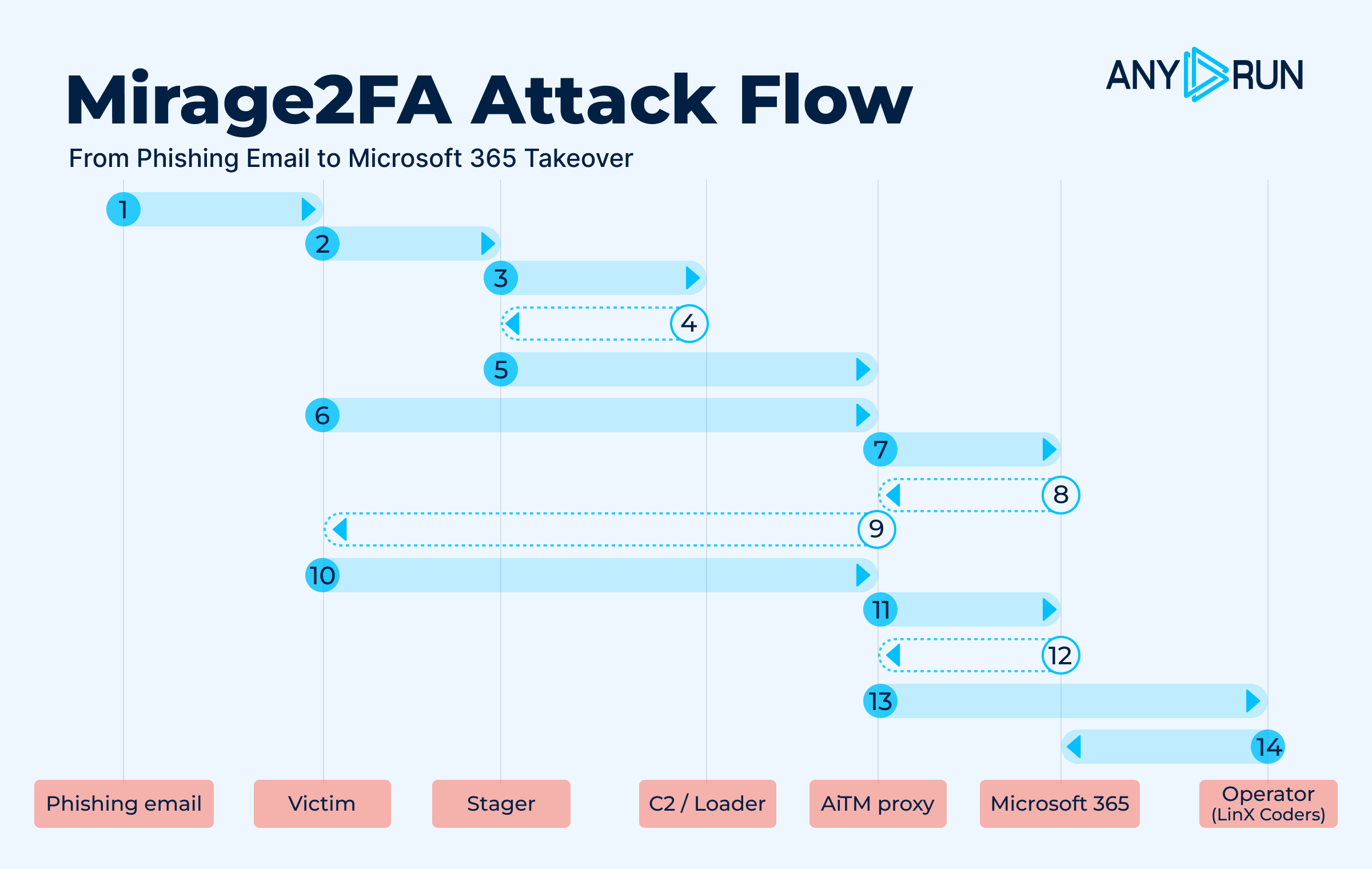
The complete Mirage2FA attack flow
Stage 1: Delivery
A phishing email delivers a malicious .htm, .xhtml, or .svg attachment , or directs the victim to a QR-code link. Campaigns have also used Amazon SES for distribution.
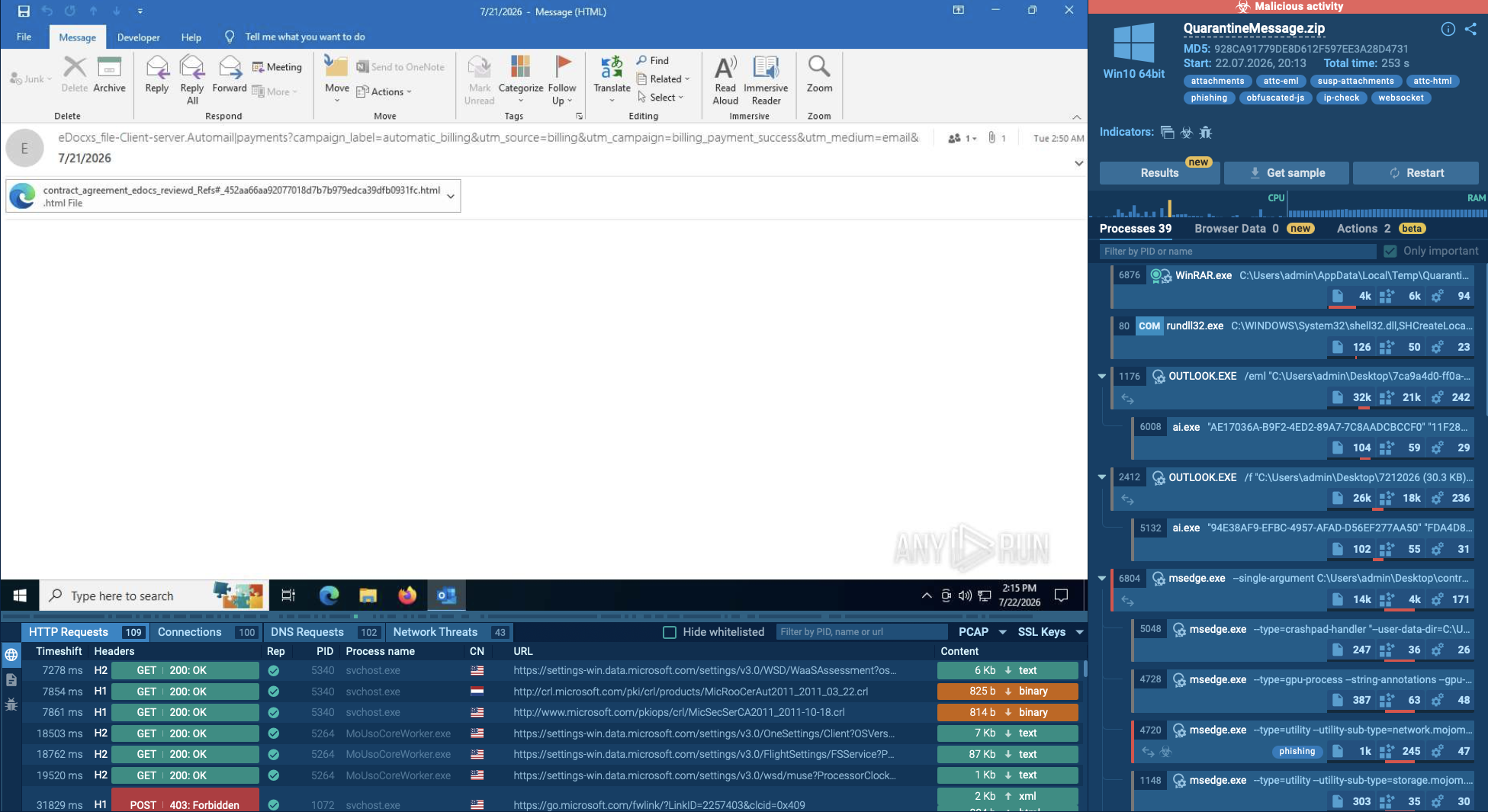
Mirage2FA detonated inside ANY.RUN’s Interactive Sandbox
Stage 2: Browser Execution
Opening the attachment launches an embedded stager. The files contain no traditional binary malware and instead execute JavaScript in the browser.
Stage 3: Hidden Staging
The stager uses HTML smuggling, SVG scripts, or JavaScript obfuscation to conceal its logic. It also carries a recipient-specific token, often based on the victim's email address.
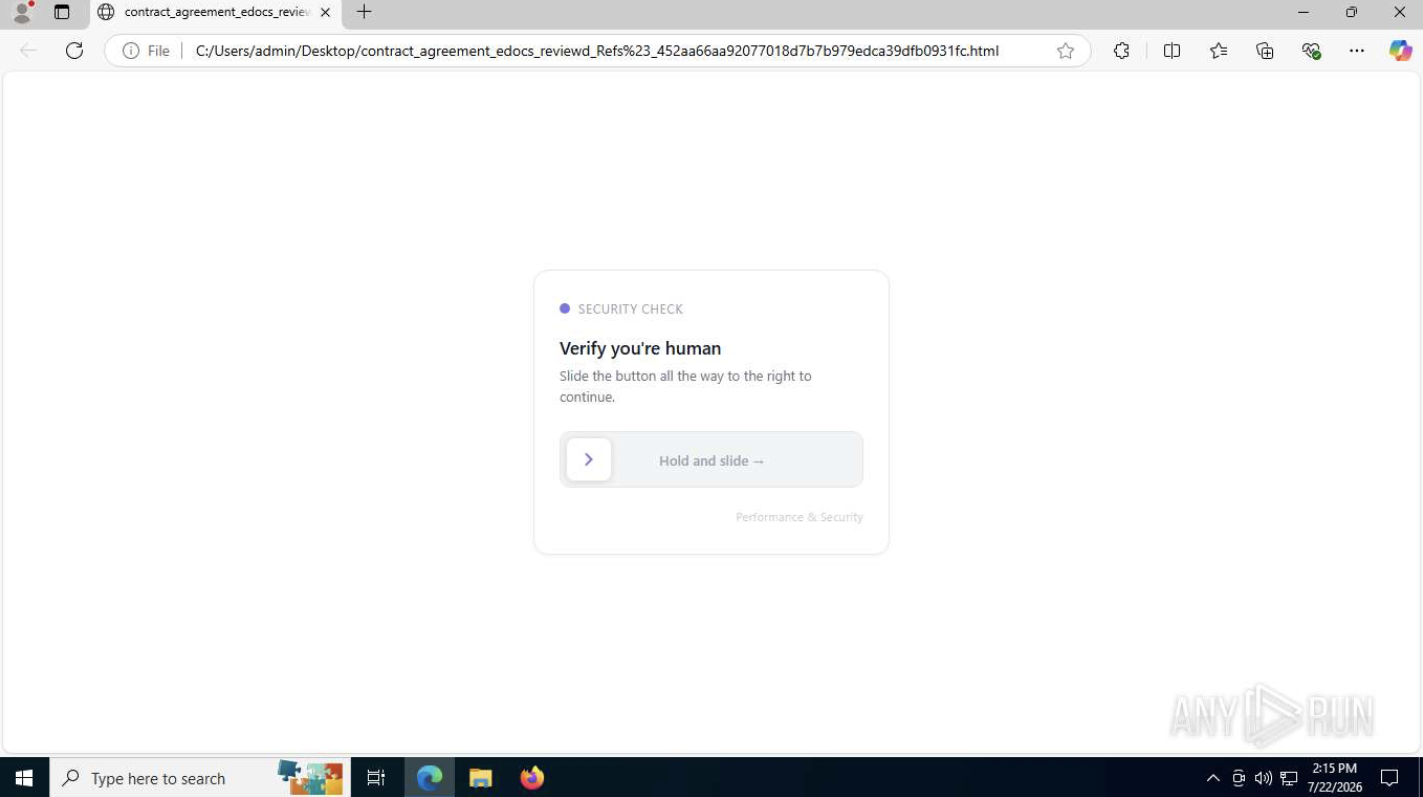
Mirage2FA behavior verified in ANY.RUN sandbox
Stage 4: Remote Loader
The stager retrieves the harvesting code from an attacker-controlled server, typically through the /xls/.js URL pattern.
Stage 5: AiTM Authentication
The victim is shown a convincing Microsoft 365 login page backed by an Adversary-in-the-Middle reverse proxy. The victim enters their credentials and 2FA code.
Stage 6: Credential and 2FA Interception
The phishing page captures the victim’s username, password, and one-time 2FA code.
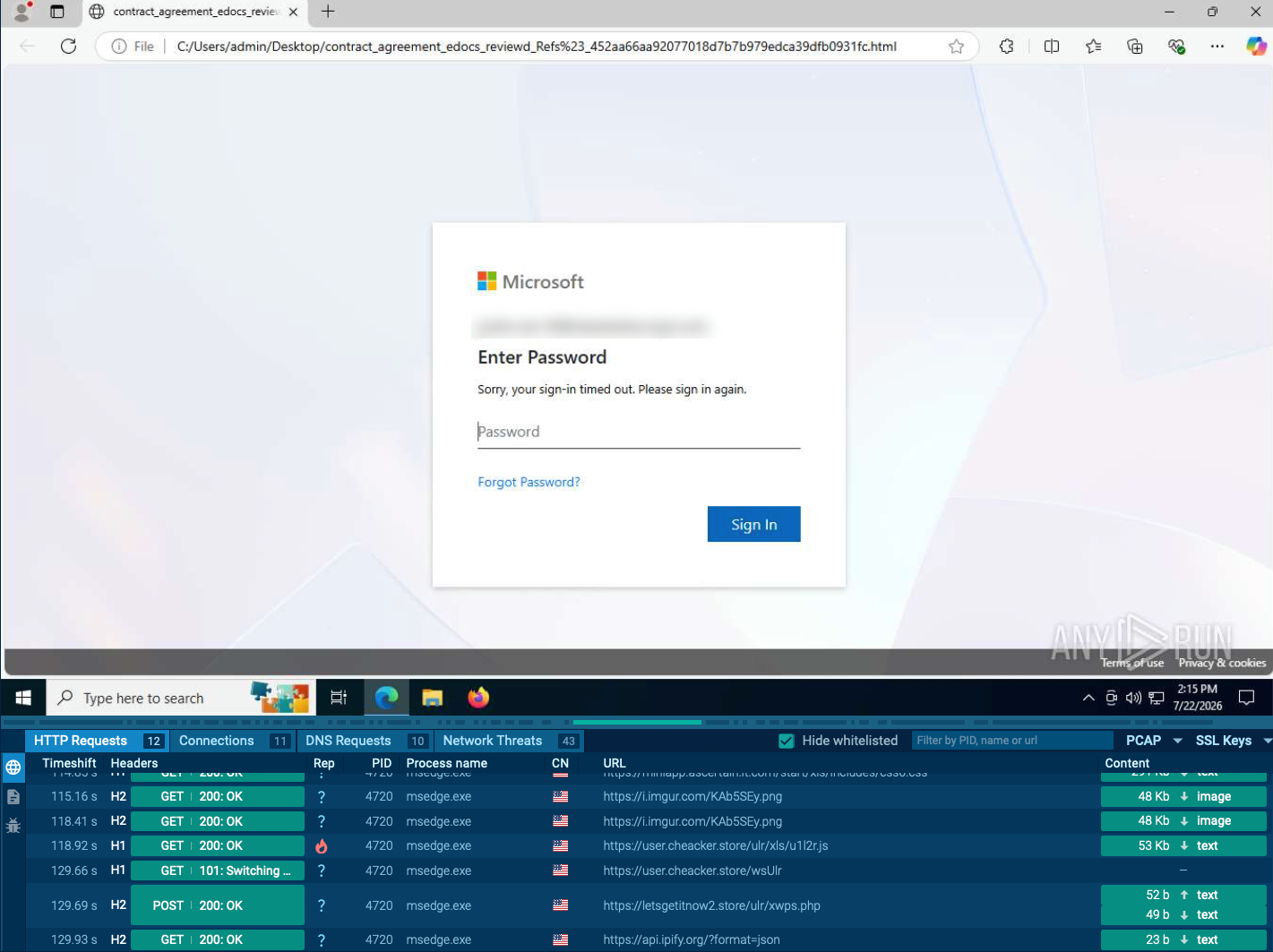
Victims submit their Microsoft credentials through a fake login page
Stage 7: Real-Time Relay
Mirage2FA relays the authentication to legitimate Microsoft 365 services over a WebSocket channel, allowing the attacker to obtain the resulting authenticated session despite MFA.
Stage 8: Session Theft
The toolkit exfiltrates session cookies and credentials to the operator infrastructure, storing stolen cookies as Base64-encoded .txt dumps.
Stage 9: Account Takeover
Attackers can reuse the stolen session to access Microsoft 365, read email, and impersonate the victim without entering the password or completing MFA again.
The stagers use several concealment techniques: XHTML variants can dynamically create full-screen iframes or hide logic behind hex decoders, .htm samples use remote-loader stubs or XOR + Base64 + eval, and SVG samples use inline scripts or obfuscator.io-style wrappers to hide redirects.
This browser-based design makes Mirage2FA particularly difficult to detect with traditional malware controls, as the attack relies on legitimate browser functionality rather than deploying an executable payload.
Since its emergence in 2024, Mirage2FA has continuously adapted its delivery and evasion techniques while preserving infrastructure and code patterns that help researchers track the operation.
Mirage2FA captures login credentials from targeted companies
Mirage2FA rotates domains and infrastructure, making static IOCs easy to outlive. ANY.RUN’s Threat Intelligence helps SOC teams combine known indicators with recurring behavioral patterns to detect and investigate the threat.
Threat Intelligence Lookup helps analysts uncover the broader campaign behind a single suspicious artifact.
Hunt for Mirage2FA patterns across email, proxy, EDR, DNS, and browser telemetry, including:
Fresh ANY.RUN’s Threat Intelligence Feeds built from data contributed by 16,000 organizations and 700,000 security professionals, can deliver known malicious infrastructure to SIEM, SOAR, and EDR platforms, as well as other security controls. Behavioral detections help maintain coverage as Mirage2FA changes its domains and paths.
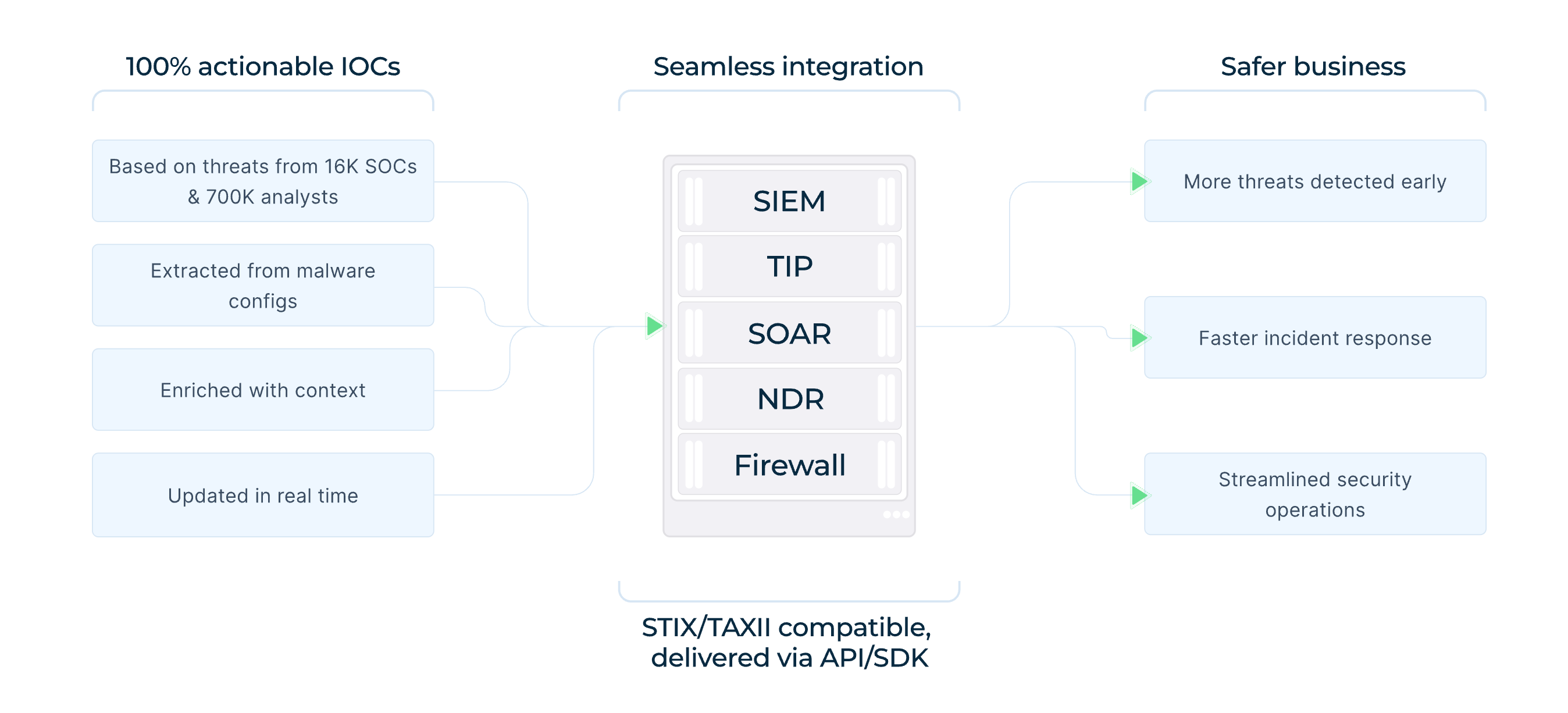
Actionable IOCs backed by data from 16K SOCs and 700K analysts
Analysts can use ANY.RUN’s Threat Intelligence Lookup to pivot from suspicious URLs, domains, IPs, or loader patterns to related samples, infrastructure, and previous sandbox activity.
For Mirage2FA, the characteristic loader pattern can be used as a starting point: url:"/???/xls/?????*.js$"
This type of infrastructure pivot helped researchers expand individual Mirage2FA samples into a broader campaign cluster.
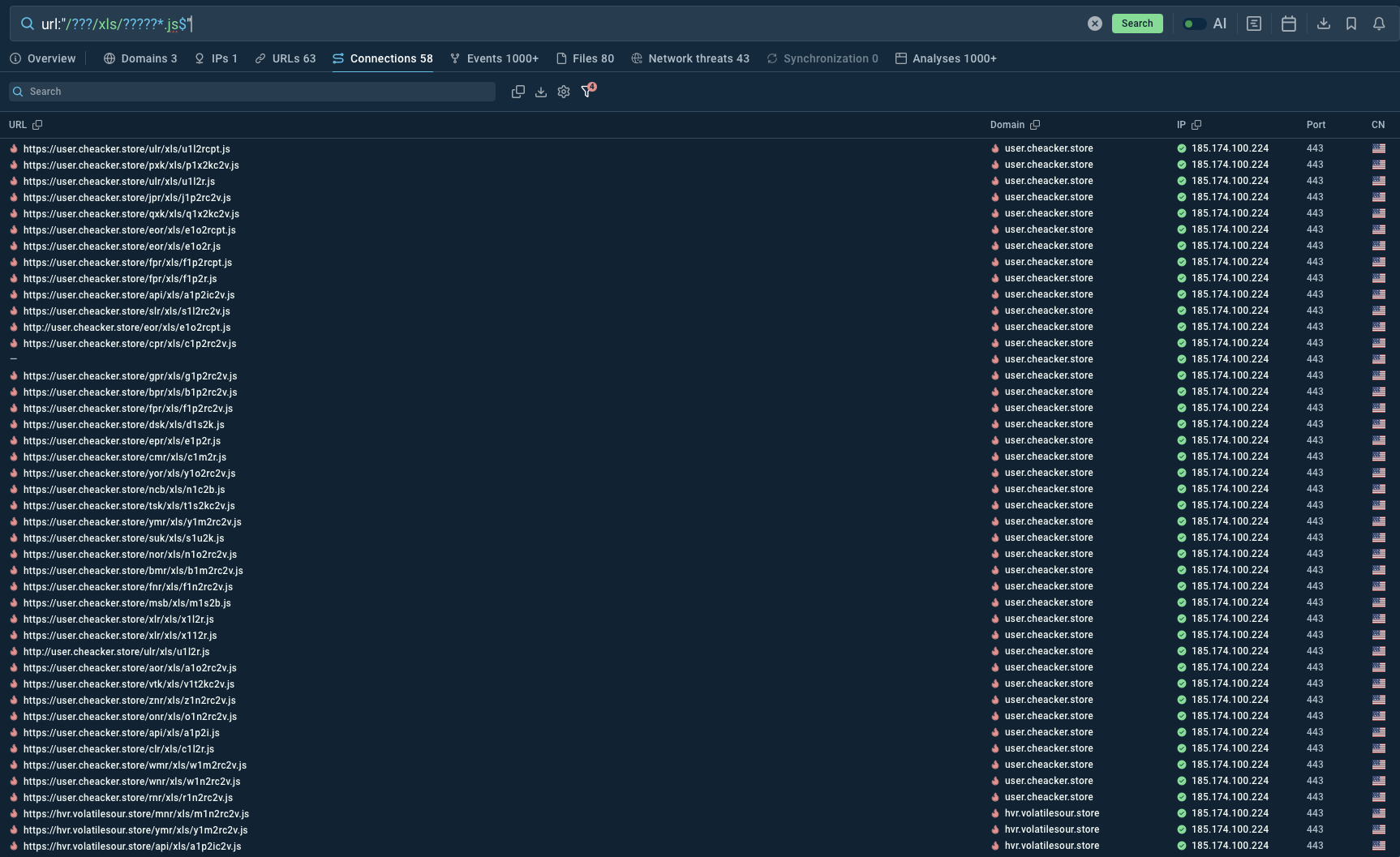
TI Lookup delivers real-time intelligence on Mirage2FA activity
If investigation confirms that Mirage2FA has stolen a Microsoft 365 session cookie, password rotation alone is insufficient. Response teams should revoke active sessions and tokens, review mail-forwarding rules and OAuth grants, and investigate activity performed through the compromised account.
Combining behavioral hunting, fresh threat intelligence, and sandbox-based investigation gives SOC teams a more complete way to detect Mirage2FA and contain compromised identities.
Mirage2FA demonstrates how phishing has evolved from simple credential theft into session-based identity compromise. By intercepting Microsoft 365 authentication and stealing active session cookies, it can bypass conventional MFA and provide attackers with trusted access.
Reducing the risk requires a combination of phishing-resistant MFA, behavioral detection, isolated analysis, threat intelligence, and session-focused incident response. The faster defenders identify the campaign and revoke stolen access, the smaller the potential impact.
Mirage2FA is a Phishing-as-a-Service (PhaaS) toolkit designed to compromise corporate Microsoft 365 accounts. It uses Adversary-in-the-Middle (AiTM) phishing to capture credentials, 2FA codes, and authenticated session cookies.
Mirage2FA proxies the Microsoft 365 authentication process in real time. When a victim enters their password and completes 2FA, the toolkit relays the authentication to the legitimate service while capturing the resulting authenticated session cookie, allowing attackers to potentially reuse the session without another MFA prompt.
The toolkit commonly arrives through malicious .htm, .xhtml, and .svg attachments that execute in the browser and retrieve JavaScript from attacker-controlled infrastructure. Campaigns have also used QR-code lures and email distribution services such as Amazon SES.
Interactive sandboxing allows analysts to observe the complete attack chain in real time, including JavaScript execution, redirects, fingerprinting, remote loaders, WebSocket communication, and fake Microsoft 365 authentication pages. Proactive threat intelligence can then help pivot from suspicious URLs, domains, IPs, or loader patterns to related infrastructure and activity.
Security teams should look beyond static domains and IP addresses and hunt for recurring behavioral indicators, including /xls/*.js
LINX* markers, Base64-encoded email addresses in DNS subdomains, suspicious browser-executed attachments, and WebSocket connections to unknown hosts following JavaScript execution.