GandCrab
- 157
- Global rank
- 144
- Month rank
- 112
- Week rank
GandCrab is probably one of the most famous Ransomware. A Ransomware is a malware that asks the victim to pay money in order to restore access to encrypted files. If the user does not cooperate the files are forever lost.
- Ransomware
- Type
- ex-USSR territory
- Origin
- 26 January, 2018
- First seen
- 22 October, 2026
- Last seen
How to analyze GandCrab with ANY.RUN
IOCs
IP addresses
- 104.26.8.198
- 104.18.22.222
- 204.79.197.203
- 2.16.204.160
- 74.144.67.119
- 23.52.181.141
- 162.55.0.137
- 150.171.27.11
- 2.16.204.138
- 185.199.110.215
- 199.232.214.172
- 140.82.121.3
- 146.112.255.205
- 140.82.113.21
- 185.199.108.133
- 23.52.181.212
- 150.171.109.99
- 150.171.27.10
- 23.207.210.132
- 23.207.210.139
Hashes
- 1967da158234d42db7bddffea780b95eacb916af2731194a2369650ac66ae7ba
- 9fef4babc8ffb98e43b275acfc4c4c28f051fc1a4b0708c3e8314049899b9c8e
- e94dd763aa6c461b4b1c6e8734b5aa424db0f04552b9adcda4328a350598cad7
- 84755d89559d2ec3afaa63d66ec80f201d478bd72c7af72fef714a867b507227
- f5d002bfe80b48386a6c99c41528931b7f5df736cd34094463c3f85dde0180bf
- 326bcb85652c67780d0193d78d5bab30e3668e6bcbcffcff304751b2f4518f54
- e2e4d97c20d4478e8e947480c8f6c71a2c795776d405366be70db82e4ea4ba77
- ad09dd119b38abbb90fbe0c99d13993bcc86ebbbfc0130a9b55cb9fd753941ed
- 2216603095c906d7da198c3c6e54416083634a423226634f12ffeee4011d051b
- b9fa2d52a4ffabb438b56184131b893b04655b01f336066415d4fe839efe64e7
- dddf7894b2e6aafa1903384759d68455c3a4a8348a7e2da3bd272555eba9bec0
- e079fa28ea51fa98644164caf585ae3231d25372fccca1245902fb57488d4660
- 438888ef36bad1079af79daf152db443b4472c5715a7b3da0ba24cc757c53499
- eb22c6ecfd4d7d0fcea5063201ccf5e7313780e007ef47cca01f1369ee0e6be0
- a7836550412b0e0963d16d8442b894a1148326b86d119e4d30f1b11956380ef0
- a3b24d8e4921214784d97c457089bf52ca9edffa176b93edc95e678b4437e8ff
- 3b1ec0bc5e0864a5815defaffc90db222a4c7b519d2cd9ae7022262c755bad29
- 75da533888189d13fc340d40637b9fc07a3f732e3fcf33ec300f4c7268790a62
- 907f2709d1d3c8fa26294938f4080bc477e62281c4c50a082c22db0195cda663
- 22ca9415e294d9c3ec3384b9d08cdaf5164af73b4e4c251559e09e529c843ea6
Domains
- vcf.bing.com
- github.com
- api.edgeoffer.microsoft.com
- www.bing.com
- edge.microsoft.com
- copilot.microsoft.com
- fe3cr.delivery.mp.microsoft.com
- edge-mobile-static.azureedge.net
- r.bing.com
- ntp.msn.com
- watson.events.data.microsoft.com
- zne2-ib.msn.com
- www.microsoft.com
- assets.msn.com
- api.msn.com
- msedge.b.tlu.dl.delivery.mp.microsoft.com
- img.itch.zone
- user-images.githubusercontent.com
- static.itch.io
- api.github.com
URLs
- http://crl.microsoft.com/pki/crl/products/microoceraut2011_2011_03_22.crl
- http://www.microsoft.com/pkiops/crl/microsoft%20secure%20server%20ca%202026.crl
- http://edge.microsoft.com/browsernetworktime/time/1/current?cup2key=2:d_nkae8gxzv2zbmgnt3le9sediekdfl92-gogt5yzxs&cup2hreq=e3b0c44298fc1c149afbf4c8996fb92427ae41e4649b934ca495991b7852b855
- https://safal1.itch.io/people-playground-v1223
- https://edge.microsoft.com/serviceexperimentation/v3/?osname=win&channel=stable&osver=10.0.19045&devicefamily=desktop&installdate=1661339457&clientversion=133.0.3065.92&experimentationmode=2&scpguard=0&scpfull=0&scpver=0
- https://copilot.microsoft.com/c/api/user/eligibility
- https://config.edge.skype.com/config/v1/edge/133.0.3065.92?clientid=4489578223053569932&agents=edge%2cedgeconfig%2cedgeservices%2cedgefirstrun%2cedgefirstrunconfig&osname=win&client=edge&channel=stable&scpfre=0&osarch=x86_64&osver=10.0.19045&wu=1&devicefamily=desktop&uma=0&sessionid=72&mngd=0&installdate=1661339457&edu=0&soobedate=1504771245&bphint=2&fg=1&lbfgdate=1766137499&lafgdate=0
- https://api.edgeoffer.microsoft.com/edgeoffer/pb/experiments?appid=edge-extensions&country=us
- https://config.edge.skype.com/config/v1/edge/133.0.3065.92?clientid=4489578223053569932&agents=edgeruntime%2cedgeruntimeconfig%2cedgedomainactions&osname=win&client=edge&channel=stable&scpfre=0&osarch=x86_64&osver=10.0.19045&wu=1&devicefamily=desktop&uma=0&sessionid=72&mngd=0&installdate=1661339457&edu=0&soobedate=1504771245&bphint=2&fg=1&lbfgdate=1792687634&lafgdate=0
- https://edge.microsoft.com/extensionwebstorebase/v1/crx?os=win&arch=x64&os_arch=x86_64&nacl_arch=x86-64&prod=edgecrx&prodchannel=&prodversion=133.0.3065.92&lang=en-us&acceptformat=crx3,puff&x=id%3djmjflgjpcpepeafmmgdpfkogkghcpiha%26v%3d1.2.1%26installedby%3dother%26uc%26ping%3dr%253d307%2526e%253d1
- https://img.itch.zone/aw1nlzg0njy4ndauz2lm/original/tse5gr.gif
- https://static.itch.io/game.css?1792687261
- https://static.itch.io/lib.min.js?1792687261
- https://static.itch.io/game.min.js?1792687261
- https://static.itch.io/bundle.min.js?1792687261
- https://update.googleapis.com/service/update2/json?cup2key=14:0zj7ic3tr-o1aiudggwzbsogccdjoy_xueyb-y8103e&cup2hreq=ed148a098fbecf7dc0eec926e146fa71beba21eb0ec06b3bfd7e7fda0f35d38a
- https://www.bing.com/bloomfilterfiles/expandeddomainsfilterglobal.json
- https://www.bing.com/api/shopping/v1/user/shoppingsettings?enabledservicefeaturesv2=edgeserverux.shopping.cashbackeumarkets,edgeserverux.shopping.msedgeshoppingcashbackdismisstimeout2s
- https://clients2.googleusercontent.com/crx/blobs/azpvhcqj3wffap2ms9nxrilunkmwo0j3xdxsczh4-b08kq8t1tpbgqhquqd2m_3am3s1uaf08rofvfw6frba5fqd1qjibdtutib3kmssohdpancs2liy7gkcarep75_idgwaxlka5c-zkdfppyhrzz2t2n3_dybkefgx/ghbmnnjooekpmoecnnnilnnbdlolhkhi_1_111_1_0.crx
- http://ocsp.digicert.com/mfewtzbnmeswstajbgurdgmcgguabbtrjrydryt%2bapf3gspypfhbxr5xtqqus9tippmhxdiunkhmewnpyim8s8yceajtxtab8my1oj8mfwpz%2f7y%3d
Last seen at
What is GandCrab ransomware?
GandCrab is a ransomware-type malware, which means that it encrypts files on infected machines and demands a ransom in cryptocurrency to restore the lost data. What’s more, this particular strain is distributed as a Ransomware-As-A-Service, allowing anybody to use this program by purchasing access to a control dashboard.
A unique business model and constant updates of the malware, in turn, helped GandCrab to become one of the most widely spread ransomware of 2018.
General Description of GandCrab
Since its discovery on January 26, 2018, at least 5 versions of GandCrab were created. The authors of the program are extremely active and respond to created countermeasures almost instantly, making GandCrab an elusive malware that continues to terrorize private and corporate victims today.
The last identified version of the malware is 5.1 and it targets users from all over the world with one exception – having originated in an ex-USSR country GandCrab is known to ignore users from X-USSR territories, identifying them by the keyboard or UI language settings. Only Windows operating systems are affected by ransomware.
It should be noted, that the virus is assigned a different name by various antivirus software:
- Ransom: Win32/GandCrab
- Trojan.Ransom.GandCrab
- Win32/Filecoder.GandCrab
- Ransom.GandCrab
- Trojan-Ransom.Win32.GandCrypt
Usually infecting users through mail spam or exploit kits, the ransomware redirects victims to a TOR website after the files on a victim’s PC are encrypted. For the newer versions of the malware, the only way of restoring the data is through paying the ransom, the amount of which usually fluctuates between 1000 and 3000 dollars. However, some victims, have reported that they were asked to pay as much as 700,000 USD.
Having a RaaS ( Ransomware-as-a-Service ) business model, GandCrab is distributed by the original creators to “clients”, who then deliver the malware to end victims, asking for a custom ransom amount through one of the unique features of the virus – customizable ransom notes. A percentage of the “revenue” is then shared with the malware authors, once a ransom is secured.
GandCrab malware analysis
ANY.RUN provides the ability to watch the GandCrab program in action in interactive virtual machine simulation. Notably, ANY.RUN simulation can be used to perform the analysis of the stages of the virus life cycle:
- Infection. A victim downloads and opens infected Microsoft Office file which contains a script programmed to download and start the execution of the virus;
- Execution and information gathering. After the script has started the execution process, GandCrab collects information about the user. At this stage, the execution of the virus is stopped if a Russian keyboard layout or user interface is detected;
- The malware checks for the presence of antivirus drivers and stops all processes that involve files that it wants to encrypt;
- The ransomware decrypts the ransom record held in the binary;
- Next, a key pair is generated;
- The virus enumerates file and decryptors;
- GandCrab proceeds to encrypt the files;
- The malware establishes communication with the server;
- After that, the malware will try to delete all shadow copies;
- Finally, a ransom note is displayed to the user.
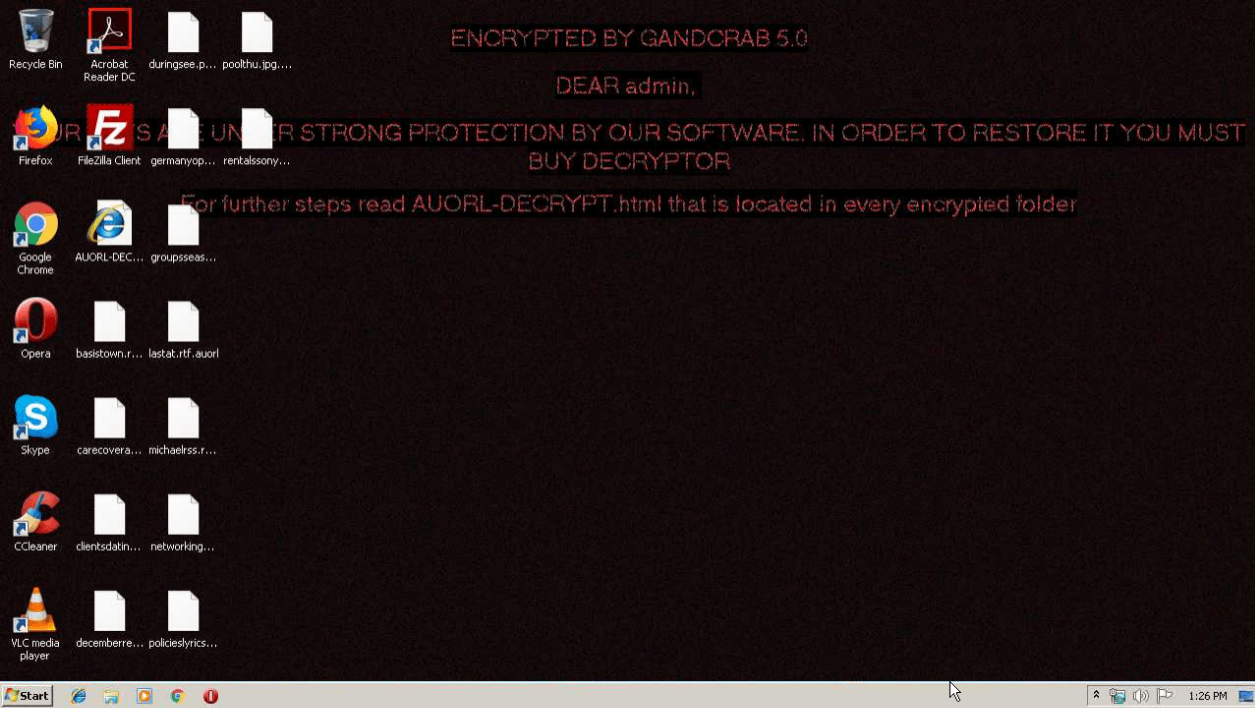
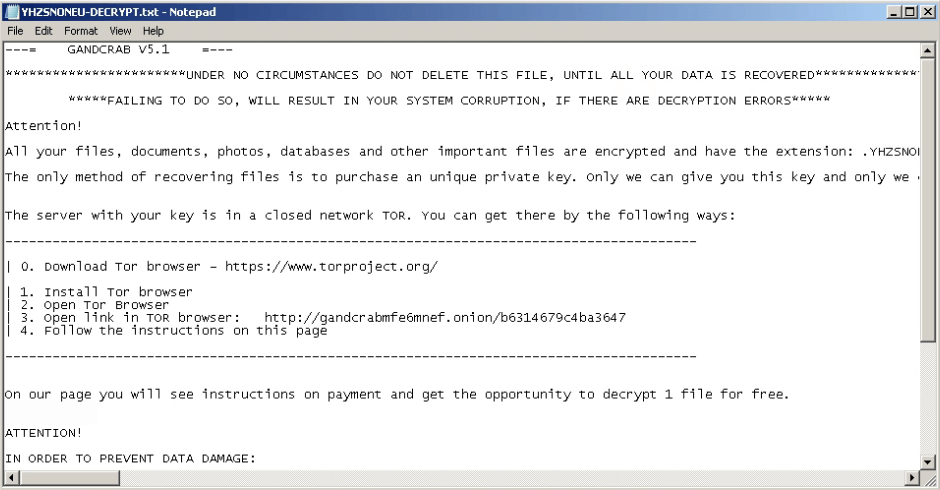
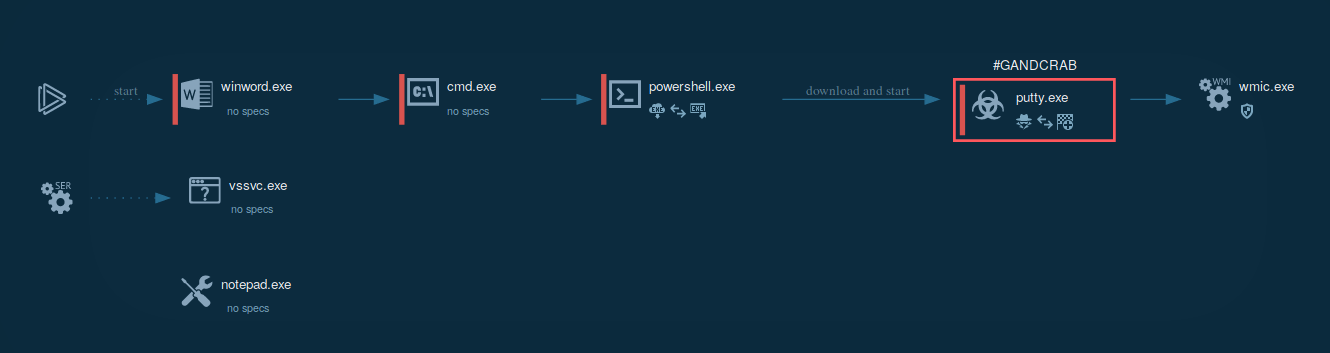
The following contamination processes are launched by the ransomware:
- Starts CMD.EXE for commands execution
- Executes PowerShell scripts
- Downloads executable files from the Internet
- Connects to CnC server
- Makes registry changes
- Runs wmic.exe
- Executes vssvc.exe
- Deletes shadow copies
- Runs NOTEPAD.EXE
The whole contamination process can be seen in a video, displaying the ANY.RUN simulation.
To build itself into the system, GandCrab starts with decrypting an extension name record that is held in the binary. By going through logical drives from “a” to “z” the malware separates all drives that are equal to 0x2 and not equal to 0x5, creating and separating thread to enumerate and encrypt all data that is prepared for encryption. After the encryption is complete, the malware uses wmic to erase all shadow copies. As a result, all data remains affected by the program even after a reboot.
The ransomware leaves behind artifacts that can help to recognize the version. Those exist in the form of extensions of encrypted files.
- Version 1 gives the .gdcb extension
- Version 2 and 3 give the .crab extension
- Version 4 gives the .krab extension
- Version 5 gives a randomized 5 or more letter extension
How to avoid infection by GandCrab?
According to the analysis, creators of GandGrab patch all exploits in the malware code fairly quickly, which makes the development of countermeasures tricky. Upon contamination with on of the latest versions, the only way to restore the lost data is to pay the ransom. Thus, the best way to stay safe is to prevent contamination.
- By keeping digital copies of important files in multiple places
- By making sure that the antivirus software is reliable and updated
- Avoiding digital downloads on suspicious or unknown websites
- Avoiding opening the attached files in emails, especially those coming from unknown senders.
- And not paying the ransom if infected.
That said, effective countermeasures do exist for older versions of the ransomware like Troldesh or Nemty, including free decrypters and Killswitches. Most notably, a Killswitch for GandCrab v4.1.2 was developed by a cyber threat analysis and response company Ahnlab. The defensive application exploits the mechanics of GandCrab ransomware by creating a file with the .lock extension, which simulates the files that GandCrab itself generates and uses to check whether the victim's computer is included in the record of previously affected machines to avoid double decryption.
The execution of the ransomware stops upon discovery of .lock file if it is placed in %Application Data% for Windows versions before Windows 7 and in %ProgramData% directory for newer OS versions. Even in cases when the malware has already activated, the killswitch will prevent some of the damage.
Interestingly, in response to the killswitch, the GandCrab authors released an exploit, targeting the Ahnlab antivirus software. The exploit was introduced in version v4.2.1 and v4.3 of the malware but did not cause sufficient harm to the antivirus users.
For versions 1, 4 and up through 5.1 there are free decryption tool from Bitdefender.
Distribution of GandCrab
Based on the analysis, ransomware is known to utilize multiple attack vectors, however, compromised list and spam email campaigns are the most commonly used delivery channels. Being delivered to users in spam emails, GandCrab tricks users into downloading a ZIP archive that contains a script file that triggers the download and execution.
GandCrab execution process and technical malware analysis
An illustration of an execution process can be found below.
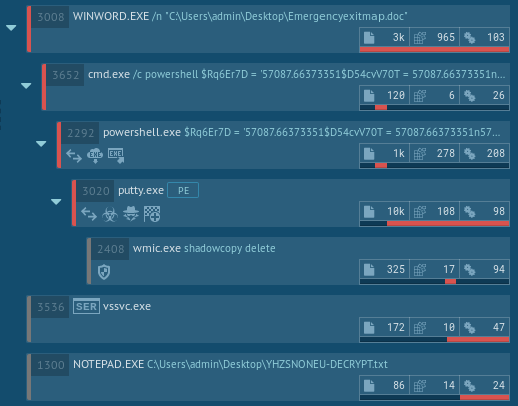
The following behavioural activities are shown in ANY.RUN’s malware analysis report.
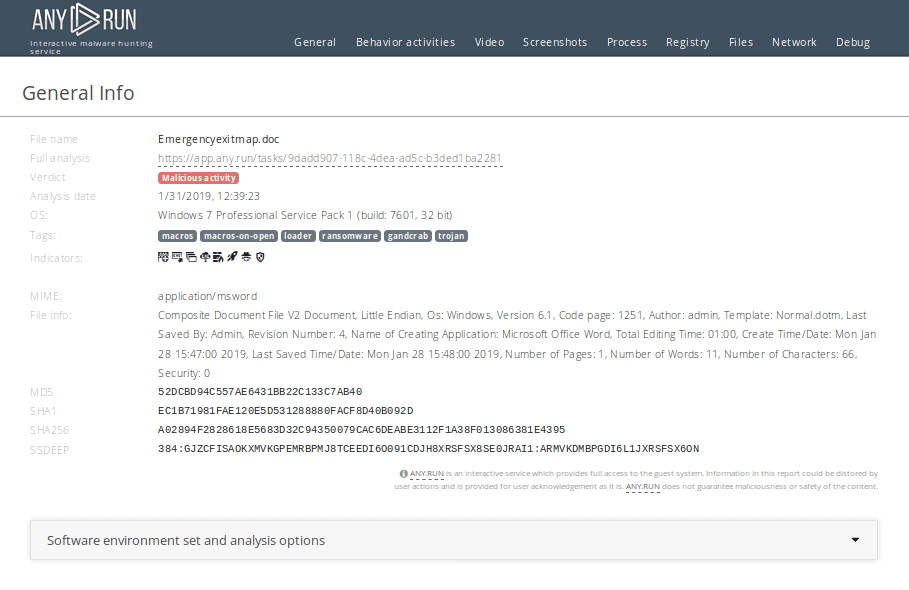
During the execution the malware creates several artifacts that can be viewed in detail in the ANY.RUN simulation.
With file encryption being the main goal of the payload, the malware launches a command line with pre-specified parameters after opening a Microsoft Word file. Startup powershell is then sent as command line parameters, followed by downloading and launching the executable file from the Internet.
How to detect Gandcrab using ANY.RUN?
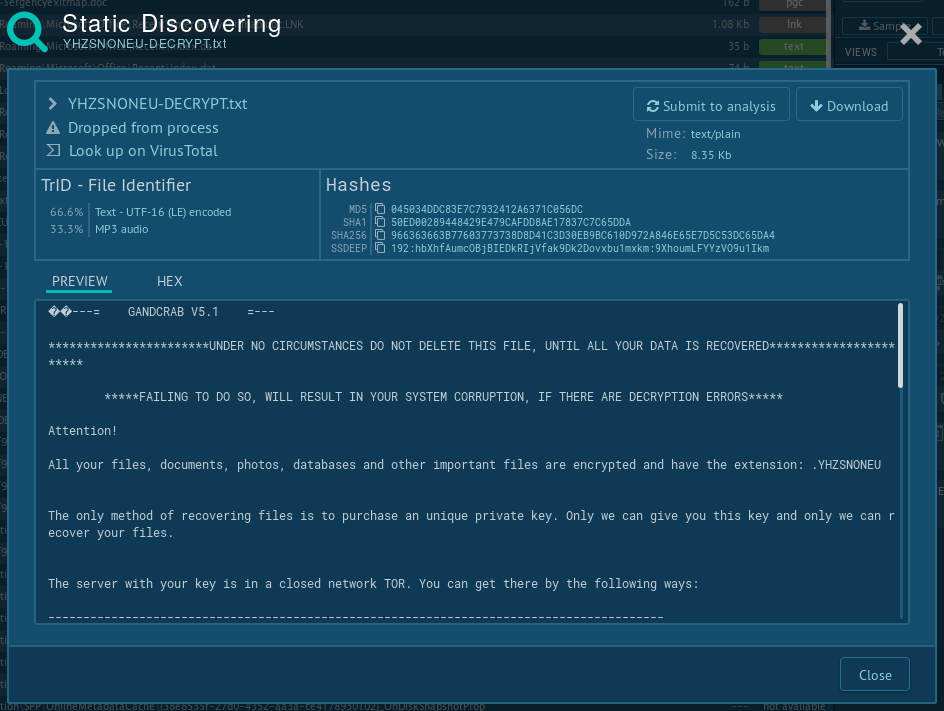
You can perform malware analysis of files using ANY.RUN's "Static Discovering". Open either "Files" tab in the lower part of the task's window or click on the process and then on the button "More Info" in the appeared window. After that, all you need to do is just click on the file.
Conclusion
Thanks a unique business model which involves selling the program as a service and defining characteristics like customizable ransom notes, GandCrab’s popularity quickly escalated in 2018, making the virus the most widely spread ransomware of the year.
Unfortunately, the creators proved to be very active and continued to respond quickly to all attempts to create effective countermeasures. While adhering to common practices of staying safe on the internet decreases the probability of getting attacked greatly, running interactive sandbox malware analysis in a service such as ANY.RUN is the best way to ensure personal or corporate safety.
P.S.
On the 1st June 2019 creators of the GandCrab ransomware made a post in which they stating that they have generated more than $2 billion in ransom payments, with average weekly payments of $2.5 million dollars. They also said that they have personally earned $150 million, which they have cashed out and invested in legal business entities. In the same post, they announced about ending of distributing the program within 20 days and that keys will be deleted.
Other malware & phishing threats
 LockBitLockBit, a ransomware variant, encrypts data on infected machines, demanding a ransom payment for decryption. Used in targeted attacks, It's a significant risk to organizations.
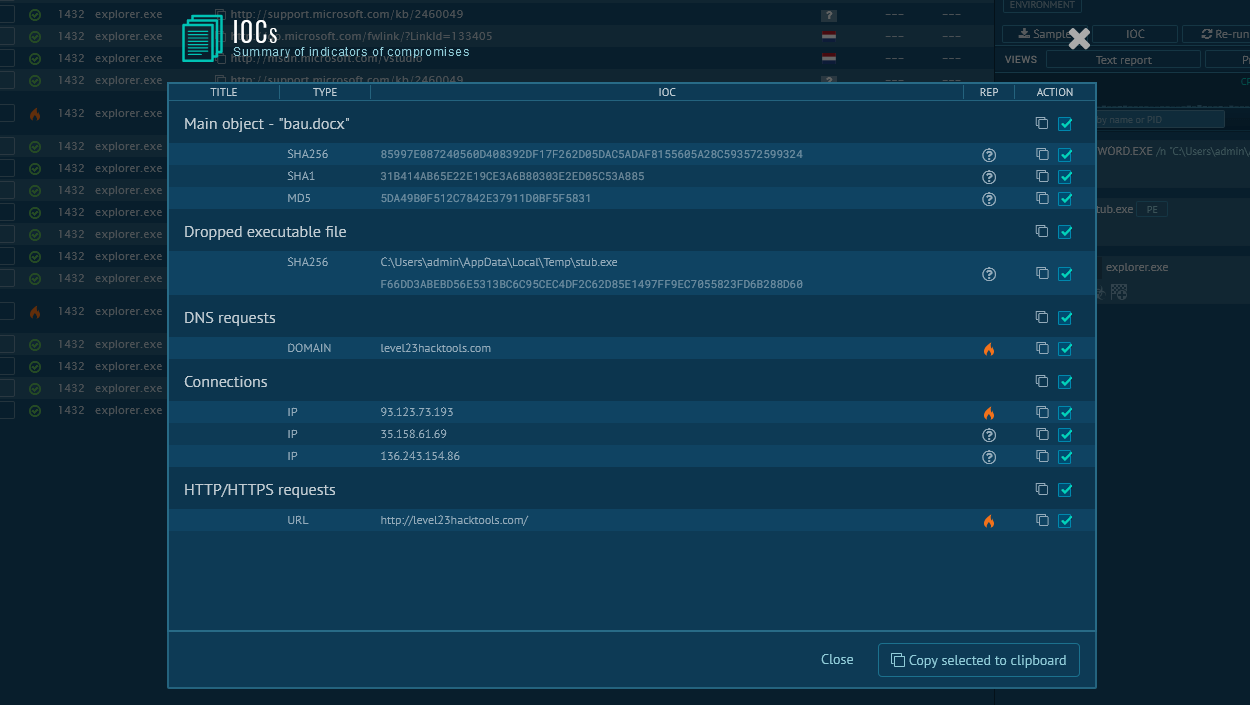 Smoke LoaderThe main function of Smoke Loader is dropping other, more destructive malware on infected machines. However, unlike many competing loaders, this one can be extended via plugins to feature destructive, malicious info-stealing functions.
 ACR StealerACR Stealer is a modern information-stealing malware designed to harvest sensitive data from infected devices. Like other infostealers, it targets credentials, financial details, browser data, and files, enabling cybercriminals to monetize stolen information through direct fraud or underground market sales.
 SystemBCSystemBC is a Remote Access Trojan (RAT) that can hide communication with the Command and Control server, and deposit other malware strains.
 TroldeshTroldesh is ransomware — a malware that demands a payment in order to unlock encrypted files. It is also can search and steal information from the banking programs if such are found on the infected machine.
 WarZoneWarZone RAT is a remote access trojan, which is written in C++ and offered as a malware-as-a-service. It packs a wide range of capabilities, from stealing victims’ files and passwords to capturing desktop activities. WarZone RAT is primarily distributed via phishing emails and receives regular updates from its C2.